
Best Mac products of the month May 2026
Explore the most innovative and popular mac products that captured the community's attention during month. These rankings help builders compare standout launches, understand what each product does, and discover practical tools shaping the future of technology.
Period
Monthly ranking
Published for
May 2026
Selection
10 ranked products
Ranked list
Community-backed mac picks
Each product profile includes the launch story, visual preview, and direct product link so readers can move from discovery to evaluation quickly.
01

Curflow revolutionizes macOS interaction by enabling intuitive, customizable gesture controls for your trackpad or mouse. Experience enhanced productivity with simple actions like right-click + drag to effortlessly close a tab, flick down to minimize windows, or swipe left to navigate back. These powerful gestures work universally across every application, including Finder, Safari, Slack, and Xcode. Trackpad users can create bespoke custom gestures beyond native macOS capabilities, while mouse users gain the full, fluid gesture control experience reminiscent of the Apple Magic Mouse, on any standard mouse. Start with a 14-day free trial, then secure a lifetime license for uninterrupted control.
02

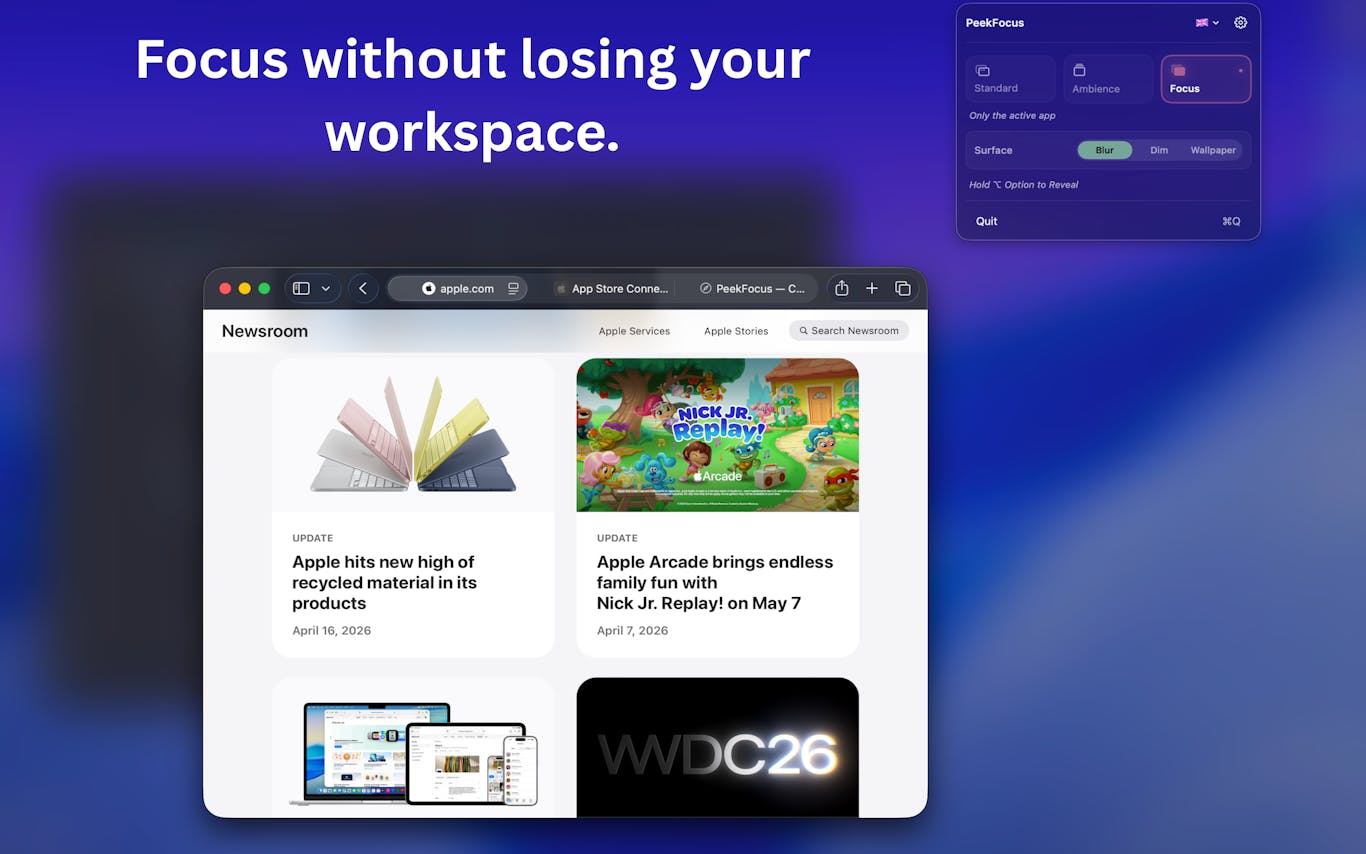
PeekFocus empowers you to achieve intentional focus within your Mac workflow with remarkable ease. With a single keystroke, you can instantly dim or blur all background elements behind your active window, ensuring your screen perfectly aligns with your desired level of clarity. Choose from three distinct modes: your standard desktop, a serene ambient backdrop, or a full focus mode where only your active window remains visible. Customize your experience with options for frosted blur, smooth dimming, or a personalized custom wallpaper. PeekFocus supports multi-display setups, integrates conveniently into your menu bar, and is offered as a one-time purchase with no subscription required. Experience enhanced productivity with a 7-day free trial.
03

Filect is an intelligent file management solution that leverages advanced AI to automatically transform chaotic digital spaces into impeccably organized folder structures. Whether you prefer fully automated autopilot mode or wish to define custom organizational rules, Filect ensures your Desktop, Downloads, and Documents remain clutter-free effortlessly. Beyond organization, its powerful search functionality allows you to instantly locate any specific file; simply describe it in plain English, such as 'that invoice I made for client X last Tuesday,' and Filect retrieves it in mere seconds. This essential tool is meticulously crafted for creators, coders, designers, and video editors who frequently find themselves overwhelmed by countless files. Available for Mac and Windows, begin your journey to a tidier digital life with a complimentary 10-day trial.
04

PaceBar is an innovative and discreet Mac menu-bar application designed to enhance your digital wellbeing and productivity. It intelligently analyzes your on-device interaction patterns, transforming complex usage data into a simple, intuitive load readout. This unique insight helps you proactively recognize periods of rising work pace, minimize disruptive app switching, and encourages timely, short resets during intense work sessions. By providing clear feedback on your activity levels, PaceBar empowers you to manage your focus and prevent burnout, fostering a more balanced and efficient workflow.
05


Manuscripts is a specialized Mac application crafted for academics seeking a more robust solution than spreadsheets for managing their research publications. Designed to support the entire scholarly workflow of drafting, submitting, revising, and resubmitting papers, it excels where generic project or reference managers fall short. Manuscripts uniquely tracks your papers' precise status throughout the submission journey, detailing the journal, submission round, and the specific reviewer comments that prompted each revision. Offered as a one-time purchase with no subscription fees and no cloud dependency, your sensitive research data remains securely on your Mac. It's thoughtfully built to align with the iterative, often meticulous, nature of academic work.
06

Keeby brings the satisfying tactile and auditory experience of a real mechanical keyboard directly to your MacBook. Each sound profile is meticulously recorded from actual mechanical switches, not synthesized, ensuring an authentic and immersive typing sensation. Choose from a diverse selection of 11 premium switch profiles, including popular options like Gateron Red, Holy Panda, Alps Blue, and Box Navy. Experience spatial audio that precisely places left key sounds in your left speaker and right key sounds in your right, enhancing realism. A reactive visualizer dynamically follows your typing in real time, while adjustable tone controls allow you to fine-tune the sound between a deep "thock" and a crisp "clack." Keeby runs conveniently from your menu bar, operates fully offline, and collects no user data, prioritizing your privacy and an unparalleled typing experience.
07

EditMind 3 is a powerful tool specifically engineered for content creators, professional video editors, journalists, and video production companies. It revolutionizes the post-production workflow by allowing users to instantly search through hours of footage, drastically reducing time spent on manual review. A key advantage is its commitment to privacy and efficiency: all processing occurs locally, meaning no cloud uploads are required, and it seamlessly integrates into your existing editing software without the need for disruptive switching, ensuring a fluid and uninterrupted creative process.
08

While many keyboard-locking applications are designed primarily for cleaning, Cats Lock is uniquely crafted for those specific 'cat moments' when your feline friend decides your keyboard is their new favorite napping spot or plaything. This app ensures your work remains undisturbed. Its standout features include a 'Stealth Lock' mode, which is completely silent and invisible, perfect for uninterrupted meetings. You can also customize the warning sound, even importing your own audio, to playfully deter curious paws. Easily activate the lock with a quick 'Command+L' from the main window or menu bar. Cats Lock operates in a sandboxed environment, offers complete privacy with no analytics or account requirements, and is available for a simple one-time purchase of $2.99, with no recurring subscriptions. It's lovingly built by an indie developer, for himself and his beloved cat to enjoy peace of mind.
09

Tapcut, the analogue shortcut, transforms your MacBook's palm rest into an intuitive control surface. By leveraging the built-in accelerometer, this innovative utility allows you to assign custom actions to simple tap gestures: two, three, or four taps can instantly trigger any desired function. Whether you want to swiftly open an application like Claude, execute a complex macOS Shortcut, or launch any program, Tapcut provides a natural, memorable gesture to replace those easily forgotten hotkeys. Compatible with macOS 14+ and optimized for Apple silicon, Tapcut offers a seamless and productive experience. Try it risk-free with our 3-day free trial.
10

Pica offers a versatile solution for creative professionals and teams, streamlining your digital asset management and design workflow. Effortlessly organize your resources into intuitive collections, experiment with various color themes and logos, and monitor watch folders for automatic updates. Gain comprehensive control over installed assets and applications, along with many other powerful features, to enhance productivity and maintain design consistency across all your projects.