

Formclick
Formclick, the form backend for any website that emails every submission to your inbox with no server, database or JavaScript required.
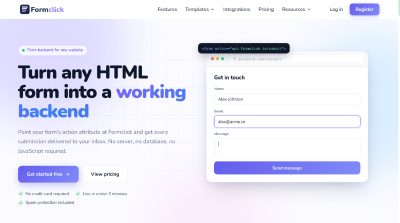
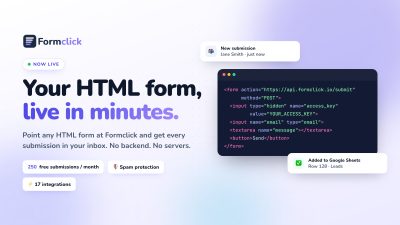
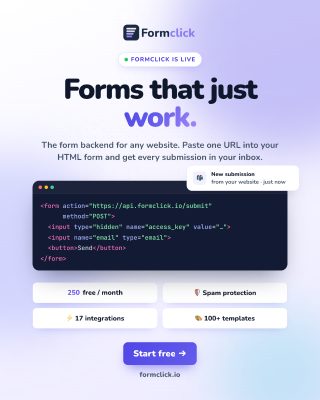
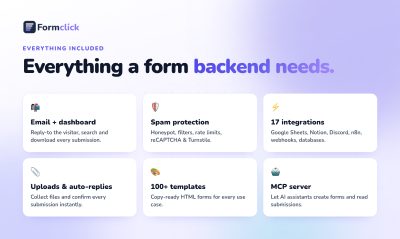
Formclick is a form backend for any website. You point your form's action attribute at the Formclick endpoint, add your access key as a hidden input, and every submission lands in your inbox. There's no server to deploy, no database to manage and no SDK to install, and a plain HTML form works with zero JavaScript. It fits static sites, WordPress, Webflow, Framer, Squarespace and any framework that lets you set an action attribute or drop in a raw HTML block. The same endpoint works in JavaScript, React, React Native, Ionic, Flutter and Expo, and you keep your own markup and styles either way. Behind that one endpoint you get instant email notifications with every field labelled, a searchable submission dashboard with CSV export, and spam filtering with rate limits, duplicate detection and honeypot fields. Paid plans add Google reCAPTCHA or Cloudflare Turnstile, autoresponder emails, file uploads up to 5 MB and domain restriction. Submissions can also be pushed to 17 connected apps and databases, from Google Sheets and Notion to PostgreSQL and Discord, so you skip building delivery, storage and spam control yourself.
Launch Team / Built with

Overview
A contact form looks simple until you need delivery, storage and spam control behind it. Formclick takes that part off your hands: you keep your own markup and design, and it handles what happens after someone hits submit. The whole integration is one line of HTML, and the form starts working the moment the page with your endpoint URL goes live.
Submissions arrive as a clean email with the sender's IP and timestamp, and are stored in a dashboard you can search and export. Suspected spam goes to its own tab instead of your inbox. If you'd rather not reload the page, POST JSON from fetch or Axios and get JSON back, so you can show your own confirmation message.
Features
- Instant email notifications: Every submission reaches your inbox in seconds. You can set the subject line, from-name and recipient from your dashboard.
- Built-in spam filter: Spam filtering, rate limits, duplicate detection and honeypot fields work on every form. Suspected spam goes to its own tab.
- Submission dashboard: Every submission is stored in one place, where you can search it, review it and export it to CSV.
- JSON for AJAX: Send from fetch or Axios and get JSON back, so you can show your own success message without reloading the page.
- Autoresponder emails: On Pro and Business plans, each person gets an automatic confirmation with your own subject and message, with no extra code.
Pricing
The Free plan includes 250 submissions a month and no credit card is required. Features without a tag are included on the Free plan, while captcha and domain restriction need Starter or higher, and autoresponders and file uploads need Pro or higher.
Who It's For
That covers developers and makers on static sites, and people building on WordPress, Webflow, Framer, Squarespace or a static site generator, since any tool that lets you set a form's action attribute or add a raw HTML embed works out of the box. The copy-paste snippets cover HTML, JavaScript, React, React Native, Ionic, Flutter and Expo, and the endpoint behaves the same in every framework and site builder.
Frequently Asked Questions
How long does it take to get a form live?
The page says you can be live in under three minutes. You sign up, create a form in the dashboard and get an access key in seconds with no setup wizard, then paste the endpoint and key into your HTML.
Do I need to install anything?
No. There are no dependencies and no build step, and a standard form with method POST and your action URL works with zero JavaScript. The optional formclick.min.js script is only there if you want file uploads and handled loading and success states.
Is my data secure?
The footer lists HTTPS and encryption at rest. Your access key only allows submissions to be sent to your account, so it cannot read your data, open your dashboard or change account settings.
Can I stop someone using my key on another site?
On Pro and higher you can lock your access key to your own domains, so a copied key can't send submissions from other sites. Every form also gets spam filtering, a honeypot field and rate limits.
Does it work on a static site?
Yes. Astro, Hugo and Jekyll sites get a working form with no server, and the same goes for any builder that accepts a raw HTML block. The form works as soon as the page with your endpoint URL is live.
Product Info
Launched November 12, 2026