
Apple's 14-inch MacBook Pro Gets the M6: Faster Silicon, Wi-Fi 7, and a Familiar Shell
Apple's 14-inch MacBook Pro Gets the M6: Faster Silicon, Wi-Fi 7, and a Familiar Shell
Apple announced a refreshed 14-inch MacBook Pro on October 27, 2026, built around its new M6 chip. The starting price is $1,999, preorders open October 28, and the laptop reaches stores on November 6 in space black and silver. Alongside it, Apple refreshed the 24-inch iMac with the same M6 silicon, continuing a busy week that started with a new iPad mini and ends with the company's "Pro and Tell" event.
The headline is the chip. The enclosure, display, port layout, camera, and speaker system all carry over from the M5 generation. That makes this a spec-bump release in the traditional sense, with the interesting work happening underneath the aluminum rather than on the outside of it.
What the M6 actually changes
The M6 moves to a 2-nanometer manufacturing process, up from the third-generation 3nm node used for M5. Apple increased both core counts: the CPU goes from 10 cores to 12, and the GPU goes from 10 cores to 12. According to Macworld's breakdown of the chip, the 12-core CPU is split into two super cores, four performance cores, and six efficiency cores, a different arrangement than the M5's four super cores and six efficiency cores.
The Neural Engine doubles from a single 16-core unit to a dual 16-core configuration. Apple claims that translates to up to 1.9 times the Neural Engine performance of M5. The GPU keeps Neural Accelerators in each core, along with hardware ray tracing and Dynamic Caching, which lets the chip allocate on-chip memory dynamically based on what a workload needs.
Unified memory bandwidth rises from 153GB/s to 170GB/s. Capacity is unchanged: 16GB standard, with 24GB and 32GB available as upgrades. More bandwidth helps everywhere, but it matters most for GPU-heavy work and for running language models locally, where throughput between the chip and memory is often the limiting factor rather than raw compute.
The performance claims, and what they compare against
Apple's numbers fall into two groups, and it is worth keeping them separate.
Against the M5, the gains are moderate but real. Apple claims up to 30 percent faster graphics, up to 25 percent faster AI workloads, and up to 1.3 times faster time to first token for LLM prompt processing. Blender ray-traced renders are quoted at up to 1.3 times faster, Affinity image processing at up to 1.2 times faster, and Xcode project builds at up to 1.3 times faster. Those are the kind of generational improvements you would expect from a process shrink plus two extra CPU and GPU cores.
Against the M1, the gap is enormous. Apple compares the M6 machine to the 13-inch MacBook Pro with M1 and quotes up to 13 times faster LLM prompt processing, up to 11.7 times faster ray-traced rendering in Blender, up to 3.3 times faster Affinity image processing, and up to 2.5 times faster Xcode builds. These figures are doing most of the marketing work, and they are aimed squarely at the large installed base of people still running Apple's first-generation laptop silicon.
As always, these are vendor benchmarks run under conditions Apple chose. Independent testing will show how the numbers hold up in real applications, particularly for sustained workloads where thermal behavior matters more than peak burst performance.
Wi-Fi 7 and Bluetooth 6 arrive on the base model
The most tangible external change is wireless connectivity. The M6 MacBook Pro supports Wi-Fi 7 (802.11be) and Bluetooth 6, replacing the M5 model's Wi-Fi 6E and Bluetooth 5.3. The Verge notes that this comes through Apple's N1 wireless networking chip, which previously appeared only on MacBook Pro configurations with the M5 Pro and M5 Max.
Wi-Fi 7 availability depends on your country and your router, so the upgrade only pays off if the rest of your network supports it. Bluetooth 6 is similarly forward-looking. Neither will change how the laptop feels on day one, but both extend the machine's useful life as access points and accessories catch up.
Everything else on the connectivity side is unchanged: three Thunderbolt 4 ports that all support charging and DisplayPort output, MagSafe 3, full-size HDMI, an SDXC card slot, and a 3.5mm headphone jack with support for high-impedance headphones.
Battery, display, and the small print
Apple rates the M6 MacBook Pro at up to 24 hours of video playback or up to 16 hours of wireless web browsing, with a 72.4Wh battery. Those are the same figures as the outgoing model, which is unsurprising given the identical chassis and battery capacity.
Fast charging reaches 50 percent in 30 minutes, but only with a 96W or higher USB-C Power Delivery adapter. The 70W adapter included in the box in the U.S. does not meet that threshold, so buyers who want fast charging should plan on a separate higher-wattage brick. This is not new behavior for the line, but it is easy to miss.
The display is the same 14.2-inch Liquid Retina XDR panel: 3024 x 1964, ProMotion up to 120Hz, 1,600 nits peak HDR brightness, and 1,000 nits sustained full-screen HDR. The nano-texture glass option, which cuts reflections, is now available on this model for a $150 upgrade. The 12MP Center Stage camera and six-speaker sound system also carry over.
Pricing and configurations
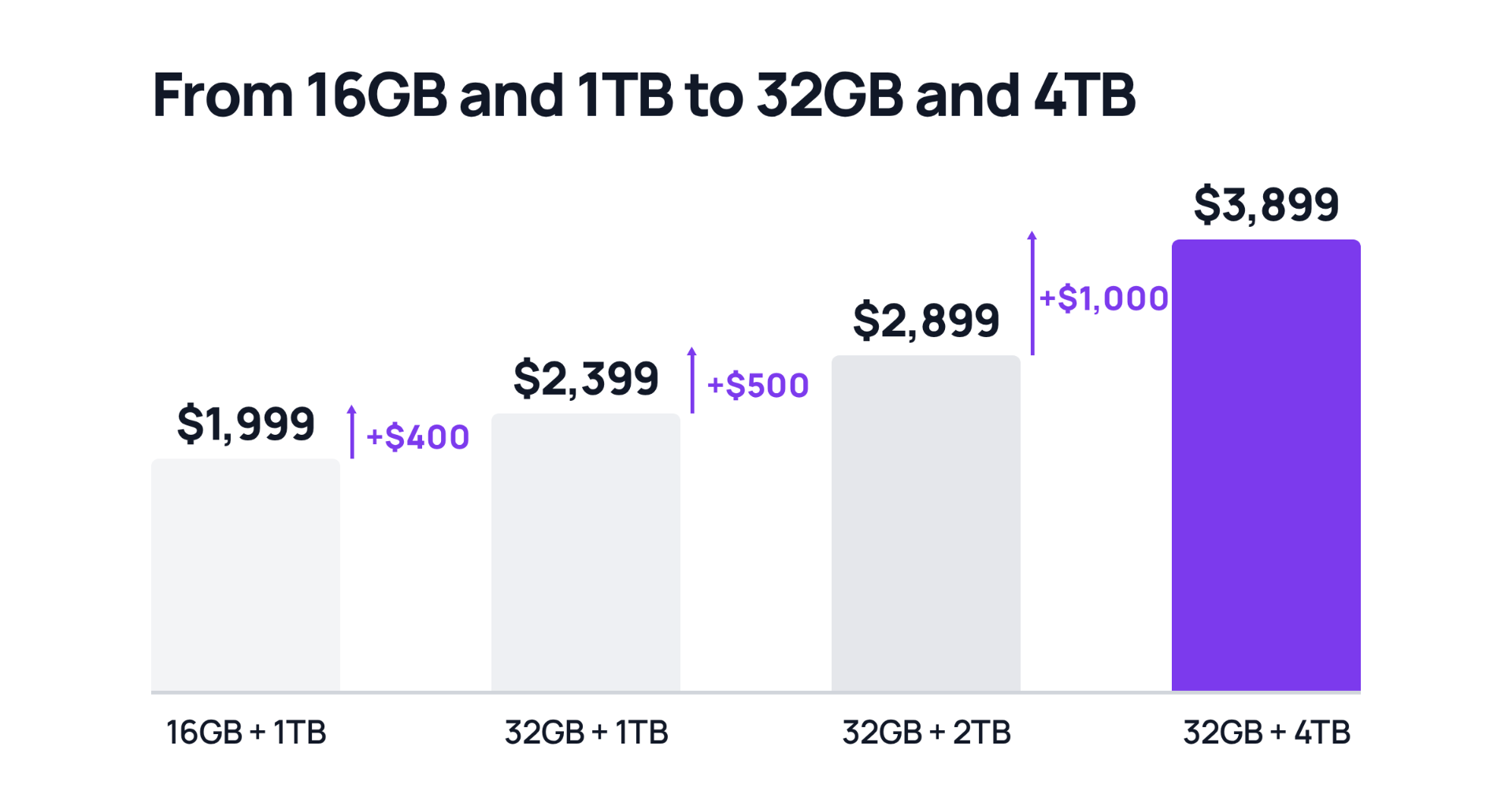
The base 14-inch MacBook Pro with M6 costs $1,999 and ships with 16GB of unified memory and 1TB of storage. Memory upgrades cost $200 for 24GB and $400 for 32GB. Storage upgrades cost $500 for 2TB and $1,500 for 4TB. A fully loaded 32GB/4TB configuration lands at $3,899.
The pricing deserves a closer look. As Macworld points out, the M5 model launched at $1,599 in October 2025, and its current listing price had already risen to $1,999 before the M6 arrived. So the new machine matches the outgoing price but sits $400 above where the previous generation started a year ago. That increase lines up with the memory supply crunch that has pushed DRAM and LPDDR5X prices sharply higher through 2026 and forced price hikes across the PC industry. Apple is not alone here, but anyone upgrading from an older machine should budget with current pricing in mind rather than last year's.
The 16-inch model is a different story
One detail worth flagging: the 16-inch MacBook Pro is not part of this update. Buyers who want the larger machine are still limited to the M5 Pro and M5 Max chips introduced earlier in 2026, not M6 silicon. Apple has a history of staggering releases like this, splitting the base chip from the Pro and Max variants across different launch windows, and the current lineup reflects that pattern.
The timing also matters. Apple's "Pro and Tell" event on October 28, the day after this announcement, is widely expected to focus on touchscreen OLED MacBook Pro models. Announcing the M6 refresh by press release a day before a hardware event suggests Apple wants to clear the spec-bump news out of the way so the event can focus on the redesigned machines. If you are considering the M6 model and a touchscreen or OLED panel would change your decision, waiting a day costs nothing.
Who should upgrade
If you are still on an M1-era MacBook Pro, the case is straightforward. The performance gap in Apple's own figures is measured in multiples rather than percentages, and the battery, display, and connectivity improvements compound over five years of silicon development. The same applies to anyone coming from an Intel-based Mac, who additionally gets 16GB of starting memory, an extra Thunderbolt port, and the space black finish with an anodization seal that resists fingerprints.
If you bought an M5 model in the past year, the upgrade calculus is much weaker. A 25 to 30 percent improvement in graphics and AI workloads is meaningful for people whose work is limited by those specific tasks, but it is not the kind of jump that justifies replacing a machine that is still under a year old. Independent benchmarks, particularly for sustained work like video export or long compile runs, are worth waiting for before deciding.
If you are choosing between configurations, put the money into memory before storage. The 16GB base is fine for everyday productivity and most development work, but 24GB gives headroom for heavier multitasking and creative applications, and 32GB is the practical choice for local AI work or large projects. Storage can be managed with external drives; unified memory cannot be added later.
The M6 MacBook Pro is not a redesign, and Apple is not pretending otherwise. It is a chip refresh that improves the parts of the laptop you cannot see, adds wireless standards that will matter more over time, and keeps everything else that made the previous model a solid machine. For a certain kind of buyer, particularly anyone arriving from M1, that is enough.