The software engineering landscape in 2026 has officially moved past the era of inline autocomplete suggestions and simple chat sidebars. Developers now work alongside autonomous agents capable of reading entire codebases, executing terminal tests, and resolving multi-file issues independently. Two tools dominate this agentic shift: Cursor Composer, the AI-native IDE built by Anysphere, and Claude Code, the terminal-native CLI agent released by Anthropic.
While both tools leverage state-of-the-art models like Claude 3.5 Sonnet to write, edit, and refactor code, they approach software development from fundamentally different paradigms. One embeds an agent directly inside a visual IDE, while the other places a headless agent directly inside your terminal shell. This guide provides a comprehensive comparison of Cursor Composer and Claude Code, evaluating their workflows, agentic capabilities, tool integrations, pricing, security, and developer ergonomics to help you choose the right tool for your setup.
Choosing between Cursor Composer and Claude Code depends entirely on your developer ergonomics and workflow preferences. Cursor Composer is designed for developers who want an editor-centric, highly visual experience. It provides interactive side-by-side diffs, codebase indexing, and multi-file editing within a familiar VS Code fork, making it ideal for frontend development, UI/UX coding, and manual reviews. Claude Code, on the other hand, is built for terminal-native power users who value automation and speed. It operates as a headless CLI that executes terminal commands, performs recursive codebase audits, writes Git commits, and manages workflows entirely in the shell. It is highly scriptable and optimized for backend logic, scripting, CI/CD systems, and keyboard-driven workflows.
The primary difference lies in where these tools operate and how developers interact with their code modifications.
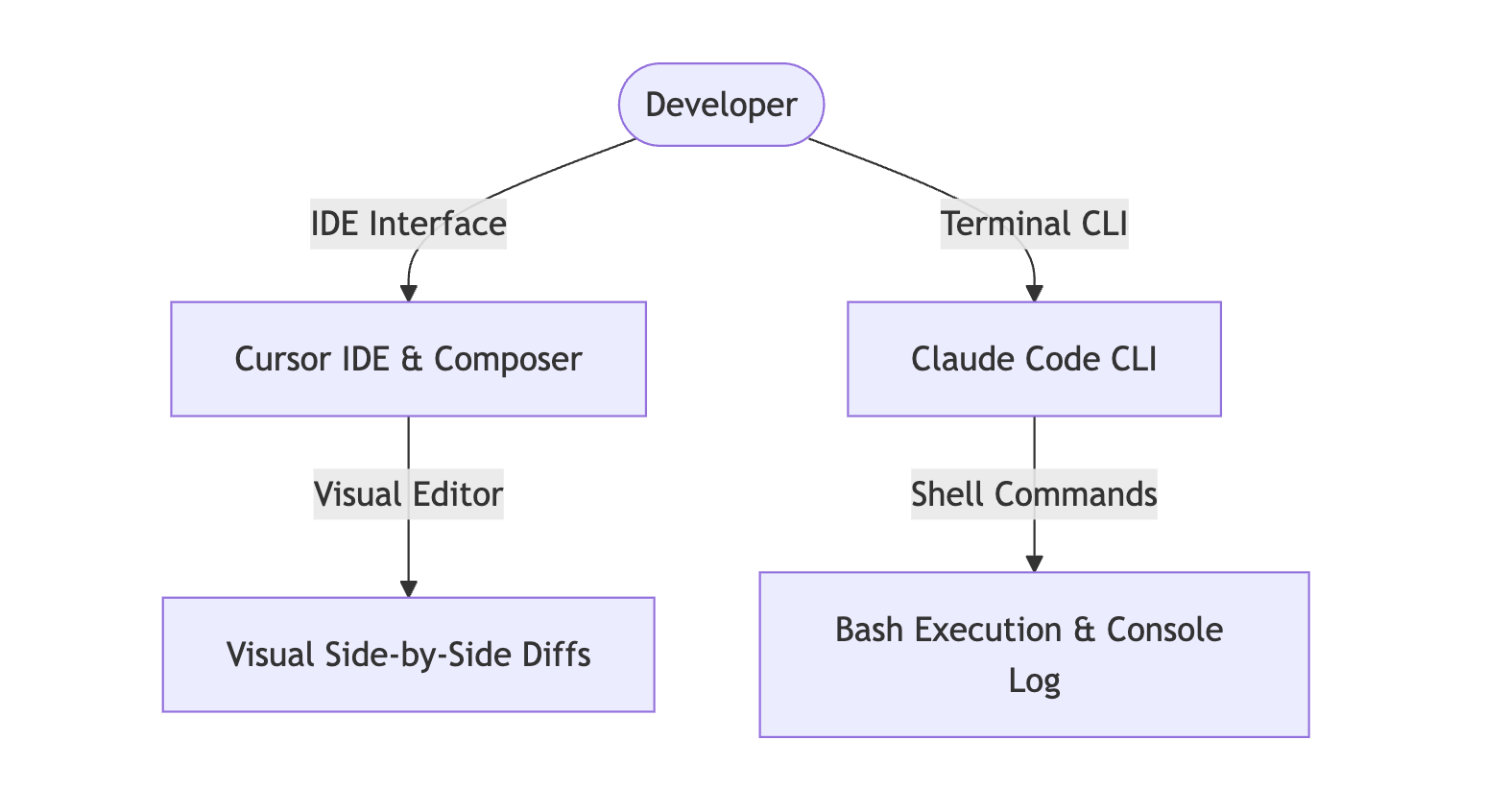
Cursor operates as a full-featured visual editor fork of VS Code. When you trigger the Composer modal via shortcuts, it lets you select files visually and interact with edits across multiple tabs. The editor provides real-time side-by-side diffs where additions are marked in green and deletions in red, allowing you to visually review and accept or reject specific changes line-by-line. This visual feedback loop is invaluable for complex layouts and developers who want strict visual control over their active editors.
Claude Code runs entirely inside the shell prompt. You launch the agent by executing a command in the terminal, and you converse with it in a text-based loop. Because there is no graphical user interface, Claude Code applies modifications directly to files on disk. To review its edits, you must rely on standard git terminal diff commands or inspect its console log output. This text-based interface is incredibly fast and fits perfectly into keyboard-driven developer environments, but it lacks the visual granularity that IDEs offer.
Autonomy is where both tools show their agentic nature, but they manage permissions and execution differently.
Cursor Composer features an Agent mode that autonomously searches codebases using local vector embeddings, writes files, and executes verification scripts. However, to maintain safety in the IDE, Cursor frequently interrupts its reasoning loops to ask for user permission before executing terminal commands or modifying files. While this keeps the developer in control, it introduces manual friction during recursive tasks.
Claude Code offers deeper terminal autonomy. It executes bash commands natively, running test suites, analyzing failures, and modifying the code recursively until the tests pass. Developers can run Claude Code in an auto-accept mode that bypasses confirmation prompts entirely, letting the agent install dependencies, create files, and execute scripts in a hands-off, automated loop. This makes it a powerful assistant for heavy scripting and backend debugging.
Modern agents must connect with external databases, APIs, and systems to resolve software issues.
Cursor relies on the standard VS Code extension marketplace for external integrations. While developers can install tools for database management, API clients, and Git extensions, these integrations are separate from the AI's internal reasoning engine, meaning the editor agent cannot query or utilize these tools natively during a generation.
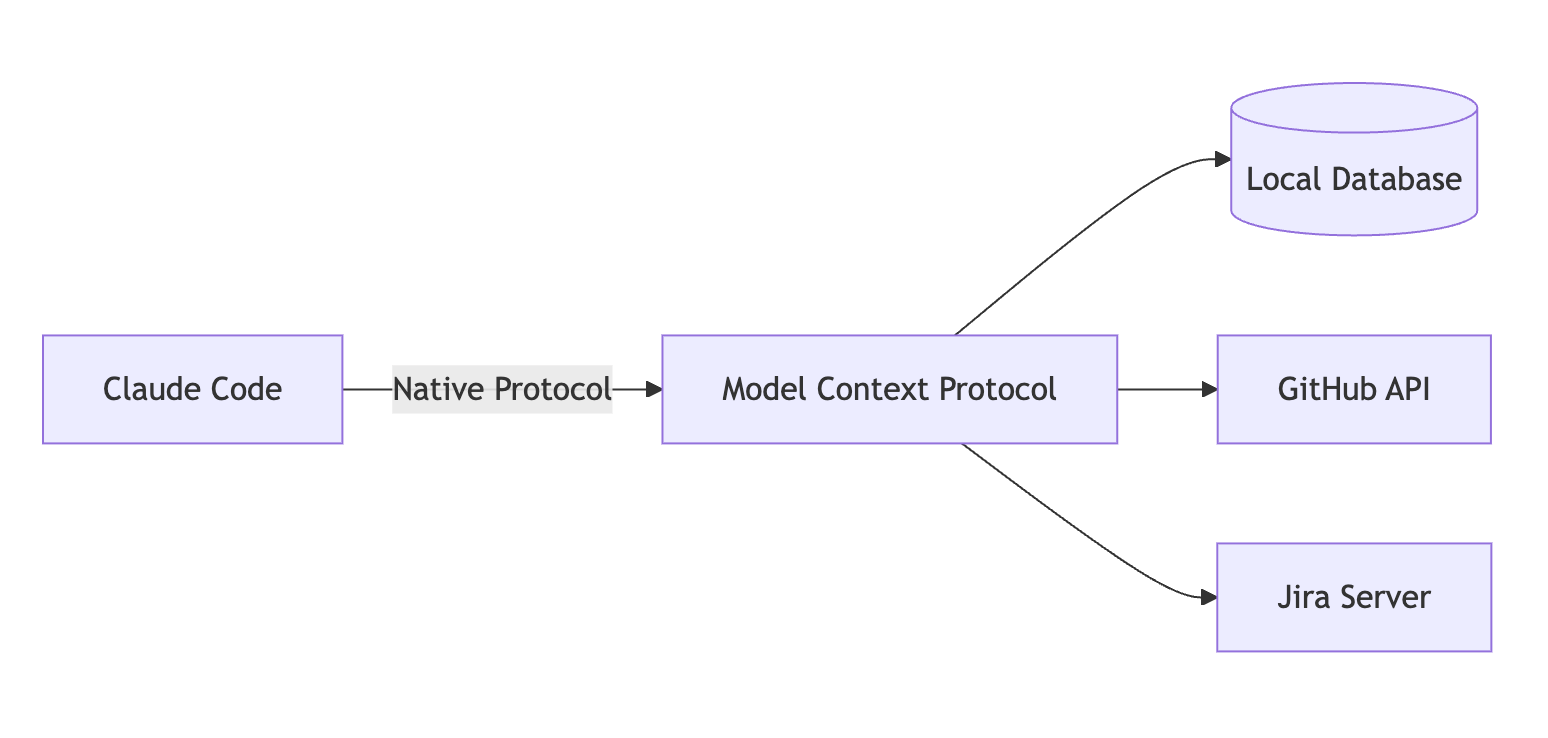
Claude Code is built on the Model Context Protocol (MCP), a standardized protocol developed to connect AI models with external tools. Developers can easily attach database servers, GitHub repositories, Jira instances, and custom web search APIs to the CLI agent. This enables Claude Code to query live databases, fetch documentation, and update issue trackers directly during its execution loop, transforming it into a highly integrated engineering assistant.
Cursor offers complete model flexibility, allowing developers to switch between Claude, GPT, Gemini, and Cursor's proprietary models depending on the task's complexity. It also supports custom API keys, allowing users to pay only for the tokens they consume.
Claude Code is tied to the Anthropic ecosystem, utilizing models like Claude 3.5 Sonnet and Haiku. It runs on a unified Claude Pro subscription or connects to the Anthropic Console API for pay-per-token developer billing.
Cursor Pro costs twenty dollars per month and provides five hundred fast premium requests alongside unlimited slow requests. This predictable subscription is ideal for developers who write code constantly.
Claude Code is included in the standard Claude Pro subscription for twenty dollars per month. Alternatively, developers can use their Anthropic console API key for token-based billing. Because Claude Code uses prompt caching to store files temporarily, repetitive reads are highly optimized, making pay-per-token pricing very cost-effective for lightweight usage.
Both tools access local codebases and require internet connectivity, making data handling critical.Cursor offers a Privacy Mode that prevents codebase indexes from being stored on external servers or used for training. Because you visually audit edits inside the editor before writing them to disk, the risk of malicious actions is minimal.
Claude Code provides zero-data retention on its API endpoints, but it requires caution when running in auto-accept mode. Since it executes shell commands autonomously, developers must ensure the environment does not run untrusted scripts or leak sensitive credentials during automated runs.
The visual diff editor makes reviewing multi-file edits safe and easy, and the native VS Code integration provides a comfortable visual workspace. The tool supports multiple LLM providers and lets you switch models dynamically. However, constant terminal command prompts introduce manual friction, and the overall editor can feel heavy for developers who prefer simple terminal workflows.
The command-line interface launches instantly and fits perfectly into standard shell workflows. Its native support for the Model Context Protocol allows developers to connect external databases, Jira, and GitHub APIs seamlessly. The autonomous terminal loops excel at running test suites and refactoring code without manual verification, but the lack of a visual diff editor makes reviewing multi-file changes more difficult.
Choose Cursor Composer if you prefer visual feedback, do significant frontend layout development, and want an AI assistant integrated directly inside a graphical VS Code workspace. It remains the best choice for visual builders who want to review every line of code as it is written.
Choose Claude Code if you live in the terminal, want a headless assistant that can run test suites and write Git commits, or need to build automation workflows using external databases and APIs via the Model Context Protocol. It is the ideal tool for backend engineers and automation-first developers.
