
Cutling is a clipboard keyboard app for iPhone, iPad and Mac. You save text snippets and images once, then tap to paste them into any app from a custom keyboard, or use a menu-bar picker and global hotkey on Mac. No accounts, no tracking.
Launch Team / Built with

Overview
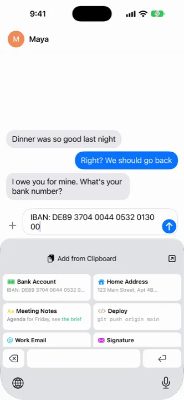
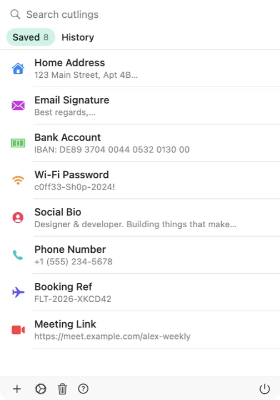
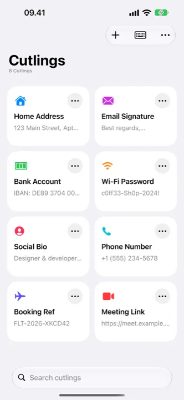
Cutling keeps your address, account numbers, email signature, canned replies and code in one place. Switch to the Cutling keyboard in any app on iPhone or iPad, tap the cutling you need, and it pastes right in. On Mac it lives in the menu bar, and a global hotkey opens a picker wherever your pointer is.
It runs on iPhone, iPad and Mac with one purchase. No subscription, no in-app purchases, no ads, and buying on iPhone or iPad includes the Mac app through universal purchase. You can also download the Mac app free from the site.
Features
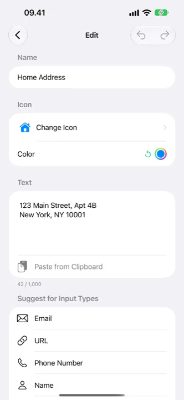
- Text Snippets: Save up to 100 text cutlings, each up to 1,000 characters, holding whole paragraphs or formatting, not just short phrases.
- Image Cutlings: Save up to 25 images for quick access: QR codes, signatures, diagrams.
- Custom Keyboard: Insert cutlings from any app without switching. One tap to paste.
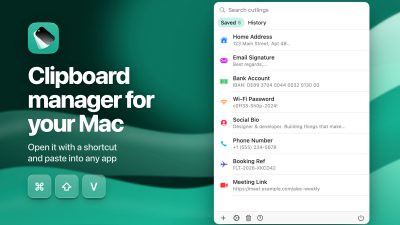
- Mac Picker & Hotkey: Press ⌘⇧V and a picker opens where your pointer is. It also keeps a clipboard history that skips passwords a password manager marks as concealed.
- Icons & Colors: Choose from 590+ icons and any color you like to organize your collection.
Pricing
Cutling has no servers to maintain and no database of your data, so there is nothing to monetize your attention or your information.
Who It's For
Cutling is for people who keep retyping addresses, bank details, email signatures and saved replies, and anyone tired of paying yearly for a clipboard app or dealing with Text Replacement that stops syncing. It also suits anyone who worries what a Full Access keyboard sees, since Cutling's keyboard has no account, no server, no analytics and no third-party code.
Founders
© 2026 Kenneth Johannes Fang. All rights reserved.
Frequently Asked Questions
Does the keyboard need Full Access?
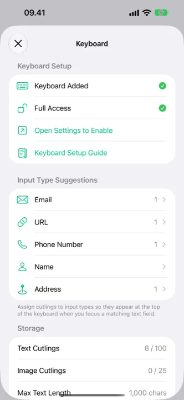
Yes. Full Access lets the keyboard read your saved cutlings from local storage so it can display them. It does not use the permission to log keystrokes, access the internet or transmit data, and its App Store label says Data Not Collected.
What does Cutling sync with?
When you enable iCloud sync, cutlings stay in step across your iPhone, iPad and Mac using Apple's private CloudKit database through your own Apple ID. Sync is optional and can be turned off anytime in settings. The Mac clipboard history stays on that Mac and is never synced.
How does the Mac app work?
It lives in the menu bar and can be summoned anywhere with a global hotkey. Pick a cutling or something you copied earlier, and Cutling pastes it straight into the app you were using. Direct paste, which sends a single Command-V for you, is optional and off by default.
Does formatting survive pasting?
Paste from Mail or a document and the bold, italics and links stay. Code stays exactly as you wrote it, and Cutling spots code on its own.
How do I set up the Cutling keyboard?
Go to Settings > General > Keyboard > Keyboards > Add New Keyboard, select Cutling, then tap Cutling and enable Allow Full Access. After that, switch to it in any app with the globe key and tap the cutling you want.
Can Cutling keep a clipboard history on iPhone?
No. iOS does not let any app read what you copy while it runs in the background, so no iPhone app can build a full history. On iPhone Cutling keeps what you save, and the Mac app keeps your clipboard history.
Product Info
Launched November 21, 2026