

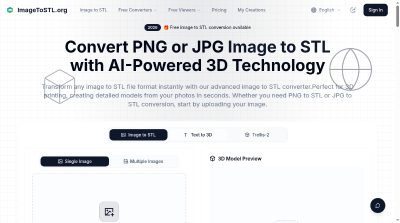
Image To STL turns your flat images into 3D printable STL files using AI. Upload a JPG or PNG, and the AI analyzes depth, contours, and details to build 3D geometry in seconds. You can use a single image or multiple angles for more accurate reconstruction, preview the model before downloading, and tweak settings like height, base thickness, and detail level. Output comes as STL or GLB files ready for 3D printing. There's also a text-to-3D tool, a bunch of free converters (OBJ, GLB, GLTF, PLY, 3MF, SVG and more), and free viewers for STL, OBJ, GLB, and other formats.
Launch Team / Built with
Overview
Image To STL is a web-based converter that takes 2D images and turns them into 3D printable STL files. You upload a JPG or PNG (up to 10MB), the AI analyzes the image's depth, contours, and details, and you get a downloadable 3D model, usually within a minute. There's no complex 3D modeling software to learn, and everything runs on high-performance cloud servers.
It's aimed at creators, designers, engineers, and anyone who wants to turn flat images into 3D printed objects. You can preview the result in an integrated 3D viewer before downloading, tweak settings like height, base thickness, and detail level, and there's support for batch processing if you have lots of images to convert.
Features
- AI-Powered Generation: Advanced neural networks analyze images to create detailed 3D geometry
- Multi-Image Support: Use multiple angles for more accurate and detailed 3D reconstruction
- Print-Ready Output: Generate STL and GLB files optimized for 3D printing and visualization
- High-Resolution STL Output: Generate detailed STL files suitable for professional 3D printing with customizable resolution settings
- Batch Image Processing: Convert multiple images to STL format simultaneously, perfect for large-scale 3D printing projects
Pricing
You can change or cancel your plan anytime by emailing [email protected]. Credit packs are also available as an option.
Who It's For
The site is aimed at creators, designers, engineers, and anyone wanting to turn flat images into 3D printed objects, plus 3D printing enthusiasts and professionals.
Frequently Asked Questions
How does the image to STL converter work?
It uses AI algorithms to analyze pixel data and create 3D geometry based on brightness values and depth perception.
What image formats can I convert to STL?
JPG, PNG and most common image formats, with support for high-resolution images up to 10MB.
Is the conversion suitable for 3D printing?
Yes, the files are print-ready and optimized for FDM, SLA, and other 3D printing technologies with proper mesh geometry and normals.
How long does a conversion take?
Most conversions finish within 1 minute depending on image complexity and quality settings. Batch conversions may take longer.
Can I customize the output from my image?
Yes, there are options to adjust your 3D model before downloading, like height, base thickness, and detail levels.
What makes the AI different?
It preserves fine details, recognizes object boundaries, and creates smooth surfaces that traditional heightmap converters can't achieve.