

Build professional estimates in the browser—line items, tax, valid-until date and terms—then download a clean PDF clients can sign. No account required; optional Pro removes watermark and adds logo.

Launch Team / Built with
Overview
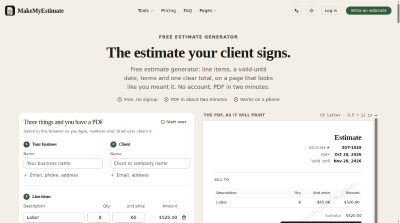
MakeMyEstimate builds the estimate in the browser. Add business and client details, then each task or material with a description, quantity and unit price. Optional fields cover the estimate number, dates, currency, tax, discount and notes. The preview updates as you type, and the math is done for you.
Drafts stay in this browser as you type and nowhere else. Start over clears the draft. Defaults are valid 30 days and plain terms.
Features
- Three things and you have a PDF: Your business name, the client and the line items are enough. Tax, dates and terms are there when you want them.
- Your business and client: Type your business name and the client's name. Phone, email and addresses are optional and fold out when you need them.
- Line items: One line per task or material, each with a quantity, a unit rate and a short description the client will understand.
- Tax, terms and valid-until date: Open the optional section for your tax rate, a discount, the dates and your payment terms. The defaults work as is.
- Download the PDF: Check the preview, then download a numbered PDF estimate ready to email or text to your client.
Pricing
Every estimate you make is free to download, with no account and no limit on how many you create. The line items, the math and the layout are the same on every plan.
Who It's For
Home service trades such as plumbers, electricians, painters and remodelers pricing a job after a walkthrough. Cleaning and lawn care businesses pricing recurring or one-off visits per visit, per room or per square foot. Photographers and creatives laying out shoot packages, editing hours and usage terms before booking. Freelancers and consultants sending project phases and hourly estimates before a statement of work.
Frequently Asked Questions
What is the difference between an estimate and an invoice?
An estimate is sent before the work and tells the client what the job is expected to cost. An invoice is sent after the work, or at a payment milestone, and asks for payment of an amount that is now owed.
What is an estimate generator?
An estimate generator is an online form that turns your prices and line items into a formatted estimate document. You enter the client, the work, the rates and the tax, and it calculates the totals and produces a PDF you can send.
Is a written estimate legally binding?
On its own, an estimate is usually treated as an informed approximation, not a binding contract. It becomes part of an agreement once the client signs or otherwise accepts it, and some states set specific rules for estimates in trades such as auto repair and home improvement.
Should an estimate include sales tax?
Yes, if the goods or services are taxable where the job takes place. Showing tax as its own line under the subtotal lets the client see the full amount they will actually pay and avoids a surprise on the invoice.
How long should an estimate be valid?
Most small businesses use 14 to 30 days. Shorter windows suit jobs heavy on materials whose prices move, and the valid-until date should be printed clearly near the top of the estimate.