
SpritePixel
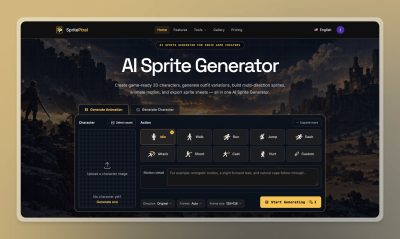
AI Sprite Generator for indie game creators. Create game-ready 2D characters, generate outfit variations, build multi-direction sprites, animate motion, and export sprite sheets, all in one tool.
SpritePixel is an AI sprite generator aimed at indie game developers. You start with a text prompt to create original 2D characters, then keep the same character identity while making outfit variations for skins, classes, or NPC versions. It can also generate front, side, and back-facing directional views for RPG and top-down games, turn characters into animated sprite actions like idle, walk, run, jump, dash, attack, shoot, cast, and hurt, and export everything as organized sprite sheets for your game workflow. The idea is to keep every asset consistent across one game project instead of juggling separate tools. There are also free browser-based extras: a Sprite Sheet Maker, a Sprite Sheet Cutter, and an AI Game Icon Generator for items, skills, weapons, and inventory assets.
Launch Team / Built with

Overview
SpritePixel is a project-based AI game asset studio for indie developers who need consistent sprites, animations, and matching asset sets without a big art team. You start with a text prompt (or a reference image) to create an original 2D character, then keep that same character while adding outfit variations, directional views, animation frames, and finally an export-ready sprite sheet. Everything lives in project-based workspaces, so the assets for one game stay together instead of being scattered across separate tools.
It's built with indie developers, RPG and top-down projects, 2D prototype teams, and game jam creators in mind. Pricing runs on credits for AI generation, while the sprite sheet tools stay free in the browser.
Features
- Generate Characters: Create original 2D game characters with AI, starting from text prompts or a reference image. You can pick a style, perspective, and character type, and there's a surprise-me option if you just want ideas. The goal is a consistent character style for your game world.
- Edit Outfits: Keep the same character and generate new outfit variations, useful for skins, classes, and NPC variants. The base character stays put, so you're not redrawing anything.
- Multi-Direction Sprites: Generate front, side, and back-facing character directions while keeping character identity consistent. Handy for RPG and top-down games where you need a full movement-ready character set.
- Generate Character Animations: Turn characters into animated sprite actions like idle, walk, run, jump, dash, attack, shoot, cast, and hurt, plus custom motion where you describe the details. You can set the direction of the motion, preview the result, and continue in the animation editor before downloading.
- Export Sprite Sheets: Export organized sprite sheets for game development that work with your asset pipeline. Downloads and exports don't use up generation credits.
Pricing
Who It's For
- Indie developers - build a consistent character and asset direction without a large art team. - RPG / top-down projects - create directional characters, variations, animation frames, and game-ready sheets. - 2D prototype teams - explore characters and motion quickly while keeping the visual language coherent. - Game jam creators - move from idea to usable sprite assets with less manual production work.
Frequently Asked Questions
What can this AI Sprite Generator create?
Original 2D characters, outfit variations, directional character views, animation frames, export-ready sprite sheets, and matching game icon sets. The available controls depend on the asset workflow you choose.
Can I create outfit variations of the same character?
Yes. Start from the same base character or reference and create costume variations for skins, classes, or NPC versions while preserving the character's core identity as closely as the generation allows.
Can I generate multi-direction sprites?
Yes. You can create consistent directional views of a character for RPG and top-down workflows, including front, side, and back-facing outputs according to the selected direction settings.
Can I generate animated sprite frames?
Yes. The generator can create movement or action-based frame sequences from a character. You can preview the result and continue to the animation editor before downloading.
Can I export sprite sheets?
Yes. Generated frames can be organized and downloaded as sprite sheets or frame sequences for use in your development workflow. Downloads and exports do not consume generation credits.
Are Sprite Sheet Maker and Sprite Sheet Cutter free?
Yes. Both tools run in the browser and can be used without generation credits. The AI Game Icon Generator is an AI-powered generation feature and uses credits.
Product Info
Launched November 23, 2026