
Blogs in claude agent
stay updated with the latest news, insights, and guides on claude agent from ProductWatch.
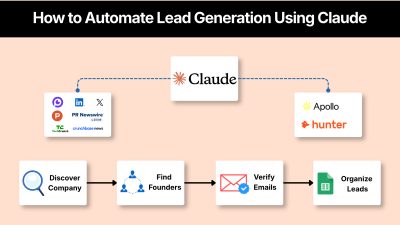
How to Automate Lead Generation Using Claude: From Founder Research to Google Sheets
Finding potential customers is rarely the hardest part of lead generation. The real work begins after discovering a company: identifying the right decision-maker, understanding what the business does, finding a reliable way to contact them, and keeping all the research organized. Doing this manually across startup directories, company websites, LinkedIn, X, and funding announcements can take hours. Claude can help reduce that workload by researching companies, summarizing public information, qualifying prospects, and preparing structured lead records. When combined with Apollo.io and Hunter.io, the process becomes more efficient: Apollo helps discover and enrich business contacts, while Hunter helps find and verify professional email addresses. The goal is not to collect as many email addresses as possible. It is to build a focused list of relevant prospects with enough context to make every outreach message useful and specific. > QUICK SUMMARY > > * Use Claude to research companies, founders, product launches, and funding announcements. > * Use Claude in Chrome to assist with research on websites you are authorized to access. > * Use Apollo.io to discover decision-makers and enrich prospect records. > * Use Hunter.io to find and verify professional email addresses. > * Use LinkedIn for manual profile and role verification. Do not scrape profiles or automate LinkedIn activity. > * Organize prospects in Google Sheets with source links, qualification notes, and email status. > * Review records before outreach. Never treat an AI-generated or unverified email as confirmed. 1. BUILD A LEAD GENERATION WORKFLOW BEFORE COLLECTING DATA A useful lead-generation system starts with a clear definition of the ideal customer profile (ICP). Decide which industries, company sizes, locations, business models, and roles are relevant to your offer. For example, a marketing agency may target B2B SaaS companies with small marketing teams, while a developer-tool provider may focus on technical founders and engineering leaders. This definition gives Claude a filter for evaluating potential prospects. Without it, the research can quickly turn into a long list of unrelated companies. A company should only enter the database when there is a reasonable explanation for why it could benefit from your product or service. A practical workflow moves through five stages: discover companies, identify relevant decision-makers, find professional contact details, verify and qualify the information, and save approved records in a central database. Claude can support each stage, but the process should include human review before a lead is marked ready for outreach. For example, a startup that recently launched a B2B analytics product may be relevant to a SaaS marketing agency. Claude can summarize the product, identify the company website, research the founder or head of marketing, and prepare a prospect record. The person reviewing the record can then decide whether the company fits the agency's target market. 2. SET UP CLAUDE WITH CHROME BROWSER ACCESS Claude in Chrome allows Claude to interact with supported webpages through the browser. Depending on the permissions and website, it can read page content, navigate between tabs, follow links, and assist with repetitive browser tasks. This is useful when company information is spread across About pages, team pages, product pages, and public announcements. To get started, install the official Claude in Chrome extension, sign in to your Claude account, pin the extension to the browser toolbar, and grant only the permissions needed for the task. Open a public company website and test a small research request before using it for a larger batch. Check Claude's current plan requirements and the official setup instructions, as availability and features may change. Browser access does not mean every website permits automated data collection. In particular, use LinkedIn for manual research and verification rather than scraping profiles or automating connection requests and messages. Review LinkedIn's User Agreement and guidance on prohibited software before using any browser automation. Follow the terms and access rules of every source you use. 3. DISCOVER COMPANIES FROM MULTIPLE SOURCES Relying on one source can make a lead list narrow and repetitive. A better approach is to combine company launch platforms, founder updates, professional networks, funding announcements, and official company websites. Each source provides a different signal about a potential prospect. STARTUP LAUNCH PLATFORMS AND DIRECTORIES Launch platforms and startup directories can reveal recently released products, new companies, and founders actively introducing their work to the market. Browse categories that match your ICP, then open the product or company website to confirm that the business is active and relevant. Claude can summarize a product description, identify its category, and extract details such as the company name, website, target audience, and stated use case. Ask it to explain why the company may fit your target profile instead of simply collecting every listing. A recently launched product is a discovery signal, not proof that the company needs your service. X: FIND FOUNDERS AND ACTIVE STARTUP TEAMS Founders often use X to share product launches, hiring updates, fundraising news, customer milestones, and lessons from building a company. Search for phrases such as "just launched our startup", "we raised our pre-seed", "launching our AI tool", and "building in public". These searches can surface companies at moments when they are actively growing or looking for support. When a relevant post appears, review the public profile and visit the company's official website. Claude can summarize the announcement and organize the available company information. Keep the original post URL as a source so that the reason for adding the prospect can be checked later. Avoid automated mass collection and unsolicited automated messages. LINKEDIN: VERIFY DECISION-MAKERS AND COMPANY ROLES LinkedIn is useful for checking whether a person is actually a founder, co-founder, CEO, marketing leader, or another relevant decision-maker. Review the person's current role, company name, professional background, and public company updates manually. Then record the profile URL for reference. This step matters because names and job titles found on old articles or third-party databases may be outdated. A person who founded a company several years ago may no longer work there, and a company may have changed its leadership. Use LinkedIn to verify relevant details manually. Do not use Claude in Chrome or browser extensions to scrape profiles or automate LinkedIn activity. FUNDING ANNOUNCEMENTS AND COMPANY NEWS Funding announcements can help identify companies that may be expanding their teams, investing in marketing, or purchasing new tools. Sources such as TechCrunch, Crunchbase News, PR Newswire, and official company blogs publish launch, investment, and growth updates. When reviewing an announcement, capture the company name, official website, funding stage, amount if reported, announcement date, investors, and founder names. Claude can summarize the article and compare the company against your ICP. Prioritize the business only when its industry, size, location, and likely needs match your offer. A funding announcement alone does not make a company a qualified lead. 4. IDENTIFY THE RIGHT FOUNDER OR DECISION-MAKER Once a company has passed the initial relevance check, identify the person most likely to understand or make a decision about your offer. For a small startup, this may be the founder or CEO. For a larger business, the relevant contact could be a head of marketing, sales director, operations lead, or engineering manager. Start with the company's official About, Team, Leadership, or Contact page. Check recent press releases and company announcements to confirm the person's role. Then use public professional profiles for additional manual verification. Record the person's name, current title, company, and profile URL, along with the page or announcement that supports the information. Avoid assuming that the founder is always the right contact. If your service is related to SEO, a marketing lead may be more relevant. If you sell developer infrastructure, a CTO or engineering leader may be a better fit. Matching the contact's responsibilities to the offer improves the quality of the prospect list and makes later outreach more relevant. 5. FIND AND VERIFY BUSINESS EMAILS WITH APOLLO.IO AND HUNTER.IO Finding a relevant company and decision-maker is only useful if there is a reliable business contact. This is where Apollo.io and Hunter.io can support the research process. Apollo.io can be used to search for companies and people based on filters such as industry, job title, location, company size, and other available firmographic or professional attributes. Once a relevant person is identified, Apollo may provide additional contact and company information through its data and enrichment features. Use the available Claude connector or an authorized API or integration where supported by your account. Review the results before using them, because database records can be incomplete or out of date. Hunter.io provides tools for finding professional email addresses associated with a company domain. Its Domain Search can help identify email patterns and publicly available business contacts for a domain. Email Finder can help locate a likely address using a person's name and company domain, while Email Verifier checks whether an address appears deliverable. Verification results are useful signals, not a guarantee that an email will reach the intended person or that the person wants to receive outreach. A practical sequence is to use Apollo to identify the company and relevant decision-maker, then use Hunter to find or check the business email when needed. Keep the source and status of each address in the lead record. For example, distinguish between an email published on the company's website, an address returned by a contact database, and an address that has passed an email verification check. If no reliable address is available, leave the field blank rather than guessing. AUTOMATE THE RESEARCH WITH CLAUDE Where the relevant Apollo and Hunter connectors, MCP integrations, or APIs are available and authorized, Claude can help coordinate the research steps. Ask it to identify prospects in Apollo using your ICP, summarize the matching people and companies, and prepare selected records for email discovery or verification through Hunter. If a direct integration is not available in your account, use the tools separately and provide Claude with the permitted results for analysis. For a controlled workflow, have Claude show the proposed contacts and any actions that may consume credits before proceeding. Ask it to preserve the source of each field, flag missing information, and avoid sending emails or messages. The final step should be a review of the records before they are added to your prospect database. Example Claude prompt: > Act as a B2B lead research assistant. Find 20 companies that match this ideal customer profile: [describe industry, company size, location, and business type]. > > Use Apollo, where an authorized connection is available, to identify relevant companies and decision-makers. Prioritize these job titles: [add relevant roles]. For selected prospects, use Hunter, where an authorized connection is available, to find and verify professional business email addresses. > > Return the company name, official website, industry, company size if available, contact name, job title, business email, email verification status, LinkedIn profile URL for manual review, discovery source, and source URLs. > > Do not invent missing details, guess email addresses, scrape LinkedIn, or send emails or direct messages. Mark uncertain information as "Needs Verification". Show the records and any credit-consuming actions for approval before adding approved leads to Google Sheets. This approach makes Claude a research coordinator rather than an unchecked data collector. It can reduce repetitive work, but the accuracy of the final list still depends on source quality, current records, and human review. 6. ORGANIZE PROSPECTS IN GOOGLE SHEETS A spreadsheet is a simple way to keep company research, contact information, and qualification decisions in one place. Create a separate row for each relevant contact and use consistent fields so that records can be filtered, reviewed, and updated. Useful columns include Company Name, Official Website, Industry, Product or Service, Company Size, Contact Name, Job Title, Business Email, Email Source, Email Verification Status, X Profile, LinkedIn Profile, Discovery Source, Funding Stage, Funding Date, Lead Score, Lead Status, and Notes. Add a Source URL column so that important details can be checked against the original page or announcement. Use clear statuses to show where each prospect sits in the process. "New" means the company has been discovered. "Researching" means important details are still missing. "Needs Verification" means a person, role, or email requires checking. "Qualified" means the company matches the ICP. "Ready for Outreach" means the contact and business relevance have been reviewed. "Contacted" should only be used after an outreach message has actually been sent. One row per contact-company combination makes it easier to manage businesses with multiple decision-makers. Before adding a new row, check whether the company or contact already exists. Duplicate records can waste research time and lead to multiple messages being sent to the same person. 7. CONNECT CLAUDE TO GOOGLE SHEETS For a small batch, Claude in Chrome can help organize reviewed information in an open Google Sheet. Ask it to map each field to the correct column, check for missing values, and show the rows before they are added. Review the result and confirm that URLs, names, and email statuses appear in the right places. For a recurring or larger workflow, use the Google Sheets API, Make, or Zapier to transfer approved records. An automation platform can handle the data transfer and duplicate checks, while Claude handles research, classification, and summaries. This is generally easier to maintain than relying on browser clicks for every spreadsheet update. A typical process looks like this: company discovery leads to Claude research; Claude identifies the company and decision-maker; Apollo supports prospect discovery and enrichment; Hunter helps find and verify the business email; a duplicate check and human review take place; and approved records are saved in Google Sheets. Keep the research and the final approval steps separate so that incomplete or irrelevant records do not enter the outreach list automatically. 8. SCORE LEADS BEFORE OUTREACH A large database is not necessarily a useful database. Lead scoring helps prioritize prospects that are more likely to need your product or service. Create a simple scoring model based on the factors that matter to your business, and ask Claude to explain the reason behind each score. For example, assign 25 points when a company matches the target industry, 20 points when the right decision-maker is identified, 15 points when the product is active, 15 points when a recent launch or funding event creates a relevant opportunity, 15 points when a usable business contact is available, and 10 points when there is a clear reason the company may need your service. This creates a 100-point model. Use the score as a prioritization aid rather than an objective prediction. Prospects scoring 80 to 100 can receive a closer review first, those scoring 60 to 79 can be researched further, and lower-scoring records can be held or removed. Ask Claude to explain which criteria were met and which details are still uncertain. This makes the score easier to audit and improve. 9. MAKE THE WORKFLOW REPEATABLE Once the process works for one batch, turn it into a routine. Check launch platforms, founder updates, and funding announcements regularly for new companies. Review incomplete contact records and duplicates at least once a week. Revisit lead scores as company information changes, and remove records that no longer match your target market. Recurring research can be scheduled through approved APIs, automation platforms, or scheduled tasks where available. Do not assume that Claude will continuously monitor websites by itself. Each source may have different access rules, rate limits, and data availability, so configure the workflow accordingly. It is also useful to review which sources produce the best prospects. If funding news generates many companies but few qualified contacts, adjust the filters. If launch platforms produce smaller companies that closely match your offer, give those sources more attention. The objective is to improve the quality of the list over time, not simply increase the number of records. 10. MEASURE LEAD GENERATION PERFORMANCE Measure the workflow by the quality and usefulness of the leads it produces. Track the number of companies discovered, the percentage that match your ICP, the percentage with a confirmed decision-maker, and the percentage with a usable business email. Also monitor duplicate rates, email verification outcomes, and the number of prospects approved for outreach. After outreach begins, measure reply rate, positive reply rate, meetings booked, and opportunities created. Compare these results by source, industry, company size, and job title. This helps identify whether the problem is weak targeting, incomplete contact data, poor messaging, or a source that does not produce suitable prospects. Do not judge success by the number of emails collected. A smaller list of relevant, well-researched decision-makers is often more valuable than a large database with outdated contacts and little context. CONCLUSION Claude can make lead generation more manageable by researching companies, summarizing public information, identifying relevant decision-makers, and organizing prospect records. Apollo.io can support company and contact discovery, while Hunter.io can help find and verify professional email addresses. Google Sheets provides a straightforward place to review and manage the resulting leads. The most effective workflow combines these tools with clear targeting and human oversight. Define the ideal customer profile first, verify company and contact details against reliable sources, record where each piece of information came from, and review every prospect before outreach. Automation should reduce repetitive research, not replace judgment. The result is a cleaner prospect database and a more relevant foundation for business development.