
Blogs in b2b lead generation
stay updated with the latest news, insights, and guides on b2b lead generation from ProductWatch.
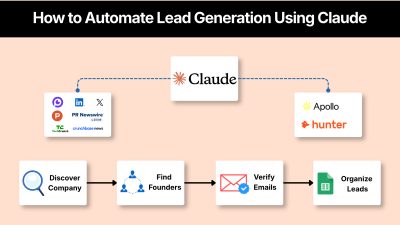
How to Automate Lead Generation Using Claude: From Founder Research to Google Sheets
Finding potential customers is rarely the hardest part of lead generation. The real work begins after discovering a company: identifying the right decision-maker, understanding what the business does, finding a reliable way to contact them, and keeping all the research organized. Doing this manually across startup directories, company websites, LinkedIn, X, and funding announcements can take hours. Claude can help reduce that workload by researching companies, summarizing public information, qualifying prospects, and preparing structured lead records. When combined with Apollo.io and Hunter.io, the process becomes more efficient: Apollo helps discover and enrich business contacts, while Hunter helps find and verify professional email addresses. The goal is not to collect as many email addresses as possible. It is to build a focused list of relevant prospects with enough context to make every outreach message useful and specific. > QUICK SUMMARY > > * Use Claude to research companies, founders, product launches, and funding announcements. > * Use Claude in Chrome to assist with research on websites you are authorized to access. > * Use Apollo.io to discover decision-makers and enrich prospect records. > * Use Hunter.io to find and verify professional email addresses. > * Use LinkedIn for manual profile and role verification. Do not scrape profiles or automate LinkedIn activity. > * Organize prospects in Google Sheets with source links, qualification notes, and email status. > * Review records before outreach. Never treat an AI-generated or unverified email as confirmed. 1. BUILD A LEAD GENERATION WORKFLOW BEFORE COLLECTING DATA A useful lead-generation system starts with a clear definition of the ideal customer profile (ICP). Decide which industries, company sizes, locations, business models, and roles are relevant to your offer. For example, a marketing agency may target B2B SaaS companies with small marketing teams, while a developer-tool provider may focus on technical founders and engineering leaders. This definition gives Claude a filter for evaluating potential prospects. Without it, the research can quickly turn into a long list of unrelated companies. A company should only enter the database when there is a reasonable explanation for why it could benefit from your product or service. A practical workflow moves through five stages: discover companies, identify relevant decision-makers, find professional contact details, verify and qualify the information, and save approved records in a central database. Claude can support each stage, but the process should include human review before a lead is marked ready for outreach. For example, a startup that recently launched a B2B analytics product may be relevant to a SaaS marketing agency. Claude can summarize the product, identify the company website, research the founder or head of marketing, and prepare a prospect record. The person reviewing the record can then decide whether the company fits the agency's target market. 2. SET UP CLAUDE WITH CHROME BROWSER ACCESS Claude in Chrome allows Claude to interact with supported webpages through the browser. Depending on the permissions and website, it can read page content, navigate between tabs, follow links, and assist with repetitive browser tasks. This is useful when company information is spread across About pages, team pages, product pages, and public announcements. To get started, install the official Claude in Chrome extension, sign in to your Claude account, pin the extension to the browser toolbar, and grant only the permissions needed for the task. Open a public company website and test a small research request before using it for a larger batch. Check Claude's current plan requirements and the official setup instructions, as availability and features may change. Browser access does not mean every website permits automated data collection. In particular, use LinkedIn for manual research and verification rather than scraping profiles or automating connection requests and messages. Review LinkedIn's User Agreement and guidance on prohibited software before using any browser automation. Follow the terms and access rules of every source you use. 3. DISCOVER COMPANIES FROM MULTIPLE SOURCES Relying on one source can make a lead list narrow and repetitive. A better approach is to combine company launch platforms, founder updates, professional networks, funding announcements, and official company websites. Each source provides a different signal about a potential prospect. STARTUP LAUNCH PLATFORMS AND DIRECTORIES Launch platforms and startup directories can reveal recently released products, new companies, and founders actively introducing their work to the market. Browse categories that match your ICP, then open the product or company website to confirm that the business is active and relevant. Claude can summarize a product description, identify its category, and extract details such as the company name, website, target audience, and stated use case. Ask it to explain why the company may fit your target profile instead of simply collecting every listing. A recently launched product is a discovery signal, not proof that the company needs your service. X: FIND FOUNDERS AND ACTIVE STARTUP TEAMS Founders often use X to share product launches, hiring updates, fundraising news, customer milestones, and lessons from building a company. Search for phrases such as "just launched our startup", "we raised our pre-seed", "launching our AI tool", and "building in public". These searches can surface companies at moments when they are actively growing or looking for support. When a relevant post appears, review the public profile and visit the company's official website. Claude can summarize the announcement and organize the available company information. Keep the original post URL as a source so that the reason for adding the prospect can be checked later. Avoid automated mass collection and unsolicited automated messages. LINKEDIN: VERIFY DECISION-MAKERS AND COMPANY ROLES LinkedIn is useful for checking whether a person is actually a founder, co-founder, CEO, marketing leader, or another relevant decision-maker. Review the person's current role, company name, professional background, and public company updates manually. Then record the profile URL for reference. This step matters because names and job titles found on old articles or third-party databases may be outdated. A person who founded a company several years ago may no longer work there, and a company may have changed its leadership. Use LinkedIn to verify relevant details manually. Do not use Claude in Chrome or browser extensions to scrape profiles or automate LinkedIn activity. FUNDING ANNOUNCEMENTS AND COMPANY NEWS Funding announcements can help identify companies that may be expanding their teams, investing in marketing, or purchasing new tools. Sources such as TechCrunch, Crunchbase News, PR Newswire, and official company blogs publish launch, investment, and growth updates. When reviewing an announcement, capture the company name, official website, funding stage, amount if reported, announcement date, investors, and founder names. Claude can summarize the article and compare the company against your ICP. Prioritize the business only when its industry, size, location, and likely needs match your offer. A funding announcement alone does not make a company a qualified lead. 4. IDENTIFY THE RIGHT FOUNDER OR DECISION-MAKER Once a company has passed the initial relevance check, identify the person most likely to understand or make a decision about your offer. For a small startup, this may be the founder or CEO. For a larger business, the relevant contact could be a head of marketing, sales director, operations lead, or engineering manager. Start with the company's official About, Team, Leadership, or Contact page. Check recent press releases and company announcements to confirm the person's role. Then use public professional profiles for additional manual verification. Record the person's name, current title, company, and profile URL, along with the page or announcement that supports the information. Avoid assuming that the founder is always the right contact. If your service is related to SEO, a marketing lead may be more relevant. If you sell developer infrastructure, a CTO or engineering leader may be a better fit. Matching the contact's responsibilities to the offer improves the quality of the prospect list and makes later outreach more relevant. 5. FIND AND VERIFY BUSINESS EMAILS WITH APOLLO.IO AND HUNTER.IO Finding a relevant company and decision-maker is only useful if there is a reliable business contact. This is where Apollo.io and Hunter.io can support the research process. Apollo.io can be used to search for companies and people based on filters such as industry, job title, location, company size, and other available firmographic or professional attributes. Once a relevant person is identified, Apollo may provide additional contact and company information through its data and enrichment features. Use the available Claude connector or an authorized API or integration where supported by your account. Review the results before using them, because database records can be incomplete or out of date. Hunter.io provides tools for finding professional email addresses associated with a company domain. Its Domain Search can help identify email patterns and publicly available business contacts for a domain. Email Finder can help locate a likely address using a person's name and company domain, while Email Verifier checks whether an address appears deliverable. Verification results are useful signals, not a guarantee that an email will reach the intended person or that the person wants to receive outreach. A practical sequence is to use Apollo to identify the company and relevant decision-maker, then use Hunter to find or check the business email when needed. Keep the source and status of each address in the lead record. For example, distinguish between an email published on the company's website, an address returned by a contact database, and an address that has passed an email verification check. If no reliable address is available, leave the field blank rather than guessing. AUTOMATE THE RESEARCH WITH CLAUDE Where the relevant Apollo and Hunter connectors, MCP integrations, or APIs are available and authorized, Claude can help coordinate the research steps. Ask it to identify prospects in Apollo using your ICP, summarize the matching people and companies, and prepare selected records for email discovery or verification through Hunter. If a direct integration is not available in your account, use the tools separately and provide Claude with the permitted results for analysis. For a controlled workflow, have Claude show the proposed contacts and any actions that may consume credits before proceeding. Ask it to preserve the source of each field, flag missing information, and avoid sending emails or messages. The final step should be a review of the records before they are added to your prospect database. Example Claude prompt: > Act as a B2B lead research assistant. Find 20 companies that match this ideal customer profile: [describe industry, company size, location, and business type]. > > Use Apollo, where an authorized connection is available, to identify relevant companies and decision-makers. Prioritize these job titles: [add relevant roles]. For selected prospects, use Hunter, where an authorized connection is available, to find and verify professional business email addresses. > > Return the company name, official website, industry, company size if available, contact name, job title, business email, email verification status, LinkedIn profile URL for manual review, discovery source, and source URLs. > > Do not invent missing details, guess email addresses, scrape LinkedIn, or send emails or direct messages. Mark uncertain information as "Needs Verification". Show the records and any credit-consuming actions for approval before adding approved leads to Google Sheets. This approach makes Claude a research coordinator rather than an unchecked data collector. It can reduce repetitive work, but the accuracy of the final list still depends on source quality, current records, and human review. 6. ORGANIZE PROSPECTS IN GOOGLE SHEETS A spreadsheet is a simple way to keep company research, contact information, and qualification decisions in one place. Create a separate row for each relevant contact and use consistent fields so that records can be filtered, reviewed, and updated. Useful columns include Company Name, Official Website, Industry, Product or Service, Company Size, Contact Name, Job Title, Business Email, Email Source, Email Verification Status, X Profile, LinkedIn Profile, Discovery Source, Funding Stage, Funding Date, Lead Score, Lead Status, and Notes. Add a Source URL column so that important details can be checked against the original page or announcement. Use clear statuses to show where each prospect sits in the process. "New" means the company has been discovered. "Researching" means important details are still missing. "Needs Verification" means a person, role, or email requires checking. "Qualified" means the company matches the ICP. "Ready for Outreach" means the contact and business relevance have been reviewed. "Contacted" should only be used after an outreach message has actually been sent. One row per contact-company combination makes it easier to manage businesses with multiple decision-makers. Before adding a new row, check whether the company or contact already exists. Duplicate records can waste research time and lead to multiple messages being sent to the same person. 7. CONNECT CLAUDE TO GOOGLE SHEETS For a small batch, Claude in Chrome can help organize reviewed information in an open Google Sheet. Ask it to map each field to the correct column, check for missing values, and show the rows before they are added. Review the result and confirm that URLs, names, and email statuses appear in the right places. For a recurring or larger workflow, use the Google Sheets API, Make, or Zapier to transfer approved records. An automation platform can handle the data transfer and duplicate checks, while Claude handles research, classification, and summaries. This is generally easier to maintain than relying on browser clicks for every spreadsheet update. A typical process looks like this: company discovery leads to Claude research; Claude identifies the company and decision-maker; Apollo supports prospect discovery and enrichment; Hunter helps find and verify the business email; a duplicate check and human review take place; and approved records are saved in Google Sheets. Keep the research and the final approval steps separate so that incomplete or irrelevant records do not enter the outreach list automatically. 8. SCORE LEADS BEFORE OUTREACH A large database is not necessarily a useful database. Lead scoring helps prioritize prospects that are more likely to need your product or service. Create a simple scoring model based on the factors that matter to your business, and ask Claude to explain the reason behind each score. For example, assign 25 points when a company matches the target industry, 20 points when the right decision-maker is identified, 15 points when the product is active, 15 points when a recent launch or funding event creates a relevant opportunity, 15 points when a usable business contact is available, and 10 points when there is a clear reason the company may need your service. This creates a 100-point model. Use the score as a prioritization aid rather than an objective prediction. Prospects scoring 80 to 100 can receive a closer review first, those scoring 60 to 79 can be researched further, and lower-scoring records can be held or removed. Ask Claude to explain which criteria were met and which details are still uncertain. This makes the score easier to audit and improve. 9. MAKE THE WORKFLOW REPEATABLE Once the process works for one batch, turn it into a routine. Check launch platforms, founder updates, and funding announcements regularly for new companies. Review incomplete contact records and duplicates at least once a week. Revisit lead scores as company information changes, and remove records that no longer match your target market. Recurring research can be scheduled through approved APIs, automation platforms, or scheduled tasks where available. Do not assume that Claude will continuously monitor websites by itself. Each source may have different access rules, rate limits, and data availability, so configure the workflow accordingly. It is also useful to review which sources produce the best prospects. If funding news generates many companies but few qualified contacts, adjust the filters. If launch platforms produce smaller companies that closely match your offer, give those sources more attention. The objective is to improve the quality of the list over time, not simply increase the number of records. 10. MEASURE LEAD GENERATION PERFORMANCE Measure the workflow by the quality and usefulness of the leads it produces. Track the number of companies discovered, the percentage that match your ICP, the percentage with a confirmed decision-maker, and the percentage with a usable business email. Also monitor duplicate rates, email verification outcomes, and the number of prospects approved for outreach. After outreach begins, measure reply rate, positive reply rate, meetings booked, and opportunities created. Compare these results by source, industry, company size, and job title. This helps identify whether the problem is weak targeting, incomplete contact data, poor messaging, or a source that does not produce suitable prospects. Do not judge success by the number of emails collected. A smaller list of relevant, well-researched decision-makers is often more valuable than a large database with outdated contacts and little context. CONCLUSION Claude can make lead generation more manageable by researching companies, summarizing public information, identifying relevant decision-makers, and organizing prospect records. Apollo.io can support company and contact discovery, while Hunter.io can help find and verify professional email addresses. Google Sheets provides a straightforward place to review and manage the resulting leads. The most effective workflow combines these tools with clear targeting and human oversight. Define the ideal customer profile first, verify company and contact details against reliable sources, record where each piece of information came from, and review every prospect before outreach. Automation should reduce repetitive research, not replace judgment. The result is a cleaner prospect database and a more relevant foundation for business development.
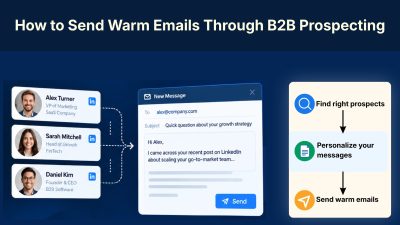
How to Send Warm Emails Through B2B Prospecting
Cold email works better when a prospect feels like a relevant business conversation, not another message sent from a database. The difference starts before the email is written: identifying the right accounts, finding the right contact, and understanding what is happening in the business right now. A practical B2B outreach workflow combines account research, contact enrichment, business signals, personalized messaging, useful follow-ups, and CRM tracking. The goal is not simply to send more emails, but to make every outreach step more relevant and intentional. AI can make much of this process faster, from finding prospects and detecting signals to researching accounts and drafting messages. But AI works best as part of a structured sales workflow, where human judgment still determines who to contact, why to reach out, and what is worth saying. > QUICK SUMMARY > > * Define the ICP, buyer role, problem, and buying signals before prospecting. > * Use tools such as Apollo or HubSpot to find and organize prospects. > * Use Clay for enrichment, account research, buying signals, and AI-powered personalization. > * Verify prospect information before adding contacts to an outreach sequence. > * Make the email relevant to a real company event, problem, or business situation. > * Keep the first email short and focused on one problem. > * Use tools such as Instantly or Apollo to manage sequences and follow-ups. > * Use AI to research accounts, summarize signals, create first drafts, classify replies, and update CRM data. > * Review AI-generated emails before sending. > * Measure positive replies, qualified meetings, opportunities, and revenue, not just email opens. > * Start with a small campaign, identify what works, and then increase volume. 1. START WITH A SPECIFIC ICP Do not begin with thousands of emails. Start by defining exactly who should receive the message. For example, B2B SaaS companies with 20–200 employees that are hiring salespeople and expanding outbound sales could be a specific ICP. The more specific the ICP, the easier it becomes to find relevant prospects and explain why the product matters. Apollo can build prospect lists using company size, industry, job title, seniority, technology, and other filters. Its AI workflows can also identify prospects matching an ICP and add them to lists or sequences. Mark Hughes, Co-Founder of Solidroad, used a focused ICP as part of the company's outbound strategy. Solidroad later reported $1M ARR from its outbound motion, with around 500,000 emails generating 5,000 replies, 250 meetings, and 40 customers. The key is simple: better targeting creates a better prospecting list. 2. FIND A REASON TO CONTACT THE COMPANY The strongest cold emails usually have a reason behind them. Look for signals such as hiring, funding, expansion, product launches, technology changes, leadership changes, or problems visible on the company's website. Generic: > We help SaaS companies generate more qualified leads. Signal-based: > Saw the team is hiring several SDRs while expanding outbound. That usually means more time spent building lists and researching accounts. The second email gives the prospect a reason to understand why they were contacted. This is where AI can help. Clay can combine company and contact data with signals such as hiring, funding, and website activity to support personalized outreach. Huntr used a similarly focused approach by targeting career services teams at coding bootcamps. Apollo reports that its targeted outreach achieved around a 20% reply rate, with the company also reporting 2x revenue growth in 10 months. 3. FIND THE PERSON WHO OWNS THE PROBLEM The right company is not enough. The email needs to reach someone connected to the problem. For a prospecting product, that could be a VP of Sales, Head of Sales, RevOps leader, SDR manager, or founder. Apollo can find contacts by role and seniority, while Clay can enrich them with additional company and professional information. For larger accounts, identify multiple stakeholders instead of depending on one contact. Solidroad's outbound strategy also focused on reaching specific decision-makers connected to the problem, rather than contacting companies without identifying the relevant buyer. The goal is not simply finding a contact. It is finding the person connected to the problem. 4. BUILD A CLEAN PROSPECT LIST Create a simple prospect record: This gives AI and sales teams structured information to work with. Avoid relying on unverified data. An incorrect job title, outdated company detail, or false trigger can make a good email look careless. Apollo provides prospecting, enrichment, sequencing, and workflow capabilities. Clay can also enrich records using multiple data sources and AI research. Claire Hardesty, founding GTM engineer at Pump.co, helped build an outbound infrastructure capable of handling more than 130,000 emails in its first month. Smartlead reports nearly $200,000 in attributed pipeline revenue during that period. At this scale, clean data and organized campaign workflows become essential. 5. USE AI FOR PROSPECT RESEARCH AI can reduce the time spent manually researching every account. For each prospect, ask: What does the company sell? Who is the likely buyer? What has changed recently? What problem might that create? Why could the product be relevant now? Clay can combine enrichment, AI research, and account signals into prospect information. HubSpot also uses AI and company signals to support prospect identification and personalized outreach. The important part is to give AI real data. Asking AI to simply “personalize this email” without account context usually produces generic copy. Huntr's results also show the value of researching a specific audience before scaling. Its targeted campaigns reportedly reached a 20% cold outreach reply rate. 6. TURN THE RESEARCH INTO A SHORT COLD EMAIL A useful first email does not need to explain the entire product. A simple structure is: Relevant observation → Problem → Product → Simple question For example: > Hi [name], > > Noticed the team is hiring several SDRs as outbound expands. > > That usually means more time spent finding accounts and researching contacts. > > [Product] helps automate that research and enrichment. > > Is improving this workflow currently a priority? The objective is not to close the deal in the first email. It is to determine whether the problem is relevant enough to start a conversation. Apollo recommends connecting something relevant about the recipient with a problem the product can address and a clear next step. Myles Kreiner, Founder & CEO of Epiphany Scales, used targeted cold email, list building, and message testing. A BEC Growth case study reports $35,000+ in new revenue within two months and 4+ booked meetings per day. 7. PERSONALIZE THE RIGHT THING Adding a first name is not personalization. Useful personalization explains why the prospect is relevant. For example: > Noticed your team recently opened six SDR positions. is more useful than: > Loved the work you're doing at ABC. The first connects to a business situation. The second could be sent to almost anyone. AI can create the first draft, but a person should verify the claim before sending. Apollo also recommends reviewing AI-generated messages for accuracy, relevance, tone, and context. Huntr used A/B testing to refine messaging for specific audiences, with its targeted outreach reportedly reaching a 20% reply rate. Personalization should therefore change the reason and message, not just the recipient's name. 8. BUILD A SHORT FOLLOW-UP SEQUENCE Many prospects will not reply to the first email. The solution is not to send the same message repeatedly. A practical sequence could be: > Day 1: Relevant trigger + problem > > Day 3: Problem-focused follow-up > > Day 6: Relevant result or use case > > Day 10: Different angle > > Day 14: Close-the-loop message Each follow-up should give the prospect a different reason to respond. Apollo supports sequences and AI-assisted campaign creation, while Instantly focuses on cold-email campaigns and sequencing. Epiphany's reported campaign continuously tested and removed underperforming copy while refining lists and sequences. The case study reports 4+ booked meetings per day at its peak. Follow-ups should therefore be treated as an optimization process, not repetition. 9. USE AI TO CREATE BETTER PERSONALIZATION AT SCALE Suppose there are 500 prospects. Instead of manually researching every company, create structured fields: Company signal: Hiring 8 SDRs Role: VP Sales Problem: Scaling outbound research Product capability: Automated lead enrichment Personalization: Based on current hiring activity AI can turn these fields into short, relevant emails while keeping the campaign consistent. Clay supports this workflow through enrichment, AI research, signals, and personalized messaging. The goal is not 500 completely different emails. It is 500 relevant emails based on reliable prospect information. At Pump.co, Claire Hardesty helped build a much larger outbound system that reportedly sent 130,000+ emails in its first month and generated nearly $200,000 in attributed pipeline revenue. Personalization at scale requires both good data and good infrastructure. 10. ADD A DRIFT CAMPAIGN FOR WEBSITE VISITORS Cold email brings prospects to the website. The next opportunity is to engage them while they are actively researching the product. A Drift campaign can show targeted messages based on the visitor, page, or campaign context. For example: > Looking for a faster way to build your prospecting workflow? See how the process works or chat with a sales specialist. Drift's Playbooks can engage website visitors, qualify leads, and route conversations to sales representatives. A simple workflow is: > Cold Email → Website Visit → Drift Campaign → Qualification → Sales Conversation → CRM Drift can also trigger specific Playbooks from links or buttons, allowing an email campaign to continue naturally into a website conversation. The key is consistency. If the email discusses outbound prospecting, the website campaign should continue that same conversation instead of showing a generic message. 11. KEEP AI OUT OF THE MOST IMPORTANT CONVERSATIONS AI is useful for repetitive research and preparation. It can: > Find prospects → Enrich data → Research accounts → Identify signals → Draft emails → Summarize replies → Categorize objections → Update records Humans should handle: > Offer positioning → Final review → Important replies → Objections → Pricing → Negotiations → Sales calls This keeps the workflow fast while reducing the risk of incorrect AI-generated information reaching prospects. HubSpot recommends using AI to reduce manual prospecting and research while allowing sales teams to focus on higher-value activities. Solidroad's reported outbound funnel shows why automation is only one part of the process: 500,000 emails generated 5,000 replies, 250 meetings, and 40 customers. The sales conversations still had to be handled by people. 12. CONNECT COLD EMAIL TO THE SALES PIPELINE Cold email should not end when someone replies. A real B2B workflow should move prospects through: > Target Account → Researched → Contacted → Replied → Qualified → Meeting → Opportunity → Customer A CRM such as HubSpot can store account history, contact information, email activity, deal stages, notes, and next actions. Apollo can also connect prospecting and outbound activity with CRM workflows. Solidroad's reported funnel shows why tracking the complete journey matters: > 500,000 emails → 5,000 replies → 250 meetings → 40 customers → $1M ARR These figures come from the company's reported outbound results and illustrate why email volume alone is not the final metric. Every positive response should have a clear next step. 13. ANALYZE REPLIES INSTEAD OF CHASING OPEN RATES A campaign should answer practical questions: Which ICP segment replied? Which job title responded? Which trigger produced conversations? Which message generated qualified replies? Which campaign produced opportunities? Track: > Positive reply rate → Qualified replies → Meetings → Opportunities → Customers → Revenue If a campaign generates opens but no qualified conversations, simply increasing volume will not fix the problem. Huntr, for example, used reply rates, interested responses, and revenue growth to evaluate its outbound campaigns rather than focusing only on email opens. This creates a more useful feedback loop: > Prospect → Research → Email → Reply → Analysis → Better targeting → Better email That is where AI becomes useful beyond simply writing copy. A PRACTICAL B2B COLD EMAIL STACK A small team does not need ten different platforms. A practical setup could look like this: Apollo: Find contacts, companies, and buying signals. Clay: Enrich prospects, research accounts, identify signals, and generate personalized data. ChatGPT: Analyze research, improve messaging, classify replies, and create campaign variations. Instantly: Run cold-email campaigns and follow-ups. HubSpot: Manage contacts, conversations, deals, and pipeline stages. Larger teams can connect these systems instead of moving CSV files manually. Apollo supports workflow integrations, while Clay can push enriched prospects into sequencing systems such as Apollo and Instantly. The Pump.co example shows how these tools can become a connected outbound infrastructure, with reported use of Clay and large-scale email infrastructure to support its campaigns. THE REAL WORKFLOW A practical B2B outreach campaign can run like this: 1. Define the ICP Choose the company type, buyer, problem, and buying signals. 2. Find accounts Use Apollo or another prospecting database. 3. Enrich the list Add verified contact information and company details. 4. Detect signals Use Clay or Apollo to identify hiring, funding, product, technology, or other relevant changes. 5. Research with AI Create a short account brief for every qualified prospect. 6. Score prospects Prioritize prospects with strong ICP fit and a current business reason. 7. Generate the email Use AI to draft a short message based on the research. 8. Review Check every important claim manually. 9. Send the sequence Use Apollo, Instantly, or the existing sales engagement system. 10. Handle replies Move interested prospects into the CRM and continue the conversation manually. 11. Analyze results Compare positive replies, meetings, opportunities, and revenue. 12. Improve the next campaign Use the results and AI analysis to change targeting, triggers, offers, and messaging. CONCLUSION A warm cold email is created before the email is sent. The prospect needs to be a good fit, there needs to be a credible reason for contacting them, and the message needs to connect that reason to a problem the business may actually have. AI makes this process faster by handling research, enrichment, signal detection, personalization drafts, reply analysis, and repetitive CRM work. Tools such as Apollo, Clay, ChatGPT, Instantly, and HubSpot can turn those individual tasks into a connected workflow. The objective is not to send more emails simply because automation makes it possible. The objective is to identify better prospects, understand them faster, send more relevant emails, and turn responses into qualified pipeline.
Top 10 Best B2B Prospecting Tools in 2026
A predictable B2B sales pipeline starts with knowing who to target and when to reach them. A SaaS founder may know exactly which companies are a good fit, but turning that ideal customer profile into qualified prospects takes work. Identifying the right decision-maker, verifying work emails, checking technology stacks, spotting buying signals, and keeping contact data updated can quickly consume hours. That’s where B2B prospecting tools come in. Modern sales platforms help teams discover target companies, identify decision-makers, verify contact details, enrich lead data, uncover buying signals, and move qualified prospects into CRM or outreach workflows. > QUICK SUMMARY > > * Apollo.io: An all-in-one B2B prospecting platform combining a large contact database, advanced filters, buying intent, lead scoring, enrichment, and outbound sequences, making it useful for teams that want prospecting and outreach in one place. > > * ZoomInfo SalesOS: An enterprise sales intelligence platform built around company and contact data, intent signals, organizational information, and account intelligence for larger sales and marketing teams. > > * LinkedIn Sales Navigator: Uses LinkedIn's professional network for advanced lead and account search, saved lists, alerts, InMail, account maps, and relationship-based prospecting. > > * Clay: A flexible prospecting and enrichment platform that connects 150+ data providers with waterfall enrichment, AI research through Claygent, job-change signals, web intent, and CRM automation. > > * Cognism: A B2B sales intelligence platform focused on verified contact and company data, mobile numbers, intent signals, job changes, AI research, and compliance-focused prospecting, with particularly strong relevance for European sales teams. > > Other useful tools include Lusha, UpLead, Hunter, LeadIQ, and Icypeas, which support contact discovery, verification, enrichment, and prospect research. B2B PROSPECTING TOOLS COMPARISON | # | Tool | Key prospecting features | Minimum price | Best for | Free plan | | -- | | | | | | | 1 | Apollo.io | 240M+ contacts, 65+ filters, buying intent, lead scoring, enrichment, sequences, AI research | $49/user/month, billed annually | SaaS founders, startups, sales teams wanting data + outreach | Yes | | 2 | ZoomInfo SalesOS | Contact/company intelligence, intent data, org charts, buyer signals, account intelligence | Custom quote | Enterprise sales and ABM teams | Trial | | 3 | LinkedIn Sales Navigator | Advanced search, lead/account lists, alerts, InMail, account maps, buyer interest | $119.99/user/month | Founder-led sales, B2B sales, relationship prospecting | Trial | | 4 | Clay | 150+ data providers, waterfall enrichment, Claygent AI research, job changes, intent, CRM enrichment | $185/month for Launch | RevOps, developers, growth teams, custom prospecting workflows | Yes | | 5 | Cognism | Verified emails and mobiles, firmographics, technographics, intent, job changes, AI research | Custom quote | EMEA prospecting and enterprise sales teams | No | | 6 | Lusha | Verified contact data, phone numbers, firmographics, buying signals, Chrome extension, CRM enrichment | $37/month, billed annually | SMB and mid-market sales teams | Yes | | 7 | UpLead | Verified emails, mobile numbers, company data, Chrome extension, LinkedIn prospecting | $99/month | Small sales teams and founders needing verified contacts | 5-credit trial | | 8 | Hunter | Domain search, email finder, email verification, lead discovery, AI assistant, outreach | $34/month | Email-first prospecting and lean teams | Yes | | 9 | LeadIQ | Contact discovery, job changes, CRM enrichment, AI messaging, sales signals, Chrome extension | Free, paid plans available | SDR teams and LinkedIn-based prospecting | Yes | | 10 | Icypeas | Email finding, verification, profile scraping, company search, API, MCP, no-code integrations | $19/month | Developers, agencies, and lean outbound workflows | Yes | 1. APOLLO.IO Apollo.io is one of the most complete options for teams that want to combine B2B contact discovery with outbound sales workflows. Its prospecting database currently covers more than 240 million contacts, and users can filter prospects using more than 65 data attributes. Filters can be used to narrow prospects by company, role, seniority, location, industry, technology, and other characteristics. Apollo also supports personas, buying intent, saved searches, alerts, and lookalike prospecting. For a SaaS founder, this can simplify the process of defining an ICP and turning it into an actual lead list. For example, a developer selling an API monitoring platform could search for engineering leaders at SaaS companies using a specific technology stack and then enrich those contacts before starting outreach. Apollo also goes beyond database search. Its platform includes CRM enrichment, CSV enrichment, API enrichment, lead scoring, AI research, and outbound sequences. That means a small sales team does not necessarily need separate tools for finding prospects and starting email outreach. PRICING Minimum paid price: $49/user/month, billed annually. A free plan is available, while higher tiers add more credits, intent topics, filters, automation, and other capabilities. Best for: SaaS founders, startups, agencies, and sales teams that want prospecting data and outbound execution in one platform. 2. ZOOMINFO SALESOS ZoomInfo SalesOS is designed for organizations that need detailed B2B sales intelligence across companies, contacts, accounts, and buying signals. The platform is particularly relevant for enterprise sales teams because prospecting is not limited to finding someone's email address. Teams can investigate company structures, identify decision-makers, monitor intent, and build account-level intelligence around target organizations. ZoomInfo's wider data platform includes company and professional profiles, organizational information, intent data, and signals that can help sales teams prioritize accounts. Current industry comparisons continue to position it as an enterprise-focused B2B intelligence platform with deep North American coverage. For an enterprise SaaS company selling into large organizations, this account-level approach can be more useful than simply downloading a large contact list. Sales teams can identify the company first, map the buying group, and then build an outreach strategy around multiple stakeholders. The tradeoff is that ZoomInfo is designed for a much larger sales operation than a solo founder who needs 50 verified emails. It makes more sense when account intelligence, intent data, organizational structures, and sales workflows justify an enterprise platform. PRICING Minimum price: Custom quote. Current market comparisons report enterprise contracts rather than a standard public self-serve price. Best for: Enterprise sales organizations, ABM teams, and businesses selling complex products into large companies. 3. LINKEDIN SALES NAVIGATOR LinkedIn Sales Navigator is different from traditional contact databases because its biggest advantage is direct access to LinkedIn's professional network. Its advanced search lets salespeople identify leads and companies using criteria such as job title, company, geography, seniority, industry, and other professional attributes. Users can save leads and accounts, receive alerts, use InMail, and organize prospects into custom lists. For founders, this is especially useful when selling requires understanding the person before sending an email. A founder selling developer infrastructure, for example, can identify CTOs, engineering managers, or founders at target companies, follow their activity, and use relevant information to make the first message more specific. Sales Navigator also has account maps and buyer-interest features. Advanced and Advanced Plus plans add collaboration and CRM-related functionality, with Advanced Plus supporting CRM synchronization and activity writeback. It is therefore particularly useful when LinkedIn is already part of the sales process. The platform is less about exporting a giant database and more about helping salespeople identify and work with professional relationships. PRICING Minimum paid price: $119.99/user/month for Sales Navigator Core. LinkedIn also offers Advanced and Advanced Plus plans with additional capabilities. Annual billing lowers the effective monthly cost. Best for: Founders, B2B salespeople, recruiters, consultants, and teams that rely heavily on LinkedIn for prospect research and relationship building. 4. CLAY Clay is particularly interesting for developers, RevOps teams, growth engineers, and founders who want to build custom prospecting workflows instead of relying on a single database. The platform connects more than 150 data providers and can run multi-provider waterfalls. This means a team can search one source, then use another provider when the first source does not return the required information. Clay also includes Claygent, its AI research agent, which can use web research to generate custom data points. A founder could use this to identify whether a company uses a particular technology, determine whether it recently launched a product, classify companies according to an ICP, or research information that is not available as a standard database field. The platform also supports job-change signals, company news, hiring signals, CRM enrichment, web intent, APIs, webhooks, and automated workflows. This makes it particularly useful when prospecting becomes a data-engineering problem rather than a simple lead-search task. For example, a SaaS developer could build a workflow that finds companies hiring backend engineers, enriches them with technology information, checks company size, researches recent funding, and sends the resulting records to a CRM. PRICING Minimum paid plan: $185/month for Launch. Clay also has a free plan with limited actions and data credits. Best for: Developers, RevOps teams, growth engineers, agencies, and technical founders building custom prospecting and enrichment workflows. 5. COGNISM Cognism focuses on verified B2B data and is particularly relevant for companies prospecting in Europe. The platform provides company and contact information, including emails, mobile numbers, job titles, work history, technology usage, and company information. Its prospecting workflows also include firmographic, technographic, and signal-based filters. One of Cognism's differentiators is its focus on mobile verification. Its Pro package includes on-demand mobile verification, while the platform also supports intent data, job changes, funding, hiring, and M&A signals. Cognism also includes AI company research, AI persona building, AI search, CSV enrichment, CRM enrichment, and API or bulk data delivery. This makes it suitable for teams that need more than a browser extension for finding individual contacts. For companies selling into the UK and European markets, compliance and data quality can be important factors when selecting a prospecting database. Cognism explicitly positions its platform around compliance-first data and offers GDPR-related controls and documentation. PRICING Minimum price: Custom quote. Cognism's current pricing is based on the package, team setup, data requirements, and usage. Best for: EMEA-focused sales teams, larger B2B companies, and businesses that need verified mobile data and compliance-focused prospecting. 6. LUSHA Lusha is designed for sales and marketing teams that need verified contact and company information without adopting a large enterprise sales intelligence platform. Its prospecting workflow provides contact information, company details, buying signals, and enrichment. Lusha also offers a Chrome extension that can be used while browsing LinkedIn and other websites. Current 2026 materials from Lusha state that the platform has more than 290 million contacts and supports signals such as hiring, funding, technology changes, and intent. For a founder, this can be useful when building a focused list rather than downloading thousands of contacts. For example, a SaaS founder can search for a specific job role at companies within a particular size range, verify contact details, and then move the selected prospects into a CRM. Lusha also supports CRM enrichment and integrations, allowing teams to keep contact information updated instead of repeatedly rebuilding lists. The platform is therefore a good middle ground between lightweight email finders and expensive enterprise intelligence systems. PRICING Minimum paid price: $37/month when billed annually. Lusha also provides a free plan with limited credits. Best for: SMB and mid-market sales teams, founders, agencies, and marketers that need verified contact data plus buying signals. 7. UPLEAD UpLead focuses on verified B2B contact data and gives users a relatively straightforward way to find emails and mobile numbers. Its database search supports company and contact filters, while its platform provides verified emails, mobile direct dials, and company information. The Chrome extension can also be used while browsing LinkedIn or other websites. One useful feature for smaller teams is the way UpLead handles credits. One credit unlocks one contact, including the available email and mobile direct dial. This makes it relatively easy to estimate how much a prospecting campaign will consume before building a list. UpLead also states that it verifies email addresses with a 95% accuracy rate. This is a vendor-reported figure, so teams should still test data quality against their own target market before building a large campaign. For founders who only need a few hundred targeted prospects rather than a large sales intelligence platform, this straightforward credit model can be easier to manage. PRICING Minimum paid plan: $99/month for Essentials. A seven-day free trial includes five credits. Best for: Small sales teams, agencies, founders, and marketers who want verified contact information with a simple credit-based model. 8. HUNTER Hunter is best known for email discovery and verification, but its current platform has expanded into broader prospecting and outreach. The platform can find professional emails using domain search and individual email lookup, verify email addresses, enrich leads, and identify potential opportunities. It also includes an AI Assistant inside its Discover database and supports cold email sequences. Hunter is particularly useful when the main prospecting requirement is finding a reliable business email rather than building a complete account-intelligence system. For example, a founder may already have a list of 200 target companies and only need to identify the correct email addresses for CEOs, marketing heads, CTOs, or sales leaders. Hunter can fit that workflow without requiring the team to adopt a large sales platform. Its API is also useful for developers who want to integrate email discovery and verification into an internal application or automated lead-generation workflow. PRICING Minimum paid price: $34/month. Hunter also has a free plan with 50 credits per month. Best for: Solo founders, marketers, agencies, developers, and small teams that mainly need email finding and verification. 9. LEADIQ LeadIQ combines contact discovery with sales signals, CRM enrichment, and AI-assisted outreach. The platform can find email addresses and phone numbers, track job changes, enrich CRM records, generate AI-assisted messages, and provide sales signals. Its Chrome extension makes it possible to prospect while browsing the web or LinkedIn. One useful aspect is its credit structure. Email discovery uses one credit, while phone numbers use more credits, allowing teams to decide whether they need only email data or both email and phone information. LeadIQ is also designed to fit into existing sales engagement workflows. This matters for teams that already use CRM and sales engagement software and want prospect data to flow into those systems instead of maintaining separate spreadsheets. The platform is therefore more relevant to SDR teams and sales organizations than to someone who only wants to find a handful of email addresses. PRICING Minimum price: Free plan available. Paid pricing depends on the number of credits and the selected plan. Best for: SDR teams, sales teams using LinkedIn for prospecting, and organizations that need contact discovery plus CRM and sales workflow integration. 10. ICYPEAS Icypeas is a more specialized prospecting and email enrichment platform that can be attractive to developers, agencies, and lean sales teams. Its core tools include email finding, email verification, domain scanning, profile scraping, company scraping, person and company discovery, reverse email lookup, API access, and no-code integrations with platforms such as Make, Zapier, and n8n. It also supports MCP, which makes it relevant to teams experimenting with AI agents and automated research workflows. One important difference is its focus on paying for verified or found data rather than purchasing a large all-in-one sales intelligence suite. The platform also supports credit rollover, meaning unused credits do not simply disappear at the end of the billing period. Its pricing structure can therefore work well for teams whose prospecting volume changes from month to month. For developers, the API and automation support are particularly useful. A team can connect Icypeas to an internal lead-generation workflow, automate email discovery, verify addresses, and send clean data into another system. PRICING Minimum paid plan: $19/month plus VAT. A free plan includes 50 credits, while paid plans provide larger monthly credit allocations. Best for: Developers, agencies, technical founders, and businesses that primarily need affordable email enrichment and API-based prospecting. HOW TO CHOOSE A B2B PROSPECTING TOOL The first question should not be "Which tool has the biggest database?" The better question is what exactly needs to happen between identifying a target company and contacting the right person? If the workflow starts with a list of companies and ends with a personalized outbound sequence, an all-in-one platform such as Apollo.io can reduce the number of tools involved. If the process starts with account research and relationship building, LinkedIn Sales Navigator may fit better because the prospect's professional activity and company relationships remain central to the workflow. If the team wants to combine several data providers, run custom enrichment, research websites with AI, or build automated workflows, Clay is more appropriate. Its multi-provider waterfalls and AI research capabilities are specifically designed for this type of workflow. For teams primarily looking for verified contact information, Lusha, UpLead, Hunter, and Icypeas offer more focused workflows. For European prospecting, Cognism deserves particular consideration because its platform emphasizes verified mobile data, intent signals, and compliance-focused workflows. WHAT B2B PROSPECTING FEATURES MATTER MOST? ACCURATE CONTACT DATA A huge database means little if emails bounce or contacts have changed jobs. Look for email verification, phone data, job-change detection, regular updates, and replacement options for inaccurate records. ADVANCED FILTERS Good prospecting tools should turn your ICP into searchable criteria. Example: SaaS → 50–500 employees → US/UK/India → hiring engineers → AWS users → CTO or VP Engineering. Better filters mean less manual research. BUYING SIGNALS Firmographics show who fits your ICP. Buying signals help answer why contact them now. Funding, hiring, leadership changes, technology adoption, and expansion can provide useful outreach context. CRM ENRICHMENT Your prospecting system should keep CRM records fresh by filling missing information and updating outdated contact or company data. API & AUTOMATION For technical teams, API access can turn prospecting data into part of an automated lead-generation workflow. Clay and Icypeas are particularly useful for custom enrichment and automation. COMPLIANCE Before scaling outbound campaigns, check how a provider handles data sources, opt-outs, privacy requirements, processing, and retention, especially for European prospects. A PRACTICAL B2B PROSPECTING STACK You rarely need ten different tools. A simple workflow could look like: Sales Navigator → Find target accounts → Apollo/Lusha → Find contacts → Hunter/Icypeas → Verify emails → Clay → Enrich → CRM → Outreach Larger organizations may use ZoomInfo or Cognism as their central sales intelligence platform. The goal is not to collect more databases. It is to build a workflow that produces accurate contacts, useful context, timely outreach, and clean CRM data. CONCLUSION The right prospecting tool depends on your sales process. Apollo.io combines prospecting, contact data, enrichment, and outbound workflows. ZoomInfo focuses on broader sales intelligence for larger teams, while LinkedIn Sales Navigator is useful when LinkedIn plays a central role in prospect discovery. Clay is well suited to custom enrichment workflows, while Cognism focuses strongly on B2B data and EMEA prospecting. Lusha, UpLead, Hunter, LeadIQ, and Icypeas can handle more focused contact discovery, verification, and enrichment needs. For founders and small SaaS teams, start with one core prospecting platform. Add enrichment or verification tools only when a specific gap appears.