
Blogs in content-creation
stay updated with the latest news, insights, and guides on content-creation from ProductWatch.
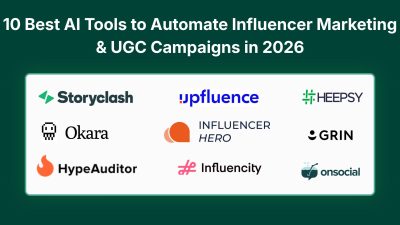
10 Best AI Tools to Automate Influencer Marketing and UGC Campaigns in 2026
The right creator can turn a SaaS product into a steady stream of attention, signups, and user-generated content. But finding that creator is often the hardest part. Searching across TikTok, Instagram, YouTube, and X, checking audience fit, reviewing past content, handling outreach, negotiating rates, and tracking results can quickly consume hours. AI creator marketing tools are changing this workflow. They can help teams discover relevant creators, analyze audiences, automate outreach, manage UGC campaigns, and measure performance. For SaaS, creator fit matters more than follower count. A developer tool needs creators who understand technical workflows, while an AI product may need creators who can demonstrate it clearly in short-form content. > QUICK SUMMARY > > * Storyclash: Best suited to teams that need AI creator discovery, competitor research, creator vetting, outreach, campaign management, and performance tracking in one workflow. > > * Janney AI: An AI-first platform designed to automate creator discovery, outreach, negotiation, campaign management, and performance monitoring across TikTok, Instagram, and YouTube. > > * Okara: Built around an AI Influencer Agent that can take a campaign from brief and creator matching through outreach, rate negotiation, deliverable tracking, and payment. > > * HypeAuditor: Combines AI creator discovery with audience-quality analysis, fraud detection, automated outreach, campaign management, reporting, and API access. > > * Influencer Hero: Combines AI discovery, automated outreach, CRM, campaign boards, UGC tracking, gifting, payments, and reporting, making it useful when the main problem is moving from creator research to campaign execution. > > The remaining tools are also useful, but they serve slightly different needs. Upfluence, Influencity, and GRIN are broader creator-management platforms, while Heepsy is more accessible for smaller teams. COMPARISON: AI CREATOR DISCOVERY AND UGC CAMPAIGN TOOLS | # | Tool | Key features for SaaS teams | Minimum price | Best for | | -- | | | | | | 1 | Storyclash | AI creator search, product URL search, image search, lookalikes, competitor creator research, outreach, campaign management, ROI tracking | €499/month | Teams running recurring creator campaigns | | 2 | Janney AI | AI creator matching, trend analysis, automated outreach, negotiation, campaign management, ROI insights | Free search; paid plans custom | Startups wanting AI-assisted campaign automation | | 3 | Okara | AI creator matching, automated outreach, rate negotiation, briefs, deliverable tracking, automatic payouts | $99/month + 10% campaign spend | Solo founders and lean SaaS teams | | 4 | HypeAuditor | AI discovery, audience analytics, fraud detection, AI Scout, outreach, CRM, campaign tracking, API | Custom quote | Data-driven creator selection | | 5 | Influencer Hero | AI discovery, automated outreach, CRM, campaign boards, UGC tracking, gifting, payments, reporting | $649/month | Teams wanting an end-to-end workflow | | 6 | Upfluence | 14M+ creator database, AI search, lookalikes, outreach, campaign management, ecommerce integrations, payments | Custom quote | Growing creator programs | | 7 | Influencity | AI discovery, 350M+ public profiles, audience analysis, CRM, outreach, campaign management, social listening | Custom quote | Large-scale creator research and management | | 8 | Heepsy | AI search, lookalikes, 30+ filters, creator analytics, outreach, marketplace, sales tracking | Free; paid from $69/month | Solo marketers and small SaaS teams | | 9 | GRIN | Gia AI agent, creator discovery, CRM, affiliate tracking, campaign management, reporting, creator marketplace | Free; paid from $200/month | Teams wanting an AI creator operations assistant | | 10 | ON Social | AI creator discovery, 27+ filters, audience intelligence, creator analytics, lookalikes, API, data exports | Custom quote | SaaS teams needing creator research and audience intelligence | 1. STORYCLASH Storyclash is particularly useful when creator discovery is only one part of the problem. Its AI discovery system can search for creators using natural-language text, images, product URLs, and lookalike searches. This means a SaaS team can start with something more specific than a generic category such as "technology influencer." For example, a company could search for creators whose content visually matches its brand or use a product URL to identify creators whose interests match the product category. The platform also provides creator collaboration history, audience information, performance metrics, competitor research, and campaign management. That can help a founder answer an important question before sending an offer: Has this creator already worked with similar companies, and did that content perform? For SaaS marketing teams, another useful part is the connection between discovery and campaign execution. Storyclash supports outreach, campaign planning, budgeting, contracts, performance tracking, and ROI measurement rather than leaving the team with a spreadsheet full of creator profiles. PRICING Minimum price: €499/month. Storyclash's current pricing page lists Starter at €499/month, Growth at €999/month, and Scale at €1,899/month, with custom options also available. Best for: SaaS and DTC teams running recurring creator campaigns and needing discovery, competitor intelligence, campaign management, and reporting in one platform. 2. JANNEY AI Janney AI takes a more automation-focused approach to influencer marketing. The platform searches across TikTok, Instagram, and YouTube and uses AI to match creators with a brand's audience, tone, and performance requirements. It also includes features such as trend analysis, hashtag analysis, creator matching, and platform-specific content insights. The more interesting part for small SaaS teams is the campaign automation layer. Janney describes workflows covering creator onboarding, approvals, payments, outreach, negotiation, campaign monitoring, and performance optimization. Instead of using one tool to find creators and another spreadsheet to track them, the platform aims to keep the workflow inside one system. For a SaaS founder launching an AI tool, developer product, or productivity platform, this can be useful when the goal is not simply to identify creators but to move quickly from "find 20 relevant creators" to "contact them and run the campaign." PRICING Minimum price: Free search; paid plans are custom. Janney currently offers free basic creator search and promotes premium SaaS and managed options for broader campaign automation. Best for: Startups and marketing teams looking for AI-assisted creator discovery and automated campaign operations. 3. OKARA Okara approaches influencer marketing as an AI-agent workflow rather than simply another creator database. A founder starts by providing information such as the product, campaign goal, audience, and budget. The Influencer Agent then matches creators from its network, handles outreach, negotiates rates, manages briefs and deliverables, and handles payments when the campaign is completed. This approach is particularly relevant to solo founders. A small SaaS company may not have a person dedicated to influencer partnerships, so the difficult part is often not understanding influencer marketing. It is finding the time to send dozens of messages, follow up, negotiate rates, track content, and chase payments. Okara also currently focuses its live influencer workflow on X, with Instagram, YouTube, and TikTok listed as upcoming platforms on its Influencer Agent page. That makes the platform particularly interesting for developer tools and SaaS products whose audiences are active on X. PRICING Minimum price: $99/month + 10% of campaign spend. Creator fees are separate from the platform fee. Best for: Solo founders and small SaaS teams that want an AI agent to handle much of the creator campaign workflow. 4. HYPEAUDITOR HypeAuditor is built around creator intelligence, which makes it useful when choosing the wrong creator could waste a significant part of the campaign budget. Its discovery system covers Instagram, YouTube, TikTok, Twitch, and X and provides filters for audience demographics, location, account quality, engagement, and other characteristics. HypeAuditor currently reports more than 227 million creator profiles in its discovery database. The platform also places considerable emphasis on audience quality and fraud detection. A creator may have a large follower count, but that number does not tell a SaaS company whether the audience contains the right people or whether engagement looks authentic. HypeAuditor provides audience quality, authenticity, demographic, and engagement analysis to help with that evaluation. Its AI Scout can take a campaign brief or previous successful campaign and produce a list of up to 50 recommended influencers, with explanations for why they were selected. Campaign tools then support outreach, contracts, payments, content tracking, approval workflows, and reporting. PRICING Minimum price: Custom quote. HypeAuditor currently offers free media plans, campaign management access, and demo versions of other features, while its full brand and agency platform is sold through a tailored plan. Best for: SaaS teams that want detailed creator and audience intelligence before spending money on campaigns. 5. INFLUENCER HERO Influencer Hero is designed to connect creator discovery directly with outreach and campaign execution. Its discovery system supports filters and AI search, while the CRM keeps creator information, communication history, deal terms, campaign participation, affiliate data, and performance information together. The outreach system can create automated email sequences and AI-generated personalization based on creators' recent content. This is useful for SaaS teams that have a shortlist of 100 creators but do not want to manually write 100 nearly identical emails. Campaign Boards then organize creators through stages such as outreach, negotiation, awaiting post, and posted. Content tracking, gifting, affiliate links, payments, and reporting can also be connected to the same creator record. PRICING Minimum price: $649/month. The current pricing page lists plans at $649, $1,049, $2,490, and a custom option. Best for: SaaS teams that want creator discovery, AI outreach, campaign management, UGC tracking, and reporting in one system. 6. UPFLUENCE Upfluence is a broader creator marketing platform covering discovery, outreach, campaign management, ecommerce integrations, creator recruitment, sales tracking, and payments. Its creator discovery system includes more than 14 million creators and supports advanced search, lookalike creators, creator applications, customer matching, performance data, and AI-assisted outreach. For campaign execution, teams can create programs, attract creators through the marketplace, send products in bulk, connect e-commerce systems, track sales, and monitor campaign performance. Its Jaice AI features are designed to help automate campaign creation and creator-program operations. Developers may also find Upfluence interesting because it provides an influencer API covering creator search, profiles, audience data, posts, streams, analytics, and workflow data. It also provides an MCP server for querying creator data through AI assistants such as ChatGPT or Claude. PRICING Minimum price: Custom quote. Upfluence uses modular custom pricing based on the selected product modules, team size, and program volume. A free trial is available after an initial call. Best for: Growing SaaS and ecommerce teams that need creator discovery, campaign management, ecommerce tracking, and developer access to creator data. 7. INFLUENCITY Influencity combines creator discovery with campaign and relationship management. Its platform provides access to more than 350 million public creator profiles across Instagram, TikTok, and YouTube. Teams can filter creators by audience demographics, interests, location, engagement, authenticity, brand affinity, follower growth, and other criteria. The AI Discovery Assistant allows marketers to describe what they are looking for in natural language instead of manually configuring every filter. A SaaS marketer could describe the audience, location, niche, and engagement requirements and then refine the generated results. Beyond discovery, Influencity includes CRM, outreach, campaign management, content tracking, payments, reporting, social listening, and social media management. This makes it more appropriate for teams managing an ongoing creator program rather than a single UGC experiment. PRICING Minimum price: Custom quote. Influencity currently offers a 7-day free trial, with pricing determined by the selected plan and usage requirements. Best for: Larger SaaS and marketing teams that need large-scale creator discovery plus campaign and relationship management. 8. HEEPSY Heepsy is one of the more accessible options for smaller teams because it combines creator discovery, AI search, analytics, outreach, and ecommerce tracking with a free starting tier. The platform supports AI, lookalike, and text search alongside more than 30 filters. Teams can narrow creators by geography, language, gender, performance, contact availability, and other criteria. It searches across Instagram, TikTok, YouTube, and LinkedIn. Heepsy also includes creator analysis, authenticity checks, recent content, public contact information, projects, email outreach, creator tracking, and sales tracking through Shopify and WooCommerce integrations. That gives a solo founder enough functionality to test creator marketing without immediately committing to a large enterprise platform. For SaaS teams experimenting with their first 10 to 50 creator relationships, the combination of free search and relatively low entry pricing makes Heepsy worth testing before moving into a more complex creator-management platform. PRICING Minimum price: Free. Paid plans start at $69/month when billed annually. Current paid plans include Starter at $69/month, Plus at $149/month, and Advanced at $229/month. Best for: Solo founders, small SaaS marketing teams, and companies testing creator marketing for the first time. 9. GRIN GRIN has evolved beyond traditional creator-management software with Gia, its AI agent for creator marketing. Gia can work across creator discovery, outreach, activation, reporting, and other creator-program tasks while keeping the team in control of actions involving messages, money, contracts, and brand risk. GRIN also provides creator discovery, relationship management, campaign execution, affiliate tracking, reporting, and a creator marketplace. Its marketplace currently states that it has more than 700,000 creators in its network and provides market-rate benchmarks to help teams understand what creators may charge. The AI creator search can also accept a campaign brief and recommend creators. This is particularly relevant when a marketing team knows the desired campaign outcome but does not want to manually translate the brief into dozens of creator filters. PRICING Minimum price: Free. Paid plans start at $200/month. GRIN currently offers a free plan with 200 monthly Gia credits and a Starter plan at $200/month. Best for: Teams that want an AI assistant to help operate an ongoing creator program rather than simply search for influencers. Replace the Trend section with this: 10. ON SOCIAL ON Social is a creator data and intelligence platform focused on helping brands, agencies, SaaS companies, and technology teams discover and evaluate creators across Instagram, TikTok, and YouTube. It is particularly useful when the main challenge is finding creators that actually match a target audience rather than simply searching by follower count. Its discovery system provides 27+ filters covering creator and audience attributes such as location, age, gender, interests, engagement, credibility, language, and brand affinity. Teams can also search by topics, keywords, hashtags, mentions, and the content creators have published in their recent posts. Lookalike creator discovery can help expand a shortlist after finding one creator who fits the campaign. For SaaS companies, the audience analytics are especially useful. ON Social provides information about creator performance, audience demographics, geography, interests, psychographics, credibility, notable followers, and previous brand partnerships. This gives founders more information to review before contacting a creator or spending campaign budget. ON Social is different from platforms that handle the entire influencer campaign workflow. It positions itself primarily as a creator data and analytics layer, with web access, API integration, exports, and white-label capabilities. A SaaS company can use its API to build creator discovery or audience-analysis features into its own product or marketing workflow. PRICING Minimum price: Custom quote. ON Social uses flexible pricing based on dashboard access, API usage, licensing, and the number of requests. The company provides a demo and temporary access so teams can evaluate the platform before selecting a plan. ([ON Social][3]) Best for: SaaS companies, agencies, creator platforms, and marketing teams that need detailed creator discovery, audience intelligence, API access, and creator data for research or campaign planning. HOW SAAS FOUNDERS SHOULD CHOOSE AN AI CREATOR TOOL The right tool depends on the main bottleneck. * Creator discovery: Storyclash, HypeAuditor, Influencity, and Heepsy * Outreach: Influencer Hero and Upfluence * Campaign automation: Janney AI, Okara, and GRIN * UGC production: Insense and other creator-focused platforms The SaaS type also matters. Developer tools may need technical walkthroughs, AI products can benefit from short screen demos, while B2B SaaS often needs creators who can explain workflows in depth. Focus on audience fit, content quality, credibility, and product demonstration, not follower count alone. HOW TO RUN A SAAS UGC CAMPAIGN WITH AI Start with the product and desired outcome, not the creator. Define what the video should show, such as the problem, product workflow, result, and CTA. Use AI discovery to build a shortlist, then manually review recent content to check whether each creator can explain the product naturally and engage the right audience. Once selected, automate repetitive outreach and follow-ups with tools such as Influencer Hero, Upfluence, GRIN, Janney AI, or Okara. Finally, treat UGC as creative testing material. Test different hooks, demos, and storytelling angles, then reuse the strongest content across social, websites, email, and ads where usage rights allow. WHAT MAKES A SAAS UGC VIDEO MORE USEFUL? A SaaS UGC video needs more than a goal to “go viral.” It should make the product clear within seconds. A simple structure works well: show the problem, demonstrate the product, highlight the result, and give viewers a clear next step. For example, a developer tool might show the old workflow, introduce the product, and demonstrate how the process changes. An AI SaaS could use a quick screen recording to show the product solving a specific task. Creator platforms can simplify discovery and campaign management, but the creative brief still determines what the audience actually sees. CONCLUSION AI is making creator marketing faster by bringing discovery, audience analysis, outreach, UGC, campaign management, and reporting into a more connected workflow. For SaaS teams, the goal is not simply to find creators with large audiences. It is to find creators who fit the product, reach the right audience, explain it clearly, and drive measurable actions such as clicks, signups, trials, or purchases. The real value of these tools is reducing manual work so teams can test more relevant creators, content ideas, and campaigns without relying on follower count alone.
How to Find UGC Video Creators on a Low Budget and Build a Content Growth System
Finding a UGC creator is easy. Finding someone who can explain a SaaS product clearly, create short-form videos that hold attention, deliver quickly, and fit a small budget takes a more structured process. For solo founders and small SaaS teams, the goal is not to find the biggest creator. It is to find several creators who can produce usable content at a reasonable cost, test them quickly, identify what works, and repeat the process. UGC also does not necessarily mean paying an influencer to publish to their own audience. A creator can simply produce videos that the SaaS company publishes on TikTok, Instagram Reels, YouTube Shorts, its website, or in paid campaigns. If the creator is also expected to publish the content on their own account, that is a separate requirement and should be discussed separately. > QUICK SUMMARY > > * Search TikTok, Instagram, and YouTube using your product category, customer problem, competitor names, and use cases, not just “UGC creator.” > * On Instagram, try #UGCcreator, #UGCforhire, #UGCportfolio, #TechCreator, #SaaSCreator, and #AICreator. > * Explore communities such as r/UGCcreators, r/UGCForBrands, r/ugc, and r/SaaS on Reddit. > * Use Modash for faster creator discovery and filters. Alternatives include HypeAuditor, Favikon, Heepsy, and Upfluence. > * For ready-to-hire UGC creators, check Billo, JoinBrands, Insense, and Collabstr. For a broader comparison, see 14 Best UGC Creator Platforms for SaaS, Startups and Brands in 2026. > * Use Fiverr or Upwork to compare portfolios and project prices. > * Review 3–5 recent videos. Check the hook, delivery, pacing, framing, and whether the creator can explain a product naturally. > * Contact 20–30 creators, then test 3–5 with a small project before scaling. > * Confirm price, turnaround, revisions, raw footage, organic usage, paid-ad usage, and usage duration before starting. > * Give creators the audience, problem, product, key message, length, and CTA, while letting them handle the presentation. > * Track creators using UTM links, signups, activated users, paid conversions , and cost per customer. Save strong performers for future campaigns. BEST PLATFORMS TO FIND UGC CREATORS 1. TIKTOK: FIND UNDISCOVERED CREATORS, NOT JUST UGC PROFILES TikTok is useful for finding affordable UGC creators because you can judge how someone actually creates content instead of relying only on a portfolio or follower count. Start by searching “UGC creator”, then go broader with niche-specific terms such as AI tools, productivity apps, tech tips, software tutorials, startup tools, AI workflows, coding tools, marketing tools, storytime, GRWM, and educational content. You can also search competitor names + review, tutorial, alternatives, or how to use to find creators who already understand the category. When you find a potential creator, check their recent videos for the first-frame hook, first few seconds, facial expression, lighting, framing, captions, pacing, and natural speaking style. Look for creators who consistently make engaging videos, not just accounts with one viral post. Follower count should be a screening signal, not the main selection criteria. Also ask shortlisted creators for a 15–30 second sample video explaining themselves or a simple product. This quickly shows camera comfort, energy, clarity, and whether their delivery feels natural rather than overly scripted. The goal is to find undiscovered creators with strong content instincts, giving you more people to test without starting with expensive creator rates. 2. INSTAGRAM: USE HASHTAGS, REELS, AND COMPETITOR POSTS Instagram is another useful source because Reels make it easy to evaluate a creator's presentation style before starting a conversation. Start with hashtags such as #UGCcreator, #UGCforhire, #UGCportfolio, #UGCcommunity, #UGCcontent, and #UGCcreatorforhire. Then narrow the search with terms such as #SaaSCreator, #TechCreator, #TechUGC, #AICreator, and #ProductivityCreator. You can also search directly for topics such as AI tools, SaaS tools, productivity apps, startup tools, and marketing tools. The aim is to find creators who already make content around software and technology rather than simply finding people who describe themselves as UGC creators. Competitor accounts are particularly useful. Find companies selling to a similar audience and review their Reels, tagged posts, creator collaborations, and product demonstrations. If the same creator appears in multiple technology or SaaS campaigns, add that creator to the shortlist. Brighter Click also recommends competitor profiles, tagged content, Reels, and Instagram discovery features as sources for creator research. 3. YOUTUBE: FIND CREATORS WHO ALREADY EXPLAIN SOFTWARE YouTube can be especially useful for SaaS because existing videos reveal whether a creator can explain software without relying on a brand-written script. Search for phrases such as [category] software review, [category] tools, best [category] tools, [product type] tutorial, [problem] solution, [competitor] review, and [competitor] alternatives. For example, searches such as "best AI coding tools," "best SaaS tools for startups," "AI tools for marketers," and "productivity software review" can uncover creators who already understand the audience. YouTube Shorts should also be checked. A creator does not need a large YouTube audience if the objective is UGC production rather than distribution. What matters is whether the creator can explain a problem quickly, demonstrate software on screen, create a clear opening, and turn a complicated workflow into a short explanation. A smaller creator with strong software communication skills can therefore be worth contacting even when their subscriber count is modest. 4. REDDIT: FIND SMALLER CREATORS AND DIRECT OPPORTUNITIES Reddit can be useful when the budget is limited because creator communities allow brands to find people who are actively looking for UGC opportunities. Start with communities such as r/UGCcreators, r/UGCForBrands, r/ugc, and r/SaaS. Search inside them for terms such as UGC, UGC creator, content creator, creator for hire, TikTok creator, Instagram creator, SaaS content, and UGC opportunity. Google can also be used to narrow Reddit searches with queries such as site:reddit.com/r/UGCcreators SaaS UGC or site:reddit.com/r/UGCForBrands UGC creator. The opportunity should be specific. Instead of simply asking for UGC creators, explain the product, required format, number of videos, approximate length, and what the creator needs to provide. This gives potential creators enough information to decide whether the project fits them. There is also an important distinction between creating content for a company and creating content while publishing it on the creator's own account. A SaaS company should clarify which service it needs because content production and creator distribution are different requirements. This distinction also appears in the SaaS discussion referenced above. Always check the rules of each subreddit before posting an opportunity. 5. USE A CREATOR-DISCOVERY TOOL When manually searching hundreds of profiles becomes time-consuming, a creator-discovery tool can speed up the process by combining creator databases, search, and filters in one place. Modash helps discover creators across Instagram, TikTok, and YouTube. You can search by niche, hashtags, content, performance, and other creator attributes, making it easier to build a relevant shortlist. For example, instead of opening hundreds of profiles after searching #SaaSCreator and #AICreator, a team can describe the requirement as: > Find creators who make short videos explaining AI and SaaS tools, regularly post short-form content, and use talking-head videos with screen demonstrations. Other useful alternatives include HypeAuditor for creator analytics and audience insights, Favikon for broader creator discovery, Heepsy for straightforward creator searches, and Upfluence for discovery combined with creator management. For a small campaign, manual research may be enough. These tools become more useful when finding and evaluating creators repeatedly or at larger scale. 6. UGC PLATFORMS: BUY CONTENT INSTEAD OF SPENDING HOURS RECRUITING Dedicated UGC platforms can reduce the work involved in finding creators, sending briefs, collecting submissions, managing revisions, and handling rights. Useful platforms include Billo, JoinBrands, Insense, and Collabstr. Current UGC platform comparisons describe these services as different types of creator marketplaces and production workflows, so the right choice depends on the content format, creator selection process, budget, and campaign requirements. For a low-budget SaaS campaign, the useful question is not which platform has the largest creator pool. The better question is which platform lets the company order the exact type of content required at an acceptable price and turnaround. A useful brief could specify one 30-second SaaS demonstration with a talking-head introduction, screen recording, two alternative hooks, one revision, and the required commercial usage rights. Comparing offers against the same brief makes creator and platform costs much easier to understand. 7. FREELANCING PLATFORMS: FIVERR AND UPWORK Freelancing marketplaces can be practical when the main requirement is finding a creator at a specific project price. On Fiverr, searches such as UGC video, UGC creator, TikTok UGC, SaaS UGC, software UGC, and AI UGC can produce a large number of portfolios to compare. The important factors are recent video samples, delivery time, revisions, commercial rights, raw footage, and previous SaaS or technology work. The cheapest gig should not automatically be selected. A creator who costs slightly more but delivers usable footage with fewer revisions can result in a lower overall production cost. Upwork works differently because companies can publish a project and ask creators to apply. A useful brief can request three relevant samples, pricing for two or three videos, turnaround time, revisions, usage rights, and previous SaaS experience. This creates a direct comparison between applicants without requiring hours of individual searching. DO NOT BUY A LARGE PACKAGE FIRST A low-budget UGC strategy should begin with a test rather than a large order. Instead of purchasing 20 videos from one creator, start with three to five creators and give each a small assignment. Different creators can test different formats, such as talking head with screen recording, voiceover with product demonstration, or a problem-first introduction. The objective is to find out who understands the product quickly, who creates a useful opening, who requires fewer revisions, who delivers on time, and who can produce consistently at a price that works for future campaigns. Motion also recommends starting with a small group of creators so different creative approaches can be tested before scaling. GIVE THE CREATOR A BRIEF, NOT A FULL SCRIPT Creators need enough information to understand the product, but a full script can make the finished video sound like a company advertisement. The brief should explain the product, target audience, customer problem, key feature, suggested hook, demonstration, video length, CTA, deliverables, revisions, and usage requirements. For example, the brief could say that SaaS founders spend hours researching competitors, the opening should highlight that problem, the creator should demonstrate how the product collects and organizes competitor information, and the CTA should direct viewers to try the product. The creator can then adapt the wording to their normal speaking style. This usually gives the company more usable creative variations than asking every creator to read exactly the same script. CHECK USAGE RIGHTS BEFORE COMPARING PRICES Two creators can quote similar prices while offering very different rights. Before production starts, confirm whether raw footage is included, how many revisions are included, whether the company can publish the video on TikTok, Instagram, YouTube, and its website, whether paid advertising is allowed, how long the usage lasts, and whether the company can edit the footage into shorter versions. Also clarify whether the creator is only producing the content or is expected to publish it on their own account. These details should be agreed upon before production rather than after the video has already been delivered. TRACK THE CREATOR'S BUSINESS RESULT Each creator should have a separate tracking method whenever possible. For example, a SaaS company can use a creator-specific UTM URL such as product.com/?utm_source=tiktok&utm_medium=ugc&utm_campaign=creator01. The important measurements are not limited to views. Track profile visits, link clicks, signups, activated users, paid conversions, and customer acquisition cost. A creator can generate a large number of views without bringing many relevant visitors. Another creator may receive fewer views but generate more qualified signups. For SaaS, those downstream actions provide more useful information about whether the content should be repeated. TURN ONE GOOD VIDEO INTO MORE CONTENT When a UGC concept performs well, do not immediately move to an entirely new idea. Break the concept into its basic structure: Hook → Problem → Demo → Proof → CTA. Then change one element at a time. The same problem can be tested with a different creator. The same creator can test another hook. The same demonstration can target another use case. The same concept can also be shortened for another platform. A single useful concept can therefore become several versions for TikTok, Instagram Reels, YouTube Shorts, LinkedIn, a SaaS website, and paid advertising. This is where UGC starts becoming a content system rather than a one-time video purchase. BUILD A CREATOR DATABASE Every creator worth contacting again should be saved. A simple spreadsheet can contain the creator's platform, niche, price, turnaround time, usage rights, preferred format, contact method, and campaign results. Creators who were good but were not selected should also remain in the database. After two or three campaigns, this database can become more useful than starting a new creator search from zero. It also makes it easier to identify which creators are reliable, which formats they are good at, and what each creator typically charges. A REALISTIC 7-DAY LOW-BUDGET WORKFLOW On day one, search TikTok, Instagram, YouTube, Reddit, Fiverr, and UGC platforms and collect around 30 potential creators. On day two, review recent videos and remove creators whose content does not fit the SaaS category, whose delivery style does not match the product, or whose pricing does not fit the campaign. On day three, contact 15 to 20 shortlisted creators with the same basic requirements so the responses can be compared. On day four, compare portfolios, prices, turnaround times, revisions, and usage rights. On day five, select three to five creators and send the brief. On days six and seven, review the first submissions and identify which creators should receive another assignment. A UGC marketplace can reduce the manual recruitment work when speed matters. Current platform comparisons show that some UGC services advertise turnaround measured in a few days, although actual delivery depends on creator availability, the brief, and revision requirements. WHICH METHOD SHOULD A SMALL SAAS TEAM USE? | Situation | Practical option | | | | | Almost no budget | TikTok + Instagram + Reddit + direct outreach | | Need three creators quickly | TikTok/Instagram research + Fiverr | | Need many creators | UGC marketplace | | Need creators across TikTok, Instagram, and YouTube | Modash or another creator-discovery database | | Need a creator who understands SaaS | YouTube + competitor research | | Need fixed project pricing | Fiverr / Upwork | | Need content plus creator posting | Creator marketplace or direct influencer deal | | Need repeated UGC production | Creator database + marketplace | | Need creator discovery at scale | Modash, HypeAuditor, Favikon, Heepsy, or Upfluence | | Need to test before spending more | Three to five creator pilot | The important distinction is the bottleneck. Modash and similar discovery tools are mainly useful when the problem is finding and filtering creators. HypeAuditor can make more sense when creator or audience analysis is important. Favikon can be useful for multi-channel and professional creator discovery, while Upfluence is more relevant when discovery needs to connect with broader creator relationship and affiliate workflows. Dedicated UGC platforms such as Billo, JoinBrands, Insense, and Collabstr are more directly focused on commissioning creator content. Current UGC platform comparisons group these services around different production and marketplace models, so the decision should be based on the actual workflow rather than the number of creators advertised by each platform. THE LOW-BUDGET UGC SYSTEM The complete process is: Search → Filter → Contact → Test → Measure → Reorder Start with TikTok, Instagram, YouTube, Reddit, UGC marketplaces, Fiverr, and Upwork. Use a discovery tool when manual research becomes the bottleneck. Filter creators based on SaaS experience, recent content, hooks, delivery, price, turnaround, and usage rights. Contact multiple creators instead of waiting for one person to respond. Test three to five creators with small orders. Measure signups, activated users, paid conversions, and customer acquisition cost rather than views alone. Then reorder from creators who consistently produce usable content at a cost the SaaS can afford. Over time, the creator database becomes an asset that reduces both search time and production risk. The objective is not to find the cheapest creator. It is to find a creator who can repeatedly produce usable SaaS videos within the required timeframe and at a cost the business can support. CONCLUSION A small SaaS team can start UGC without a large influencer budget. The practical approach is to combine manual discovery on TikTok, Instagram, YouTube, and Reddit with marketplaces such as Fiverr and dedicated UGC platforms. When manual search becomes too slow, creator-discovery tools such as Modash, HypeAuditor, Favikon, Heepsy, and Upfluence can reduce different parts of the research and management workload. The tool does not replace reviewing the creator's actual videos. A shortlist still needs to be checked for SaaS understanding, communication style, turnaround, pricing, and usage rights. Start with three to five creators, keep the first order small, measure the resulting traffic and customers, and save useful creators in a database. Over time, the combination of creator data, tested hooks, repeat creators, and performance results becomes a content production system that can keep producing SaaS marketing videos without restarting the search every campaign.
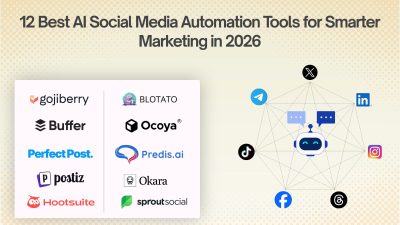
12 Best AI Social Media Automation Tools for Smarter Marketing in 2026
Social media automation used to mean one thing: write a post, choose a date, and schedule it. That is changing quickly. AI-powered social media tools can now help research topics, understand a brand's voice, generate platform-specific content, create visuals, schedule posts, analyze performance, identify trends, and, in some cases, let an AI agent handle several steps of the workflow from a single instruction. For SaaS founders, indie hackers, developers, creators, marketers, and business owners, this can remove a surprisingly large amount of repetitive work. Instead of spending hours every week moving content between LinkedIn, X, Instagram, Facebook, TikTok, and other platforms, a founder can build a repeatable system where AI handles the preparation while the human remains in control of the final message. But not every "AI social media tool" is actually agent-driven. Some are primarily schedulers with an AI writing assistant. Others are focused specifically on LinkedIn. Some are built around autonomous agents that can research, create, schedule, publish, and analyze content. This list focuses on the tools that provide the most useful combination of AI content creation, automation, scheduling, analytics, brand intelligence, and agent-style workflows. > QUICK SUMMARY > > * Gojiberry: Better viewed as an AI sales and social outreach agent than a social media publishing tool. It finds warm leads from intent signals and runs personalized outreach across email and social channels. > > * Velocity: An AI social media manager built around specialized autonomous agents for researching, writing, creating, scheduling, publishing, and analyzing content across major social networks. > > * Predis.ai: An AI-first social content platform that generates posts, creatives, and videos, builds content calendars, and supports bulk scheduling and auto-publishing. > > * Blotato: A LinkedIn-focused content workflow with writing, formatting, preview, scheduling, analytics, and creator tools, making it particularly useful for founder-led LinkedIn content. > > * AuthoredUp: Combines AI content creation, scheduling, automation, analytics, and multi-profile management for founders, freelancers, brands, and agencies. > > Buffer, Ocoya, PerfectPost, Sprout Social, and Hootsuite are the other notable AI-powered social media automation tools worth considering. AI SOCIAL MEDIA AUTOMATION TOOLS COMPARISON | Tool | AI & automation features | Starting price | Best for | Free option | | | | : | | | | Gojiberry | AI sales agent, intent signals, warm-lead discovery, personalized social/email outreach | $99/month | Founders focused on social selling | Free trial | | Velocity | Autonomous AI agents, brand agent, research agent, content creation, scheduling, publishing, analytics, brand health | $29/month | Founders, small businesses, agencies, multi-brand teams | Free agent access + 7-day full trial | | Postiz | AI agents, AI content, AI images/videos, 30+ networks, scheduling, publishing, API, MCP, CLI, n8n/Make automation, analytics | $29/month | Developers, SaaS founders, automation teams, agencies | 7-day trial | | Blotato | AI content creation, publishing, scheduling, 9+ networks, API, MCP, analytics, AI-agent integrations | $29/month | AI-native founders, creators, developers, agencies | 7-day trial | | Ocoya | AI writing, AI captions, AI art, scheduling, automation, analytics, best-time recommendations | $15/month | Solo founders, freelancers, brands, agencies | 7-day trial | | Predis.ai | AI posts, videos, creatives, content calendar, competitor analysis, scheduling, auto-publishing | Free plan available | Small businesses, marketers, creators, SaaS teams | Yes | | Buffer | AI Assistant, post ideas, rewriting, platform-specific copy, scheduling, analytics, publishing | Free plan; paid from $5/channel/month annually | Solo founders, startups, small teams | Yes | | AuthoredUp | LinkedIn AI writing, formatting, preview, scheduling, analytics, content workflow | $19.95/month | Founders and LinkedIn creators | 14-day trial | | PerfectPost | AI hooks, polishing, LinkedIn scheduling, analytics, Claude MCP integration | Free plan available | LinkedIn creators and founders | Yes | | Sprout Social | AI Assist, social intelligence, listening, analytics, publishing, engagement, AI insights | $79/month | Medium/large businesses and social teams | 30-day trial | | Hootsuite | Wisdom AI, AI writing, scheduling, analytics, listening, inbox automation, best-time publishing | $99/user/month | Marketing teams and growing businesses | 14-day trial | | Okara | AI CMO, LinkedIn/X agents, Reddit agent, influencer agent, UGC agent, SEO/GEO agents, content automation | From $99/month | SaaS founders, startups, small businesses, growth teams | Yes | 1. GOJIBERRY Gojiberry is slightly different from the other products in this article, but it is worth understanding because it sits at the intersection of AI agents, social channels, and sales automation. Its primary job is not to create a social media calendar. Gojiberry is an AI sales representative designed to identify warm leads using buying and social signals, qualify them against an ideal customer profile, and run personalized outreach across email and social channels. For a SaaS founder, this can be useful when the goal of social activity is not simply impressions or followers but finding potential customers and starting sales conversations. The platform can identify intent signals, build prospect lists, perform research, personalize messages, and run campaigns. That makes it more appropriate for founder-led sales and social selling than traditional social media publishing. It should therefore not be compared directly with Buffer or Predis for content scheduling. Its value lies in using AI to automate parts of the prospecting and outreach process. Best for: SaaS founders, B2B businesses, sales-led startups, and operators who want AI-assisted prospecting and social outreach. PRICING Gojiberry's Pro plan is listed at $99/month and includes email and social capabilities for founders and operators running outbound campaigns. 2. VELOCITY Velocity stands out because it is built around autonomous AI agents rather than treating AI as just a writing button. Its system includes specialized agents for research, brand understanding, publishing, content creation, and analysis. A founder can give the system a social media task and let the agents coordinate the work across channels such as Instagram, Facebook, YouTube, TikTok, LinkedIn, and X. The Brand Agent can apply a company's brand identity to captions, hooks, and visuals, while the Research Agent can investigate topics and the Publishing Agent can handle scheduling and publishing. Velocity also provides analytics and brand-health monitoring to help teams understand what is working. For a SaaS founder, this can be useful when social media has become another job on top of building the product. Instead of separately brainstorming LinkedIn posts, preparing images, scheduling content, and checking analytics, the founder can use one AI-driven workflow. Best for: Founders, small businesses, agencies, and teams managing several brands or social accounts. PRICING Velocity's Pro plan starts at $29/month and includes the AI Social Media Assistant, autonomous AI agents, 15 connected social channels, three brand identities, content creation, basic analytics, and brand health. Pro Max starts at $149/month, while Pro Max + Business starts at $399/month. A 7-day full-feature trial is available. Here are the two sections in the same detailed, ProductWatch-style format: 3. POSTIZ Postiz takes a more automation-focused approach to social media management, combining AI content creation with scheduling, publishing, analytics, and developer-friendly automation capabilities. Unlike a basic social media scheduler, Postiz is designed to work with AI agents and automation workflows. It supports publishing across more than 30 social networks and can help create posts, images, and short videos before scheduling them for publication. One of the most interesting aspects for SaaS founders and developers is its developer ecosystem. Postiz provides an API, MCP server, CLI and SDK, along with integrations for automation platforms such as n8n and Make. This makes it possible to connect social publishing with custom AI workflows instead of manually moving content between different tools. For example, a developer could build a workflow where a newly published blog post is detected, an AI agent creates platform-specific versions for LinkedIn, X, Reddit, or other supported networks, and Postiz handles the scheduling and publishing. This makes it particularly useful for teams trying to build a repeatable content distribution system. Postiz is also available as an open-source project, which can be attractive to technical teams that want more control over their social media infrastructure and automation workflows. Best for: Developers, SaaS founders, AI-native businesses, agencies, and teams that want to connect AI agents with multi-platform social media publishing. PRICING Postiz's paid plans start at $29/month, with higher tiers available for teams requiring additional accounts, features, and capacity. A free trial is also available. 3. AUTHOREDUP AuthoredUp is a specialized option for people who primarily want to build a personal brand on LinkedIn. Rather than trying to manage every social network, AuthoredUp focuses heavily on LinkedIn content creation, formatting, scheduling, previews, analytics, and publishing workflows. Its editor provides text styling, formatting, bullet points, and post previews. That focus can be useful for SaaS founders because LinkedIn often becomes an important distribution channel for founder-led content. Product lessons, technical insights, launch stories, customer lessons, hiring updates, and build-in-public posts can all be managed through a LinkedIn-specific workflow. AuthoredUp also supports business plans for multiple personal LinkedIn profiles, making it more useful for teams, ghostwriters, and organizations managing several founder or employee profiles. Best for: SaaS founders, executives, LinkedIn creators, ghostwriters, and businesses focused heavily on personal-brand content. PRICING The Individual plan starts at $19.95/month, or $16.63/month when billed annually. Business pricing starts at $12.46 per profile/month when billed annually and requires multiple profiles. A 14-day free trial is available. 5. BLOTATO Blotato is particularly interesting for developers and AI-native teams because it is not only a social media application. It also provides a social media API and MCP layer. The platform lets users create, schedule, and publish content across nine or more social networks, while also supporting comment replies, direct-message management, and analytics. More importantly for developers, Blotato can connect with AI systems such as ChatGPT and Claude through its API and MCP capabilities. This opens up more advanced workflows. A founder could build an automation where a blog post becomes multiple social posts, an AI agent prepares the variations, and Blotato handles the publishing layer. That makes Blotato especially useful for people who want to go beyond "schedule my posts" and build AI-powered content pipelines. It can also reduce repetitive copy-pasting between different social platforms. Best for: Developers, AI-native founders, solo creators, SaaS businesses, and agencies that want social publishing connected to AI agents or automation workflows. PRICING Blotato's Starter plan starts at $29/month, with Creator at $97/month and Agency at $499/month. The platform offers a 7-day free trial, and its pricing is flat rather than charging per post or per seat. 6. OCOYA Ocoya combines content creation, scheduling, publishing, automation, and analytics in one platform. Its AI capabilities include AI copywriting, captions, visual creation, and tools for producing social content. It also provides multi-profile management, content planning, analytics, and automation features, making it suitable for someone who does not want to maintain separate tools for every stage of social media production. For a solo founder, one useful aspect is consolidation. Instead of using one tool for writing, another for designs, another for scheduling, and another for performance tracking, Ocoya brings several of these tasks together. It is also relevant for agencies because its higher tiers support multiple workspaces, social profiles, team members, and AI credits. That gives agencies a way to manage multiple client accounts without building a completely separate workflow for each brand. Best for: Solo founders, freelancers, agencies, SaaS businesses, and brands that want AI content creation and social scheduling in one workspace. PRICING Ocoya's Bronze plan starts at $15/month. Silver starts at $39/month, Gold at $79/month, and Diamond at $159/month. The platform also offers a 7-day free trial. 7. PREDIS.AI Predis.ai takes an AI-first approach to social content creation. Instead of starting with a blank social media composer, users can provide an idea, product information, or other input and use AI to generate social posts, creatives, videos, captions, and other marketing assets. The platform also includes content planning, scheduling, and competitor-analysis capabilities. Its auto-posting workflow can generate and schedule a month's worth of content and publish across platforms including Instagram, Facebook, LinkedIn, Pinterest, and TikTok. This makes it useful for founders who know they need consistent social content but do not have a designer and dedicated social media manager. A SaaS company can use it to turn product features, blog topics, announcements, and marketing ideas into a larger content calendar. The platform also supports multiple languages, which can be useful for companies targeting audiences outside English-speaking markets. Best for: Small businesses, SaaS marketers, creators, founders, and teams that want AI-generated social posts and visual content with scheduling. PRICING Predis.ai offers a free plan, with paid plans available for users who need additional AI generation, scheduling, and account capacity. 8. BUFFER Buffer is one of the simpler choices on this list, which is exactly why it can work well for founders. Its AI Assistant helps brainstorm content ideas, rewrite existing posts, shorten or expand copy, and adapt content for different tones and platforms. This means a founder can start with one idea and quickly turn it into variations suitable for different audiences. Buffer also provides scheduling and publishing across major networks, including Facebook, Instagram, TikTok, LinkedIn, Threads, X, Pinterest, YouTube Shorts, Mastodon, and others. For an indie hacker, the biggest advantage is simplicity. A founder who does not need enterprise social listening or complex approval systems can use Buffer to create a queue, prepare content, and maintain a consistent publishing schedule. It also works well when social media is only one part of the growth strategy. Instead of spending hours managing the social calendar, a small team can prepare content in batches and use AI assistance when ideas or copy need improvement. Best for: Indie hackers, solo founders, startups, creators, and small businesses that want simple AI-assisted social scheduling. PRICING Buffer has a free plan, while paid plans start at $5/month per channel when billed annually. Its paid Essentials plan currently includes AI Assistant, unlimited scheduled posts, analytics, API access, and other features. 9. PERFECTPOST PerfectPost is another LinkedIn-focused platform, but it puts particular emphasis on post quality, hooks, scheduling, and analytics. The platform provides AI-powered hooks and polishing tools to help turn rough ideas into more structured LinkedIn posts. It also provides scheduling and analytics, allowing creators to move from writing to publishing without switching tools. One feature that makes PerfectPost particularly interesting for developers is its MCP integration with Claude. The company provides a way to connect PerfectPost with Claude so users can analyze LinkedIn posts, create content, and automate parts of the growth workflow through an AI interface. For a technical founder, that creates an interesting workflow. Instead of opening a social media dashboard every time a post needs to be created, an AI workflow can help analyze previous content, generate new ideas, and move content into the publishing system. Best for: LinkedIn-focused founders, creators, consultants, developers, and professionals who want AI-assisted content creation with scheduling and analytics. PRICING PerfectPost offers a free plan, with paid plans available for users who need additional capabilities. The platform states that users can start without a credit card. 10. SPROUT SOCIAL Sprout Social is positioned much more toward businesses and professional social teams than individual creators. Its AI capabilities go beyond writing captions. Sprout's AI offering is designed to turn social data into business intelligence, with tools for social listening, analytics, trend discovery, customer insights, and AI-assisted workflows. For a growing SaaS company, this distinction matters. At a certain point, social media stops being only a publishing problem. A company may need to understand what customers are saying, monitor competitors, identify emerging conversations, measure brand awareness, and connect social activity with business outcomes. Sprout also provides publishing, engagement, reporting, and collaboration capabilities, making it suitable for teams where multiple people work on social content and customer conversations. Best for: Medium and large businesses, SaaS companies with dedicated marketing teams, agencies, and organizations that need social intelligence alongside publishing. PRICING Sprout Social pricing starts at $79/month, with higher plans adding more advanced capabilities. 11. HOOTSUITE Hootsuite is one of the most established all-in-one social media management platforms in this category. Its current AI layer, Wisdom, acts as an AI teammate across the platform. Hootsuite describes it as an AI system that can draft, recommend, and analyze content while connecting AI assistance with the broader social workflow. Its AI content capabilities include generating captions and post ideas, creating content based on links, identifying and repurposing successful posts, and suggesting content around relevant topics. Hootsuite also offers best-time-to-publish recommendations based on account data. Beyond AI writing, Hootsuite provides scheduling, publishing, analytics, social listening, inbox management, and automation. This makes it particularly useful when social media is being handled by a team rather than a single founder. For a growing SaaS company, Hootsuite can therefore function as more than a content scheduler. It can become the central workspace for publishing, engagement, reporting, and social intelligence. Best for: Marketing teams, established SaaS companies, agencies, and businesses managing multiple social channels and team members. PRICING Hootsuite's Standard plan starts at $99/user/month, with Professional at $199/user/month and Advanced at $399/user/month. A 14-day free trial is available. 12. OKARA Okara approaches social media automation from a broader AI CMO perspective. Instead of focusing only on scheduling and publishing posts, it uses specialized AI agents to automate several parts of a company's marketing workflow. Its AI agents cover areas such as LinkedIn, X, Reddit, influencer marketing, UGC, SEO, GEO, content creation, and technical SEO. This makes Okara particularly interesting for SaaS companies where social media is only one part of the overall growth strategy. For a SaaS founder, the advantage is that content distribution can be connected with other marketing activities. For example, an AI workflow could help identify a topic, create content around it, prepare social posts, distribute the content through relevant channels, and work on improving visibility in search and AI-powered search engines. The Reddit and social-focused capabilities are particularly relevant for founders targeting communities where potential customers already discuss their problems. Rather than treating every platform as another place to publish the same announcement, an agent-based approach can help adapt the content and workflow to the specific channel. Okara is therefore better suited to businesses looking for an AI marketing system rather than a traditional social media scheduler. Founders who want one platform covering social content, community distribution, influencer outreach, UGC, SEO, and GEO may find it more useful than a tool focused exclusively on scheduling. Best for: SaaS founders, startups, small businesses, growth teams, and marketers looking to automate social media alongside broader AI-driven marketing activities. PRICING Okara offers a free starting option, while its paid AI CMO plans start at $99/month. WHICH AI SOCIAL MEDIA AUTOMATION TOOL IS BEST FOR YOU? Choosing an AI social media automation tool becomes easier when the decision starts with the workflow rather than the feature list. FOR SOLO FOUNDERS AND INDIE HACKERS Buffer, Ocoya, Predis.ai, and Velocity are strong starting points. Buffer is useful when simplicity matters most. Ocoya is useful when content creation and scheduling need to live together. Predis.ai is particularly useful when generating visual content is part of the problem. Velocity is the more agent-oriented option when the goal is to delegate larger parts of the workflow. FOR SAAS FOUNDERS Velocity, Blotato, Ocoya, and Buffer cover different stages of the SaaS growth journey. A founder who wants to connect AI agents to social publishing should look closely at Blotato. Someone who wants an autonomous social assistant can evaluate Velocity. A small SaaS marketing team that needs a simpler content workflow may prefer Buffer or Ocoya. FOR LINKEDIN-FOCUSED FOUNDERS AuthoredUp and PerfectPost deserve the closest look. Both focus specifically on LinkedIn rather than trying to become an everything-for-everyone social platform. This can be an advantage when LinkedIn is the primary channel for founder-led marketing, personal branding, hiring, networking, and B2B lead generation. FOR LARGER MARKETING TEAMS Sprout Social and Hootsuite are better suited to organizations that need more than AI-generated posts. Social listening, reporting, collaboration, customer engagement, analytics, permissions, and broader social intelligence become increasingly important as a company grows. FOR AI-NATIVE DEVELOPERS Blotato is particularly interesting because of its API and MCP capabilities. Instead of using AI only inside a traditional dashboard, developers can connect social publishing with broader AI workflows and automation systems. ([Blotato][3]) FOR SOCIAL SELLING Gojiberry belongs in a different category. If the objective is finding prospects and starting conversations rather than maintaining a content calendar, its AI sales-agent workflow is more relevant than a traditional social scheduler. WHAT SHOULD AN AI SOCIAL MEDIA AUTOMATION TOOL ACTUALLY AUTOMATE? The biggest mistake is assuming that automation means publishing more posts. The better question is: Which repetitive parts of social media can AI safely handle? A useful AI social media workflow can start with research. The system identifies relevant topics, customer questions, competitor activity, or industry trends. Next comes content creation. AI can turn those inputs into hooks, captions, threads, carousels, videos, or platform-specific variations. Then comes optimization. The system can adapt the same idea to the format and audience of each platform instead of copying one post everywhere. After that comes scheduling and publishing. Finally, analytics can close the loop by identifying which topics, formats, hooks, and channels performed best. The most advanced platforms are moving toward this research → create → optimize → schedule → publish → analyze → improve cycle. Velocity, Blotato, Sprout Social, and Hootsuite are particularly interesting when evaluating this broader automation model. CONCLUSION AI social media automation is moving beyond the old idea of a scheduling tool. For a founder, the real opportunity is not simply scheduling 30 posts at once. It is building a system where AI handles repetitive social media work while the founder focuses on product, customers, strategy, and relationships. For lightweight publishing, Buffer remains a practical choice. For AI-generated creative content, Predis.ai is worth considering. Ocoya provides a broader combination of AI content creation and social management. AuthoredUp and PerfectPost make sense for LinkedIn-first personal brands. Velocity takes the agent approach further by giving specialized AI agents responsibility for research, brand understanding, content, publishing, and analysis. Blotato is particularly compelling for developers because its API and MCP capabilities can connect social publishing to AI workflows. Larger organizations may find the deeper social intelligence and team capabilities of Sprout Social or Hootsuite more appropriate. And then there is Gojiberry, which shows another direction for AI agents: using social data not only to publish content but to find and engage potential customers. The important takeaway is simple: The best AI social media automation tool is not the one that generates the most posts. It is the one that removes the most repetitive work while still helping the business publish useful content, understand its audience, and create measurable growth.
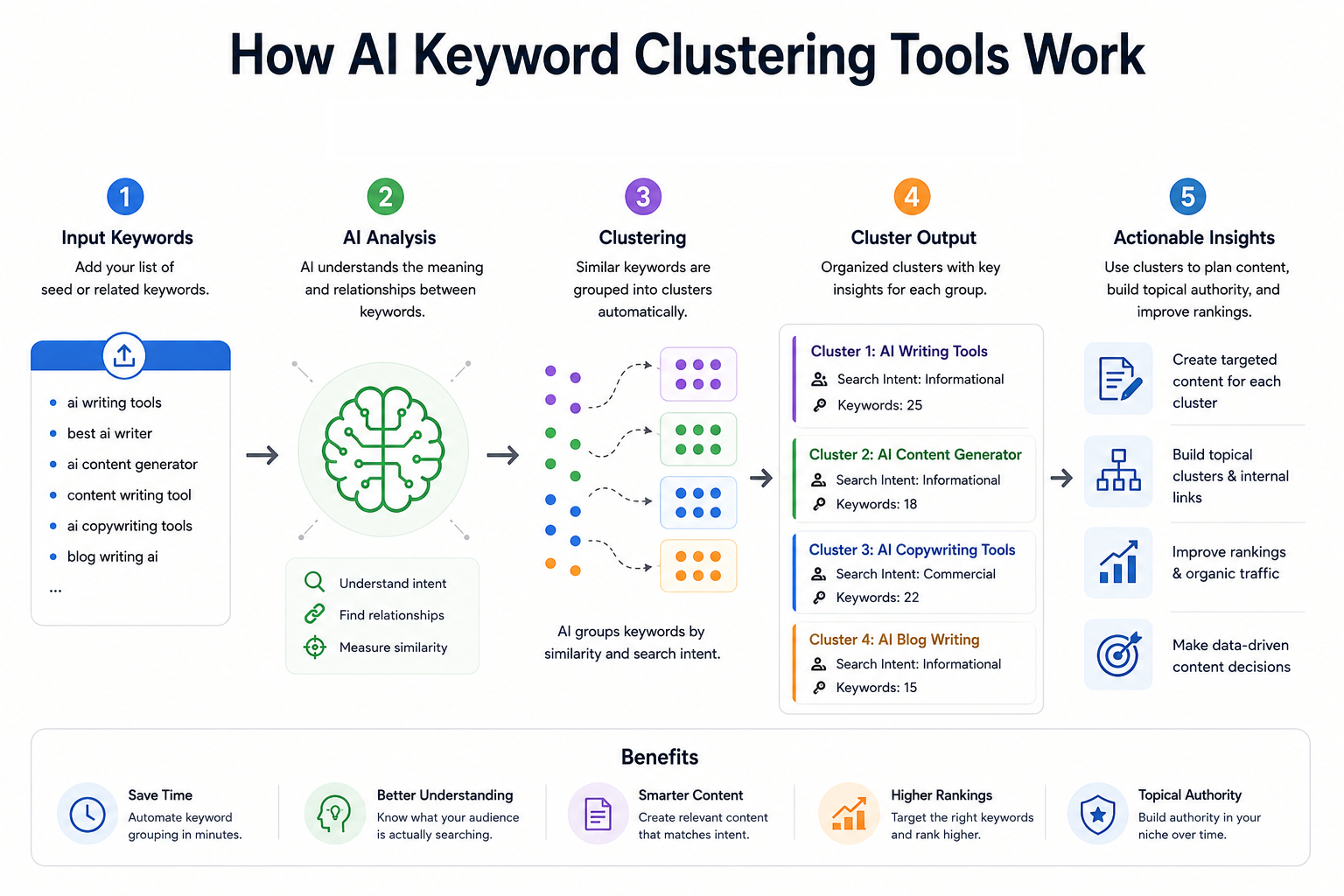
10 Best AI Keyword Clustering Tools in 2026 for Better SEO & Content Strategy
Keyword clustering has become an important part of modern SEO because one search query rarely represents the entire topic a user wants to understand. A SaaS founder researching “API monitoring,” for example, may also need content around API monitoring tools, API observability, API testing, uptime monitoring, alerts, dashboards, and related implementation questions. Treating every variation as a separate article can create overlapping pages, thin content, and keyword cannibalization. AI-assisted keyword clustering tools solve this by grouping related queries into logical topics based on factors such as search intent, semantic similarity, shared SERPs, ranking URLs, and topic relationships. The result is a clearer content architecture that can help developers, solo-founders, SaaS teams, and content teams decide which keywords belong on the same page and which deserve separate pages. The tools in this list take different approaches. Some, such as Keyword Insights and Keyword Cupid, are dedicated clustering platforms. Others, including Ahrefs and Semrush, combine clustering with large-scale keyword research and competitive SEO data. Surfer and Frase connect clustering with content optimization, while MarketMuse takes a broader topic-authority approach. KeyClusters focuses on pay-as-you-go SERP clustering, and Answer Socrates is particularly useful for question-led keyword discovery and clustering. One important distinction is that not every platform here is an AI-first keyword clustering product. Some use proprietary algorithms, SERP analysis, machine learning, or semantic models rather than generative AI. For SEO, that distinction matters less than the quality of the resulting clusters and whether those clusters reflect actual search behavior. > QUICK SUMMARY > > * Keyword Insights: A dedicated SERP-based clustering platform that analyzes live, country-specific search results and supports clustering up to 200,000 keywords at once. > * Keyword Cupid: A SERP-based clustering platform with neural-network clustering, SERP analysis, silo structuring, mind maps, and large keyword-report limits depending on the plan. > * Semrush: A broad SEO platform whose Keyword Strategy Builder organizes keywords into topics, pillar pages, and subpages, with clustering actions available across paid SEO Toolkit plans. > * Ahrefs: A full SEO suite with Keywords Explorer clustering by Parent Topic and related terms, backed by a large keyword database and extensive competitive SEO data. > * Surfer: A content-focused SEO platform whose Keyword Research feature groups keywords by intent and competitor SERP data and connects clusters directly to content optimization workflows. > > KeyClusters, Answer Socrates, LowFruits, MarketMuse, and Frase: These cover pay-as-you-go SERP clustering, question-led keyword discovery, SERP and semantic clustering, topic-authority analysis, and visual topic-cluster planning respectively. COMPARATIVE TABLE: BEST AI KEYWORD CLUSTERING TOOLS | Tool | Key clustering features | Starting price | Best for | Free or paid | | | | : | | | | Keyword Insights | Live SERP clustering, adjustable SERP overlap, search intent, ranking URLs, opportunity volume, up to 200K keywords | $58/month | Dedicated large-scale keyword clustering | Paid, $1 trial | | Keyword Cupid | SERP-based clustering, neural-network clustering, SERP Spy, silo structuring, mind maps, geo/device targeting | $9.99/month | SEO professionals and agencies needing detailed clustering | Paid, 7-day trial | | Semrush | Keyword Strategy Builder, topic clusters, pillar pages, subpages, keyword metrics, content workflow | $139.95/month | All-in-one SEO and content strategy | Paid, 7-day trial | | Ahrefs | Parent Topic clustering, related-term clustering, SERP similarity, keyword metrics, Traffic Potential | £99/month | Developers and teams needing clustering plus competitive SEO | Paid | | Surfer | SERP-driven keyword clusters, intent, sub-keywords, content-score benchmarks, Topical Maps | $99/month or $79/month annually | Content-focused SaaS teams and writers | Paid | | KeyClusters | Real-time Google SERPs, 3+ shared URLs, CSV export, Ahrefs/Semrush imports, geo/device targeting | $19 one-time credit pack | Pay-as-you-go clustering | Paid credits | | Answer Socrates | Keyword research, question discovery, clustering, PAA, recursive searches, trending topics | Free; paid from $15/month | Question-led content and solo founders | Free + paid | | LowFruits | SERP clustering, semantic clustering, intent grouping, low-competition analysis, SERP scores | $29.90/month | Niche sites and low-competition SEO | Paid + PAYG | | MarketMuse | Cluster Analysis, topic modeling, personalized difficulty, Topic Authority, content gaps, content planning | Free tier; paid plans via demo | Topic authority and content planning | Free + paid | | Frase | Visual topic clusters, pillar/supporting pages, missing subtopics, briefs, SEO/GEO optimization | $49/month or $39/month annually | Content teams building topical authority | Paid, 7-day trial | 1. KEYWORD INSIGHTS Keyword Insights is one of the most specialized options in this list. Its primary focus is keyword clustering rather than treating clustering as a small feature inside a much larger SEO suite. The platform uses live, country-specific SERP data and groups keywords when their ranking URLs overlap. The default SERP overlap threshold is 40%, and users can adjust the clustering settings depending on how strict the grouping needs to be. The scale is particularly relevant for large SaaS websites, programmatic SEO projects, agencies, and developers managing thousands of product-related queries. The platform currently supports clustering up to 200,000 keywords in one operation. Reports can include ranking URLs, average rankings, search intent, potential traffic opportunities, difficulty, and SERP features. Another useful feature is intent analysis. The system classifies keywords into informational, commercial, transactional, and other intent categories and can identify the dominant intent of a cluster. This makes the output more actionable than a simple spreadsheet containing groups of similar phrases. A developer launching documentation, comparison pages, or SaaS landing pages can use the intent information to decide whether a cluster should become a guide, feature page, comparison page, or commercial landing page. Price: The current pricing page lists Basic at $58/month with 10,000 credits and Professional at $99/month with 20,000 credits. Clustering costs one credit per keyword, while a $1 seven-day trial provides 5,000 credits and allows up to 500 keywords to be clustered. Enterprise pricing is custom. Best for: For teams that want a clustering-first workflow rather than a general SEO suite, this is one of the strongest options. The ability to control SERP overlap and work with large keyword sets makes it particularly useful for SaaS companies with extensive feature, integration, documentation, or comparison-page inventories. 2. KEYWORD CUPID Keyword Cupid approaches clustering through search-result relationships and is specifically designed for keyword grouping. Its system analyzes live Google SERPs and examines ranking URLs that appear across multiple keywords. Keywords with meaningful SERP overlap are grouped according to search intent, creating clusters that can then be used for content and site architecture. The platform goes beyond simply producing a CSV of grouped keywords. Its feature set includes SERP Spy, URL Analyzer, content briefs, neural-network clustering, interactive mind maps, downloadable Excel reports, SERP geotargeting, and device or search-engine targeting. It also supports silo structuring, which can be useful when the goal is to turn keyword research into an actual website architecture. For developers and solo-founders, the "Bring Your Own Data" approach is useful because keyword research can be collected elsewhere and then sent into the clustering workflow. This makes it possible to export keyword data from another SEO platform, upload it, and use the clustering engine to decide which terms should share a page. Price: The Starter plan costs $9.99/month and includes 500 keyword credits per month with reports supporting up to 2,000 keywords. Freelancer costs $49.99/month with 5,000 credits and up to 20,000 keywords per report. Agency costs $149.99/month with 20,000 credits and reports of up to 40,000 keywords, while Enterprise costs $499.99/month with 80,000 credits and reports of up to 80,000 keywords. A seven-day trial is available. Best for: The main advantage is depth. If the goal is simply to group 500 keywords, there are cheaper and simpler approaches. If the goal is to understand how keywords relate to SERPs, pages, silos, and search intent, Keyword Cupid provides a more specialized workflow. 3. SEMRUSH Semrush is better understood as an all-in-one SEO platform that happens to have a substantial keyword clustering workflow. Its Keyword Strategy Builder can analyze and organize up to 10,000 keywords into topics, pillar pages, and subpages. Users can start from seed keywords, import research from other Semrush tools, or upload their own keyword lists. The structured workflow is useful for building a content architecture rather than merely obtaining keyword groups. The system considers relevance, search volume, keyword difficulty, domain diversity, and SERP features when prioritizing pages. Users can then send keywords to content workflows or Position Tracking, making the transition from research to execution relatively direct. For a developer-led SaaS business, this wider ecosystem can be valuable. A founder may begin with competitor keywords, move those terms into Keyword Strategy Builder, organize them into pillar and supporting pages, and then use the rest of the platform for site audits, ranking tracking, competitor research, and content production. Price: The current SEO Toolkit pricing lists Pro at $139.95/month, Guru at $249.95/month, and Business at $499.95/month. Keyword Strategy Builder clustering actions are limited by plan, with 10 monthly actions on Pro, 30 on Guru, and 50 on Business. Semrush also advertises a seven-day free trial. Best for: Semrush makes the most sense when keyword clustering is only one part of a larger SEO operation. It is more expensive than specialist clustering tools, but the additional competitor, technical SEO, content, and rank-tracking capabilities can justify that cost for growing SaaS companies and agencies. 4. AHREFS Ahrefs takes a slightly different approach to keyword clustering. Keywords Explorer can instantly group keywords by Parent Topic or related terms, allowing users to identify which searches can potentially be targeted by the same page. The platform combines this with keyword difficulty, search volume, Traffic Potential, SERP analysis, and a very large keyword database. Its Parent Topic concept is especially useful for understanding whether a specific keyword belongs under a broader search topic. Ahrefs explains that the Parent Topic is determined from the keyword responsible for sending the most traffic to the top-ranking page. This makes the clustering approach closely connected to actual ranking behavior rather than simply matching words. The tool also provides a SERP similarity comparison for checking whether two individual keywords should be targeted by the same page. This is useful when a developer is deciding between two potentially overlapping articles, such as "API monitoring tools" and "API observability tools." If the SERPs are highly similar, combining them may make more sense than publishing two competing pages. Price: The current Ahrefs pricing page lists the Lite plan at £99/month, Standard at £199/month, and Advanced at £359/month. Annual billing can save up to 17%. Best for: Ahrefs is particularly suitable when clustering needs to sit alongside backlink analysis, competitor research, keyword research, SERP analysis, and traffic estimation. It is not the cheapest choice for clustering alone, but it becomes considerably more compelling when SEO research is part of a broader growth workflow. 5. SURFER Surfer connects keyword clustering directly with content planning and optimization. Its Keyword Research feature analyzes top-performing Google results for a target keyword and identifies how terms are grouped by intent. Each cluster can contain a main topic keyword, search intent, suggested sub-keywords, and a benchmark based on the content scores of ranking pages. The workflow is particularly useful for content teams that do not want to stop at keyword grouping. Once a cluster has been identified, it can be sent into Content Editor to create a content brief. This makes it possible to move from keyword discovery to article planning without manually copying every related keyword into another document. For SaaS teams, this can help when building topical coverage around developer-oriented subjects. A cluster around "webhook testing," for example, could reveal related searches around webhook debugging, webhook testing tools, local webhook testing, webhook security, and webhook automation. Those terms can then inform a pillar page and supporting articles instead of becoming a collection of disconnected posts. Price: Surfer's current Essential plan is $99/month, or $79/month when billed annually. It includes Keyword Research, Topical Maps, 30 Content Editor articles per month, and five AI articles per month. Scale costs $219/month or $175/month annually and raises the limits substantially. Enterprise pricing is custom. Best for: Surfer is a good choice when the real objective is not just clustering keywords but turning those clusters into optimized content. Its strongest use case is therefore content-led SEO teams, SaaS marketers, founders publishing regularly, and developers who also handle their own technical content. 6. KEYCLUSTERS KeyClusters is built around a straightforward concept: upload a keyword list, let the system analyze Google SERPs, and receive the keywords grouped according to shared ranking pages. It checks the top 10 results for each keyword and groups keywords when three or more ranking pages are shared. The pay-as-you-go model makes it different from most large SEO suites. There is no recurring subscription. Users purchase credits, and one credit represents one keyword. Credit packs include 2,500 keywords for $19, 20,000 for $110, and 100,000 for $350. Credits do not expire. The workflow also supports keyword files from Ahrefs and Semrush, along with custom files. Results can be exported to Excel, and the platform supports real-time SERP data, geographic targeting, desktop and mobile clustering, and large-scale keyword processing. That makes it practical for someone who already has keyword research and only needs a dedicated clustering layer. Price: The entry point is $19 for 2,500 keyword credits, with larger packs reducing the cost per keyword. There is no monthly subscription, no recurring charge, and no credit expiration. Best for: For solo-founders, developers, and agencies that only need clustering occasionally, this pricing model can be attractive. Instead of paying for a full SEO suite every month, a team can buy credits when a new content project begins and process the keyword set in one batch. 7. ANSWER SOCRATES Answer Socrates began with question-focused keyword research, but its current feature set also includes keyword clustering and grouping. The platform can generate search ideas from a seed topic, surface People Also Ask questions, identify long-tail searches, and organize related keywords into topic clusters. The question-first approach is particularly useful for developers building documentation, tutorials, help centers, and educational SaaS content. Instead of beginning with a large commercial keyword such as "API gateway," a developer can discover questions around how API gateways work, why they are used, API gateway security, API gateway vs reverse proxy, and implementation-related queries. The platform also includes recursive search, which can uncover additional searches connected to the initial research path. It supports country and language selection, CSV downloads, trending-topic research, and an LLM Brand Tracker. This combination makes it useful for content planning that needs to account for both traditional search and emerging AI-search visibility. Price: There is a free version for basic research. Paid plans currently start with Socrates Lite at $15/month, followed by Seneca at $29/month, Aurelius at $49/month, and Senate at $299/month. Paid plans add SEO metrics, larger keyword allowances, recursive searches, clustering credits, CSV downloads, and LLM tracking depending on the tier. Best for: This is one of the better choices for solo-founders and developers who want to understand what people actually ask rather than only looking at traditional head keywords. It is especially useful for FAQs, documentation, tutorials, comparison content, and question-driven content hubs. 8. LOWFRUITS LowFruits combines keyword discovery, SERP analysis, low-competition research, and keyword clustering. Its clustering workflow has two primary methods: SERP clustering and semantic clustering. SERP clustering groups keywords according to shared ranking URLs, while semantic clustering groups terms according to shared word patterns. The SERP method is particularly interesting because the default grouping threshold is based on a 40% URL overlap. Users can adjust the similarity threshold, allowing the clusters to become broader or narrower depending on the project. The platform also identifies the keyword with the highest estimated search volume as the main keyword for a cluster. LowFruits is also designed around finding weaker SERPs and lower-competition opportunities. That makes the clustering output more useful for smaller sites that cannot realistically compete with high-authority domains for every broad keyword. The platform can export keyword lists containing cluster information, which is useful when building content plans in spreadsheets or project-management tools. Price : The Standard plan costs $29.90/month, or $20.75/month when billed yearly, and includes 3,000 credits per month. Premium costs $79.90/month, or $62.45/month annually, with 10,000 credits. Pay-as-you-go credits start at $25 for 2,000 credits, and purchased PAYG credits remain valid for one year. Best for: LowFruits is a strong option for niche-site builders, smaller SaaS projects, affiliate sites, and founders who want keyword clusters combined with practical competition analysis. It is less focused on enterprise content governance than MarketMuse or Semrush, but its low-competition orientation can make the resulting clusters easier to act on. 9. MARKETMUSE MarketMuse approaches keyword clustering as part of a broader topic-authority and content-planning system. Its Cluster Analysis workflow can group topics and keywords while also examining rankings, search volume, intent, URLs, Topic Authority, Personalized Difficulty, parent terms, and competitive information. The platform's Topic Model is another important part of the workflow. It analyzes related topics and provides information such as volume, CPC, and trend data. Those topics can then be added to an inventory and used to build content plans and briefs. This makes the system more focused on understanding an entire subject than simply grouping a spreadsheet of keywords. MarketMuse can also analyze a site or collection of pages to determine what content already exists within a topic cluster, what is missing, and what should be updated or created. Its personalized metrics are designed to account for the authority and coverage of a particular website rather than relying only on generic keyword difficulty. Price: MarketMuse has a Free plan with one user and 10 queries per month. Paid tiers include Optimize with 100 tracked topics, Research with 1,000 tracked topics, and Strategy with 10,000 tracked topics. The current public pricing page does not display dollar amounts for those paid tiers and instead directs users to book a demo. Best for MarketMuse is best suited to teams that care about topical authority, content gaps, existing-site analysis, and content prioritization rather than simply producing keyword groups. For a mature SaaS site with hundreds of articles, documentation pages, and product resources, that broader perspective can be more valuable than clustering alone. 10. FRASE Frase has evolved from a content research and optimization platform into a broader SEO and GEO content workflow. Its Topic Clusters feature maps pillar pages and supporting content, identifies missing subtopics, and turns those gaps into content briefs. The result is a visual representation of how content fits together around a central topic. The cluster map is particularly useful for content teams that need to understand their website architecture. Instead of receiving a list of keywords and deciding manually where everything belongs, the platform can suggest where a new piece of content fits within existing clusters. It also surfaces questions and sections found in ranking results that the current cluster does not adequately cover. The GEO component is increasingly relevant for 2026. Frase can score content for both SEO and GEO and provides AI visibility features involving systems such as ChatGPT and Google AI. It also supports planning, research, and writing in more than 70 languages, which makes it useful for teams building content for multiple markets. Price: The Starter plan costs $49/month month-to-month, or $39/month when billed yearly. Professional costs $129/month month-to-month, or $103/month annually. Scale costs $299/month month-to-month, or $239/month annually. A seven-day free trial is available without a credit card. Best for: Frase is a strong fit for content teams that want keyword and topic clustering connected directly to briefs, writing, optimization, publishing, and GEO analysis. For solo founders, Starter provides a relatively accessible entry point, while larger content operations can use the higher tiers for multiple sites and users. HOW TO CHOOSE THE RIGHT KEYWORD CLUSTERING TOOL The right choice depends less on the word "AI" and more on how the tool decides that two keywords belong together. A semantic model may group keywords because they look similar linguistically, while SERP-based systems look at whether Google ranks similar pages for those queries. For SEO content planning, SERP-based clustering can often provide a clearer indication of whether two searches can realistically be targeted by one page. For developers and SaaS founders, Keyword Insights, Keyword Cupid, KeyClusters, and LowFruits are worth considering when clustering itself is the primary requirement. They are particularly useful when there is already a keyword list from another source and the next question is, "Which of these keywords should share a page?" For teams that need a complete SEO workflow, Semrush and Ahrefs make more sense. Their clustering features sit alongside keyword research, competitor analysis, rank tracking, backlinks, SERP analysis, and other SEO capabilities. That broader functionality can justify the higher subscription cost when SEO is a major acquisition channel. For content-heavy teams, Surfer, MarketMuse, and Frase offer a different advantage. They connect clustering with content optimization, topic authority, briefs, content gaps, and publishing workflows. This is particularly useful for SaaS companies that need to transform keyword research into a repeatable editorial system. Answer Socrates is the standout option when questions and long-tail searches are central to the strategy. A developer writing technical tutorials, documentation, FAQ pages, or educational content can use question-led clusters to understand what users are trying to solve, not simply what short keyword they entered into Google. KEYWORD CLUSTERING BEST PRACTICES FOR DEVELOPERS AND SAAS FOUNDERS Keyword clustering should not mean putting every keyword containing the same words on one page. The most important question is whether the searches have sufficiently similar intent and SERPs. If "API monitoring" produces tool pages while "how does API monitoring work" produces educational guides, they may belong to different content types even though they contain the same core phrase. A practical workflow is to begin with a broad keyword list, remove irrelevant terms, cluster the remaining keywords, and then inspect the SERPs for the largest or most commercially important clusters. This additional manual review matters because automated clustering is an aid to decision-making, not a substitute for understanding the search landscape. For SaaS websites, clusters can also be mapped to different page types. Informational clusters can become guides and tutorials. Commercial investigation clusters can become comparison or alternatives pages. Transactional clusters can support product, feature, integration, or landing pages. Question clusters can feed documentation, FAQ, and educational resources. Internal linking should then connect related pages. A pillar page can cover the broad concept while supporting pages answer narrower questions. This creates a useful structure for visitors and gives search engines clearer signals about how individual pages relate to the broader subject. Keyword clustering is also useful for avoiding unnecessary content production. If five keywords consistently return the same type of pages in Google, publishing five separate articles may create competing pages instead of five independent ranking opportunities. Combining those queries into one comprehensive page can provide broader topical coverage while keeping the site architecture cleaner. CONCLUSION The best AI keyword clustering tool is not necessarily the one with the most AI features. The more important question is whether it produces clusters that reflect actual search intent, SERP relationships, and the way users expect information to be organized. For a developer or solo-founder starting a SaaS content strategy, a simple workflow can be enough: discover keywords, cluster them by search behavior, identify the primary intent, assign each cluster to a page type, and build internal links between related pages. As the website grows, more advanced platforms can add ranking data, competitive analysis, personalized difficulty, content briefs, topic authority, and GEO insights. Among the ten options, Keyword Insights is particularly compelling for dedicated large-scale clustering, Ahrefs and Semrush are strong for broader SEO research, Surfer and Frase are useful for content execution, MarketMuse stands out for topic authority, LowFruits, is well suited to lower-competition opportunities, KeyClusters works well for pay-as-you-go clustering, Keyword Cupid provides a specialized clustering environment, and Answer Socrates is particularly useful for question-driven content research. The most effective approach is to use keyword clusters as a planning layer rather than treating them as an SEO shortcut. When clusters are based on genuine search behavior and then translated into useful pages, clear site architecture, strong internal linking, and comprehensive answers, they can become the foundation of a scalable SEO and GEO strategy.
Top 10 AI UGC Video Generators for Viral Content Marketing in 2026
Video marketing has become one of the most effective ways to capture attention, build trust, and increase conversions. However, producing authentic user-generated content (UGC) has traditionally required finding creators, negotiating partnerships, filming multiple takes, and waiting days or even weeks for final edits. For startups, ecommerce brands, agencies, and growing businesses, that process is often too slow and expensive to scale. AI is changing how UGC videos are created. Modern AI video platforms can generate realistic creator-style videos, product testimonials, talking-head ads, multilingual spokesperson videos, and short-form social media content in just a few minutes. Instead of organising expensive video shoots, marketers can generate dozens of ad variations, test different hooks, localise campaigns for global audiences, and launch creatives much faster. Some platforms specialise in AI UGC advertisements for ecommerce, while others focus on realistic avatars, AI presenters, cinematic video generation, or complete marketing video production. Choosing the right tool depends on whether your goal is creating paid social ads, product demonstrations, brand awareness campaigns, or educational marketing videos. In this guide, we'll compare the best AI UGC video generators available in 2026. Whether you're running an ecommerce store, launching a SaaS product, managing paid advertising campaigns, or creating social media content, this comparison will help you choose the platform that best fits your marketing strategy. > QUICK SUMMARY > > * Arcads creates highly realistic AI UGC advertisements using virtual creators, making it one of the strongest platforms for scalable paid social campaigns. > * Creatify transforms product pages into multiple AI-generated UGC video ads within minutes, making it ideal for ecommerce brands. > * HeyGen combines realistic avatars, voice cloning, multilingual support, and AI video generation for global marketing campaigns. > * Synthesia enables businesses to create professional AI presenter videos with enterprise-grade collaboration, localization, and branding features. > * InVideo delivers fast AI-powered video creation using prompts, stock media, templates, and automated editing for social media marketing. > > Captions AI, OpenArt, AdStellar, D-ID, and Runway each bring unique strengths to AI video creation, from realistic avatar generation and AI ad production to cinematic video generation, image animation, and advanced creative editing. COMPARISON TABLE | Tool | Best For | Core Feature | Starting Price | Free Plan | Platform | | : | : | : | : | : | : | | Arcads | AI UGC advertisements | AI actors, creator-style ads & product videos | From $110/month | ✗ | Cloud SaaS | | Creatify | Ecommerce marketing | Product URL to AI video ads | From $39/month | ✓ | Cloud SaaS | | HeyGen | AI avatar marketing | Talking avatars, voice cloning & translation | From $24/month | ✓ | Cloud SaaS | | Synthesia | Enterprise video | AI presenters, localization & training videos | From $29/month | ✓ | Cloud SaaS | | InVideo AI | Social media marketing | Prompt-to-video generation & editing | From $25/month | ✓ | Cloud SaaS | | Captions | Creator videos | AI talking videos, captions & editing | From $9.99/month | ✓ | Mobile & Web | | OpenArt | AI visual storytelling | AI image & video generation | From $14/month | ✓ | Cloud SaaS | | AdStellar | Performance marketing | AI UGC ads & campaign automation | From $49/month | Trial | Cloud SaaS | | D-ID | AI spokesperson videos | Talking photos & AI presenters | From $16/month | Trial | Cloud SaaS | | Runway | Cinematic AI videos | Text-to-video & video generation | From $15/month | ✓ | Cloud SaaS | 1. ARCADS Creating authentic UGC advertisements has traditionally meant hiring creators, coordinating product shipments, managing revisions, and waiting days for finished videos. Arcads removes much of that process by enabling businesses to generate creator-style marketing videos using AI actors. Built specifically for performance marketing, the platform helps brands produce high-converting video ads for TikTok, Instagram Reels, Facebook, YouTube Shorts, and other short-form channels in a fraction of the usual production time. Instead of filming with real creators, marketers simply provide a script, product details, or marketing message, and Arcads generates realistic UGC videos featuring AI actors. Users can choose from a growing library of virtual creators with different appearances, voices, accents, and presentation styles, making it easier to produce videos that match specific audiences and campaign goals. This flexibility allows businesses to test multiple creative variations without repeatedly organising new video shoots. Arcads is particularly valuable for ecommerce brands running paid advertising campaigns. Teams can quickly create product demonstrations, customer testimonial-style videos, problem-and-solution advertisements, product launches, and promotional campaigns. Because multiple versions can be generated from a single concept, marketers can perform creative testing more efficiently and identify the messaging that delivers the strongest return on ad spend. The platform also supports multilingual video generation, allowing businesses to localise campaigns for international audiences without hiring additional creators. Combined with rapid production speed and scalable AI actors, this makes Arcads well suited for brands managing high-volume advertising across multiple markets. For businesses focused on paid social advertising, Arcads has become one of the leading AI UGC video platforms by combining realistic AI presenters with a workflow designed specifically for performance marketing rather than general video editing. PRICING | Plan | Pricing | | : | : | | Starter | From $110/month | | Pro | Custom pricing | BEST FOR Ecommerce brands, DTC companies, performance marketers, advertising agencies, and businesses producing large volumes of AI-generated UGC advertisements. 2. CREATIFY Launching successful ecommerce campaigns often requires producing dozens of video advertisements for different products, audiences, and platforms. Creatify simplifies this process by transforming product pages into ready-to-publish AI marketing videos. Instead of creating every advertisement manually, businesses can generate professional UGC-style product videos directly from a product URL in just a few minutes. One of Creatify's biggest advantages is its ability to automatically extract product information, images, descriptions, and selling points from ecommerce websites. The platform then combines this information with AI avatars, realistic voiceovers, product visuals, captions, and marketing scripts to generate multiple advertising videos. This significantly reduces production time while allowing brands to launch campaigns much faster. Creatify also provides a wide selection of AI presenters and voices, enabling businesses to create advertisements that appeal to different customer segments. Users can customise scripts, edit scenes, replace visuals, and generate several creative variations for A/B testing without restarting the entire production process. This flexibility is especially valuable for brands running campaigns across TikTok, Instagram, YouTube Shorts, and Meta Ads. Another strength is multilingual video generation. Businesses selling internationally can quickly localise advertisements into multiple languages while maintaining consistent branding and messaging. Combined with fast rendering and simple editing tools, Creatify helps smaller teams produce professional marketing videos without relying on traditional production agencies. For ecommerce companies looking to scale paid advertising efficiently, Creatify offers one of the fastest workflows available. Its ability to convert product listings directly into engaging AI UGC advertisements makes it an excellent choice for businesses focused on rapid campaign creation and creative testing. PRICING | Plan | Pricing | | : | : | | Free | Available | | Starter | From $39/month | | Business | Custom pricing | BEST FOR Ecommerce businesses, Shopify stores, Amazon sellers, DTC brands, marketers, and agencies creating AI-powered product advertisements at scale. 3. HEYGEN Creating high-quality marketing videos often requires professional presenters, expensive filming equipment, multiple retakes, and extensive editing. HeyGen simplifies the entire process by allowing businesses to create realistic AI avatar videos in minutes. With lifelike digital presenters, multilingual voiceovers, voice cloning, and AI-powered video editing, it has become one of the most popular platforms for marketing, sales, customer education, and global content creation. HeyGen offers an extensive library of AI avatars representing different ages, professions, languages, and presentation styles. Users can simply write a script or generate one using AI, choose an avatar, and produce a professional talking-head video without recording themselves. This makes it especially useful for founders, marketers, educators, and businesses that need consistent on-camera content but don't want to appear in every video. One of HeyGen's biggest strengths is multilingual video localization. The platform can automatically translate videos into dozens of languages while preserving natural lip synchronization and voice quality. Instead of producing separate recordings for every market, businesses can localize a single video for global audiences in just a few clicks. This significantly reduces production costs for international marketing campaigns. The platform also supports custom avatars and voice cloning, allowing businesses to create digital versions of team members or brand ambassadors. Combined with AI script generation, templates, and collaborative editing tools, HeyGen enables marketing teams to produce product demos, customer onboarding videos, promotional campaigns, and social media content much faster than traditional production workflows. For businesses looking to scale video marketing globally, HeyGen offers one of the most complete AI avatar platforms available. Its combination of realistic presenters, multilingual capabilities, and intuitive editing makes it suitable for both small businesses and enterprise marketing teams. PRICING | Plan | Pricing | | : | : | | Free | Available | | Creator | From $24/month | | Team | From $69/month | | Enterprise | Custom pricing | BEST FOR Businesses, SaaS companies, marketers, educators, agencies, and global brands creating AI avatar videos, product demos, multilingual marketing campaigns, and customer education content. 4. SYNTHESIA For organisations producing professional business videos at scale, consistency and localization are just as important as production quality. Synthesia has established itself as one of the leading enterprise AI video platforms by enabling businesses to create presenter-led videos without cameras, studios, or actors. Its realistic AI avatars, multilingual support, and collaborative workspace make it a popular choice for marketing teams, HR departments, customer success teams, and global enterprises. Instead of recording presenters for every new campaign, users simply write a script, choose an AI avatar, customize branding elements, and generate a polished video within minutes. The platform includes hundreds of professionally designed avatars and supports voice generation in more than 140 languages and accents, making it easy to create localized marketing campaigns for international audiences. Beyond marketing videos, Synthesia is widely used for product explainers, employee training, customer onboarding, sales enablement, internal communications, and educational content. Built-in templates, media libraries, screen recording support, and collaborative editing tools allow teams to create consistent video content without relying on traditional production workflows. Another major advantage is enterprise collaboration. Multiple team members can review, edit, and approve projects while maintaining brand consistency across departments. Businesses can also create custom AI avatars based on real presenters, allowing executives or brand ambassadors to appear in videos without repeated filming sessions. Although Synthesia is often associated with corporate communications, its combination of AI presenters, multilingual video creation, and professional editing tools also makes it highly effective for marketing campaigns that require polished, scalable video production. 5. INVIDEO AI Creating engaging marketing videos no longer requires professional editing skills or expensive production software. InVideo AI allows businesses to generate complete videos from a simple text prompt, making it one of the easiest AI video creation platforms for marketers, creators, startups, and agencies. Whether you're producing product advertisements, social media videos, explainer content, or YouTube videos, InVideo AI significantly reduces the time needed to go from idea to finished video. The platform starts with a simple prompt describing the type of video you want to create. It automatically generates a script, selects relevant visuals, adds AI voiceovers, incorporates background music, and edits everything into a polished video. Instead of manually assembling scenes and transitions, marketers can create ready-to-publish videos within minutes while still having full control over editing and customization. One of InVideo AI's biggest strengths is its extensive media library. Users have access to millions of stock videos, images, animations, and audio tracks that can be combined with AI-generated scripts to create professional-quality marketing content. The editor also supports brand customization, allowing businesses to apply logos, fonts, colors, and consistent visual styles across multiple campaigns. The platform is particularly valuable for businesses producing large volumes of content across YouTube, Instagram, TikTok, Facebook, LinkedIn, and other social media platforms. Templates optimized for different aspect ratios make it easy to repurpose one concept into multiple formats without rebuilding the project from scratch. For marketers looking to create promotional videos quickly while maintaining professional quality, InVideo AI offers one of the most complete prompt-to-video workflows available. Its combination of AI scripting, stock media, automated editing, and intuitive customization makes it suitable for both beginners and experienced content creators. PRICING | Plan | Pricing | | : | : | | Free | Available | | Plus | From $25/month | | Max | From $60/month | | Generative | Custom pricing | BEST FOR Content creators, marketers, startups, agencies, YouTubers, and businesses producing social media videos, promotional campaigns, product explainers, and AI-generated marketing content. 6. CAPTIONS Short-form video has become one of the most effective marketing formats, but recording, editing, adding captions, and optimizing content for social media can still take hours. Captions simplifies this process by combining AI video editing, automatic captions, AI avatars, eye contact correction, voice enhancement, and script generation into a single platform. Designed for creators and marketers, it helps produce polished videos that are ready for TikTok, Instagram Reels, YouTube Shorts, and LinkedIn. One of the platform's standout capabilities is its AI editing workflow. Users can record a video using their phone or desktop, and Captions automatically generates subtitles, removes filler words, enhances audio quality, and improves pacing. These automated edits dramatically reduce production time while creating more professional-looking content without requiring advanced editing skills. Captions also includes AI avatar generation and voice cloning, allowing users to create talking-head videos without appearing on camera for every recording. Combined with AI script generation, this enables businesses to produce product promotions, educational videos, marketing campaigns, and creator-style content more efficiently. Features such as AI eye contact correction help videos appear more natural by making presenters look directly at the audience throughout the recording. Another advantage is its mobile-first experience. Because much of today's marketing content is created and published from smartphones, Captions provides an intuitive workflow that allows creators to record, edit, and publish directly from mobile devices without transferring projects between multiple applications. For creators, influencers, founders, and businesses focused on short-form marketing, Captions offers one of the most efficient AI-powered editing platforms available. Its combination of automated editing, realistic AI features, and social media optimization makes it especially valuable for high-volume content production. PRICING | Plan | Pricing | | : | : | | Free | Available | | Pro | From $9.99/month | | Max | From $24.99/month | | Enterprise | Custom pricing | BEST FOR Content creators, influencers, marketers, founders, agencies, and businesses producing short-form videos for TikTok, Instagram, YouTube Shorts, and LinkedIn. PRICING | Plan | Pricing | | : | : | | Free | Available | | Starter | From $29/month | | Creator | From $89/month | | Enterprise | Custom pricing | BEST FOR Enterprise businesses, SaaS companies, marketing teams, HR departments, educators, and organizations producing multilingual AI presenter videos for marketing, training, and customer communication. 7. OPENART Creating attention-grabbing marketing videos often starts with compelling visuals. OpenArt is best known for AI image generation, but it has rapidly expanded into AI video creation, allowing marketers to transform prompts, images, and characters into engaging promotional videos. For brands looking to produce visually distinctive campaigns without traditional design or animation software, OpenArt offers a flexible creative workspace powered by generative AI. The platform enables users to generate high-quality images, animate existing artwork, create AI videos from text prompts, and maintain consistent characters across multiple marketing campaigns. Instead of relying solely on stock footage, marketers can create completely original visuals tailored to their products, audience, and brand identity. This makes OpenArt particularly valuable for businesses launching new products, explaining abstract concepts, or producing visually unique advertisements. OpenArt also supports advanced editing features that allow users to modify generated visuals, replace backgrounds, extend scenes, and refine images before converting them into videos. Combined with customizable AI models and community-built styles, creators have significant control over the final output while benefiting from fast AI-assisted production. Another strength is its ability to accelerate creative experimentation. Marketing teams can quickly generate multiple visual concepts, compare different campaign styles, and test creative ideas before investing in larger production budgets. This makes OpenArt useful for both early-stage creative exploration and final marketing assets. Although it isn't dedicated exclusively to UGC advertisements, OpenArt gives businesses the flexibility to create original visual storytelling that stands out in increasingly competitive social media feeds. PRICING | Plan | Pricing | | : | : | | Free | Available | | Essential | From $14/month | | Advanced | From $29/month | | Infinite | From $56/month | BEST FOR Creative marketers, agencies, designers, startups, ecommerce brands, and businesses looking to generate unique AI visuals and marketing videos. 8. ADSTELLAR AI Performance marketers often need to launch dozens of advertising creatives every week while continuously testing new hooks, scripts, and video styles. AdStellar AI is designed specifically for this workflow by helping businesses generate AI-powered UGC advertisements, automate creative production, and optimise campaigns for paid social platforms. Rather than functioning as a general-purpose video editor, AdStellar focuses on producing conversion-oriented advertising creatives. Users can generate multiple video variations from a single product, customise scripts, select AI presenters, and create short-form advertisements designed for platforms such as TikTok, Instagram Reels, Facebook Ads, and YouTube Shorts. This significantly reduces the time required to produce new creatives for ongoing advertising campaigns. The platform also supports AI-generated marketing copy, voiceovers, subtitles, and product-focused storytelling. Because performance marketing depends heavily on testing different creative angles, AdStellar enables marketers to rapidly produce several versions of the same advertisement while maintaining consistent branding. This helps teams identify the highest-performing creatives without repeatedly organising expensive production shoots. Another advantage is its campaign-focused workflow. Rather than managing separate tools for scripting, editing, subtitles, and publishing, marketers can streamline much of the creative process inside a single platform. This makes AdStellar particularly valuable for ecommerce businesses and agencies managing multiple advertising campaigns simultaneously. For businesses prioritising paid acquisition and creative testing, AdStellar provides a focused solution that combines AI-generated UGC videos with marketing automation, allowing teams to launch campaigns faster while continually refreshing their advertising creatives. PRICING | Plan | Pricing | | : | : | | Starter | From $49/month | | Growth | Custom pricing | BEST FOR Performance marketers, ecommerce businesses, DTC brands, agencies, and growth teams producing AI-generated UGC advertisements for paid social campaigns. 9. D-ID Creating engaging spokesperson videos has traditionally required hiring presenters, recording multiple takes, and spending hours editing footage. D-ID simplifies this process by transforming text, images, and scripts into realistic AI-powered talking videos. Best known for its advanced facial animation technology, the platform enables businesses to create lifelike digital presenters for marketing, customer engagement, product demonstrations, and personalized video campaigns. One of D-ID's standout capabilities is its ability to animate static images with natural facial expressions and synchronized speech. Users can upload a portrait or choose from AI-generated presenters, add a script or AI voice, and produce a professional talking-head video within minutes. This makes it especially useful for brands looking to create engaging product explainers, promotional videos, onboarding content, and personalized customer communications without traditional filming. The platform also supports multilingual voice generation, allowing businesses to create localized marketing campaigns for global audiences. Combined with customizable avatars, branded backgrounds, and API integrations, D-ID enables organizations to automate personalized video production at scale. Marketing teams can quickly generate multiple campaign variations while maintaining a consistent visual identity. Another advantage is its developer-friendly ecosystem. Businesses can integrate D-ID's AI video generation capabilities directly into their own applications, websites, or customer engagement platforms through APIs. This flexibility makes it suitable not only for marketers but also for SaaS companies and enterprises building AI-powered customer experiences. Although D-ID serves multiple industries beyond marketing, its realistic AI presenters and conversational video technology make it an excellent choice for businesses seeking scalable, personalized UGC-style content and digital spokesperson videos. PRICING | Plan | Pricing | | : | : | | Trial | Available | | Lite | From $16/month | | Pro | From $35/month | | Advanced | Custom pricing | BEST FOR Marketing teams, SaaS companies, ecommerce brands, customer success teams, educators, and businesses creating AI spokesperson videos, personalized marketing campaigns, and digital customer experiences. 10. RUNWAY High-quality marketing campaigns often require creative visuals that go beyond traditional talking-head videos. Runway has become one of the most advanced AI video generation platforms by enabling creators to produce cinematic videos, generate entirely new scenes from text prompts, and edit professional-quality content using generative AI. While it isn't exclusively built for UGC advertising, its creative capabilities make it a valuable tool for brands producing premium marketing campaigns and social media content. Runway's AI models allow users to generate videos from text prompts, transform existing footage, remove backgrounds, expand scenes, replace objects, and create entirely new visual sequences without conventional editing techniques. This gives marketers far greater creative freedom when developing advertisements, product launches, promotional videos, and branded storytelling campaigns. Another major strength is its professional editing workflow. Instead of combining multiple AI tools for image generation, editing, visual effects, and animation, Runway provides these capabilities within a single collaborative platform. Teams can quickly experiment with different creative concepts, refine visuals, and produce polished videos suitable for advertising and social media. Runway also supports collaborative projects, making it well-suited for agencies and in-house creative teams managing multiple campaigns. Features such as AI-powered masking, motion tracking, frame generation, and video enhancement help businesses produce visually distinctive content while reducing traditional editing time. For marketers looking to create premium AI-generated campaigns that stand out visually, Runway offers one of the most powerful creative platforms available. Its advanced generative video models make it particularly valuable for brands that want to combine storytelling with cutting-edge AI production techniques. PRICING | Plan | Pricing | | : | : | | Basic | Free | | Standard | From $15/month | | Pro | From $35/month | | Unlimited | From $95/month | | Enterprise | Custom pricing | BEST FOR Creative agencies, marketing teams, filmmakers, designers, startups, and brands producing cinematic AI videos, premium advertising campaigns, and visually engaging marketing content. CONCLUSION AI UGC video generators are transforming how businesses create marketing content by reducing production time, lowering costs, and making it easier to launch campaigns at scale. Instead of coordinating creators, filming sessions, and lengthy editing workflows, marketers can now generate authentic product demonstrations, creator-style advertisements, AI spokesperson videos, and multilingual campaigns in just a few minutes. This allows brands to test more creative variations, reach global audiences faster, and respond quickly to changing marketing trends. Each platform featured in this guide serves a different marketing need. Arcads and Creatify are excellent choices for ecommerce brands producing AI-powered UGC advertisements, while HeyGen and Synthesia lead the market for realistic AI avatars and multilingual presenter videos. InVideo AI simplifies prompt-based video creation, Captions accelerates short-form content production, and OpenArt enables highly creative visual storytelling. Businesses focused on performance advertising can benefit from AdStellar AI, while D-ID delivers scalable AI spokesperson videos and Runway provides advanced generative video capabilities for premium marketing campaigns. The best AI UGC video generator ultimately depends on your marketing goals, creative workflow, and budget. Ecommerce brands may prioritise rapid ad production, agencies often require scalable creative testing, while enterprise teams may value multilingual support and collaboration features. Rather than choosing the platform with the longest feature list, focus on the solution that helps your team create authentic, engaging marketing videos more efficiently. As AI continues to reshape digital marketing, businesses that adopt these tools can produce more content, experiment with new creative ideas, and reach customers faster than ever before. Combined with strong messaging and a clear understanding of your audience, the platforms in this guide can help improve engagement, strengthen brand awareness, and drive better marketing results across every major social platform.
Top 10 AI Tools for Personal Branding & Thought Leadership in 2026
Building a personal brand used to mean spending hours writing social media posts, replying to comments, creating graphics, publishing newsletters, and staying active across multiple platforms. Today, founders, creators, executives, developers, consultants, and marketers are expected to share insights consistently to build trust and establish authority. The challenge isn't having expertise. It's finding enough time to turn that expertise into content. Artificial intelligence is making that process much easier. Modern AI personal branding tools can help generate ideas, write authentic posts, schedule content, repurpose long-form articles into social updates, create branded visuals, analyse audience engagement, and even identify trending conversations within your industry. Instead of replacing your voice, these platforms help you communicate your knowledge more consistently while saving hours every week. Some tools focus exclusively on LinkedIn, while others support X (formerly Twitter), newsletters, blogs, and multi-platform publishing. Several specialise in AI writing, whereas others concentrate on content research, visual branding, scheduling, or analytics. Choosing the right platform depends on where your audience spends time and how you prefer to create content. In this guide, we'll compare the best AI tools for personal branding and thought leadership in 2026. Whether you're launching a startup, growing a SaaS company, building an audience as a creator, or positioning yourself as an industry expert, these tools can help you publish consistently, grow your influence, and strengthen your online presence. > SUMMARY > > AI personal branding tools help professionals build a stronger online presence by creating content, scheduling posts, analyzing performance, and growing their audience across social platforms. Many also offer AI writing, content inspiration, analytics, and brand management features to make publishing more consistent and effective. > > The best tool depends on your goals, whether you're growing on LinkedIn, managing multiple social channels, creating visual content, or automating your content workflow. > > * Taplio - Best for all-in-one LinkedIn personal branding with AI writing, scheduling, analytics, and lead generation. > * EasyGen - Ideal for creating authentic LinkedIn posts that reflect your expertise and personal voice. > * AuthoredUp - Built for improving LinkedIn posts with advanced editing, formatting, previews, and publishing tools. > * Typefully - Best for creators managing LinkedIn and X with AI-assisted writing, scheduling, analytics, and cross-posting. > * Supergrow - Helps professionals consistently grow their LinkedIn presence with AI content creation, scheduling, and performance insights. > > Other notable AI personal branding tools include Hypefury, Blaze.ai, Lately.ai, Ocoya, and Kleo, each offering specialized features for content automation, visual branding, content repurposing, audience growth, and social media optimization. COMPARISON TABLE | Tool | Best For | Core Feature | Starting Price | Free Plan | Platform | | : | : | : | : | : | : | | Taplio | LinkedIn personal branding | AI writing, scheduling, analytics & lead generation | From $39/month | 7-day trial | Cloud SaaS | | EasyGen | Authentic LinkedIn content | AI-generated posts based on your expertise | From $59/month | ✗ | Cloud SaaS | | AuthoredUp | LinkedIn optimisation | Writing, formatting, previews & publishing | From $19.95/month | ✗ | Browser Extension | | Supergrow | LinkedIn growth | AI writing, scheduling & inspiration | From $19/month | Limited | Cloud SaaS | | Typefully | X & LinkedIn creators | AI writing, scheduling & analytics | Free / From $12.50/month | ✓ | Cloud SaaS | | Hypefury | Building in public | X automation, evergreen posts & engagement | From $29/month | 7-day trial | Cloud SaaS | | Blaze.ai | Consistent brand voice | AI content creation across blogs, newsletters & social media | From $26/month | Trial | Cloud SaaS | | Lately.ai | Content repurposing | Turn blogs, videos & podcasts into social content | Custom | Demo | Cloud SaaS | | Ocoya | AI social media management | AI copywriting, content scheduling, graphics & analytics | From $15/month | 7-day free trial | Cloud SaaS | | Kleo | LinkedIn research | Creator research, post inspiration & trend discovery | Free | ✓ | Chrome Extension | 1. TAPLIO Building a strong personal brand on LinkedIn requires far more than publishing occasional posts. Consistency, audience engagement, content quality, and understanding what resonates with readers all play an important role in growing influence. Taplio is one of the most comprehensive AI-powered platforms built specifically for LinkedIn, helping founders, entrepreneurs, consultants, marketers, and creators streamline every stage of their content workflow. At its core, Taplio combines AI writing, scheduling, analytics, lead generation, and content inspiration into a single platform. Instead of starting every post from a blank page, users can generate ideas based on trending LinkedIn topics, rewrite existing drafts, expand short notes into complete posts, and create content tailored to their own writing style. The platform also includes a library of viral LinkedIn posts, allowing users to analyse successful content and identify formats that consistently perform well within their niche. One of Taplio's biggest strengths is its AI-assisted writing experience. Rather than producing generic marketing copy, it helps users write professional posts that reflect their expertise while maintaining a natural tone. Whether you're sharing product updates, startup lessons, industry insights, or customer stories, the platform speeds up content creation without sacrificing authenticity. Taplio also simplifies publishing by allowing users to schedule posts in advance and maintain a consistent posting calendar. Instead of manually publishing content every day, founders can prepare several weeks of content and let the platform publish it automatically at the most effective times. Detailed analytics track impressions, engagement, follower growth, and post performance, making it easier to understand which topics generate the strongest response. Another feature that sets Taplio apart is its LinkedIn lead generation capability. Users can discover relevant prospects, organise contacts, and build meaningful professional relationships directly within the platform. This makes Taplio valuable not only for building personal authority but also for supporting business development and networking. For professionals whose primary audience is on LinkedIn, Taplio remains one of the most complete AI personal branding platforms available. By combining content creation, scheduling, analytics, and lead generation into one workspace, it removes much of the manual work involved in growing a professional presence online. PRICING | Plan | Pricing | | : | : | | Starter | $39/month | | Standard | $65/month | | Pro | $199/month | BEST FOR Founders, executives, consultants, agencies, marketers, recruiters, and professionals who want to build authority, grow their LinkedIn audience, and generate business opportunities through consistent content. 2. EASYGEN Many AI writing tools generate polished content, but they often struggle to capture a person's unique voice and professional experience. EasyGen takes a different approach by focusing exclusively on LinkedIn content that reflects your own expertise. Designed by LinkedIn creator Ruben Hassid, the platform helps founders, executives, creators, and consultants publish authentic posts that sound like they were written by a real person rather than an AI assistant. Instead of relying on generic prompts, EasyGen asks users about their experiences, ideas, achievements, and opinions before generating content. The platform then transforms these inputs into engaging LinkedIn posts that feel natural and conversational. This process helps professionals maintain their individual writing style while significantly reducing the time required to create consistent content. EasyGen also provides multiple post variations, allowing users to experiment with different storytelling styles, hooks, and structures before publishing. Whether you're sharing startup lessons, customer success stories, industry observations, or personal experiences, the platform produces content designed to encourage conversations rather than simply attract impressions. Because it focuses entirely on LinkedIn, EasyGen keeps the writing process simple. Users don't need to configure complex workflows or switch between multiple tools to create professional posts. The clean interface allows founders and busy professionals to generate high-quality content in minutes, making it easier to maintain a consistent publishing schedule. For individuals who value authenticity over automation, EasyGen offers one of the strongest AI-assisted writing experiences available. Instead of replacing your ideas, it helps communicate them more clearly while preserving the personality that makes personal branding effective. PRICING | Plan | Pricing | | : | : | | Creator | From $59/month | BEST FOR Founders, CEOs, consultants, creators, coaches, and professionals who want authentic AI-assisted LinkedIn content that reflects their own experience and expertise. 3. AUTHOREDUP Writing a great LinkedIn post is only part of building a successful personal brand. Formatting, readability, publishing consistency, and presentation all influence how people engage with your content. AuthoredUp is designed specifically to improve the LinkedIn writing experience by helping creators draft, preview, organize, and publish professional posts with greater confidence. Unlike AI writing platforms that generate content from scratch, AuthoredUp focuses on refining and optimizing posts before they go live. Its editor closely mirrors LinkedIn's publishing interface, allowing users to preview exactly how posts will appear on desktop and mobile devices. This helps eliminate formatting issues while making it easier to create visually appealing content that encourages readers to stop scrolling. The platform also includes AI-assisted editing to improve clarity, grammar, and readability without changing the original message. Users can save drafts, organize ideas, schedule content, and manage a complete publishing calendar from one workspace. For professionals publishing several times each week, these workflow improvements can save significant time while maintaining consistency. Another advantage is its post analytics and content management features. AuthoredUp helps users review past content, identify successful posts, and build a repeatable publishing strategy based on audience engagement rather than guesswork. Since the platform is focused entirely on LinkedIn, every feature is designed to help professionals produce cleaner, better-structured posts. For creators who already have ideas but want a smoother writing and publishing experience, AuthoredUp complements AI writing tools exceptionally well. Instead of replacing your voice, it helps present your expertise in the most professional way possible. PRICING | Plan | Pricing | | : | : | | Monthly | $19.95/month | | Annual | $16.63/month (billed annually) | BEST FOR LinkedIn creators, founders, consultants, recruiters, and professionals who want better formatting, editing, scheduling, and publishing without changing their writing style. 4. SUPERGROW Consistency is one of the biggest challenges in personal branding. Many founders and professionals have valuable insights to share but struggle to publish regularly while managing their businesses. Supergrow helps solve this problem by combining AI writing, scheduling, inspiration, and analytics into a platform built specifically for LinkedIn growth. The platform begins by helping users generate content ideas based on their expertise and industry trends. Instead of relying on generic prompts, Supergrow inspires successful LinkedIn posts and transforms rough ideas into polished content that reflects the user's tone and professional background. This allows founders to publish valuable insights more consistently without spending hours writing every post. Supergrow also simplifies content planning through its built-in scheduling tools. Users can prepare posts weeks in advance, organize them within a content calendar, and automatically publish at the most effective times. This makes it easier to maintain a regular posting schedule, which is essential for growing visibility and engagement on LinkedIn. Beyond writing and scheduling, Supergrow offers performance analytics that help users understand which posts generate the highest engagement, reach, and audience growth. These insights enable creators to refine their content strategy over time instead of relying on assumptions about what works. For professionals who want a balance between AI assistance and creative control, Supergrow provides a practical workflow that covers the entire LinkedIn publishing process. Its focus on idea generation, consistent publishing, and performance tracking makes it an excellent choice for founders looking to establish long-term thought leadership. PRICING | Plan | Pricing | | : | : | | Starter | From $19/month | | Pro | From $49/month | | Agency | Custom pricing | BEST FOR Founders, startup teams, consultants, coaches, and LinkedIn creators looking to publish consistently, grow their audience, and build authority with AI-assisted content creation. 5. TYPEFULLY Growing a personal brand often means publishing consistently across multiple social platforms instead of focusing on just one. Typefully is built for creators, founders, marketers, and professionals who want to write, schedule, and analyse content for X (formerly Twitter) and LinkedIn from a single workspace. Its clean writing experience, AI assistance, and collaboration features make it one of the most popular tools for thought leaders managing content across multiple channels. Typefully combines AI writing with an intuitive editor that helps users draft posts, improve readability, generate alternative versions, and refine tone before publishing. Instead of switching between different platforms, creators can prepare content for multiple social networks while keeping a consistent voice. The platform also supports long-form posts, threads, and cross-posting, allowing users to adapt content for different audiences with minimal effort. Scheduling is another area where Typefully stands out. Users can organise their content using a visual calendar, schedule posts at the best times, and automate publishing across supported platforms. This allows busy founders and professionals to maintain a regular posting schedule without logging into multiple social media accounts every day. Beyond publishing, Typefully offers detailed analytics that help users understand audience growth, engagement trends, and post performance. Teams can also collaborate on drafts, review content before publication, and manage approval workflows, making the platform suitable for both individual creators and marketing teams. For professionals building authority on both LinkedIn and X, Typefully provides an efficient workflow that combines AI writing, scheduling, analytics, and collaboration without unnecessary complexity. PRICING | Plan | Pricing | | : | : | | Free | Available | | Creator | From $12.50/month (billed annually) | | Team | From $29/month per member | BEST FOR Founders, creators, marketers, agencies, and professionals managing thought leadership across LinkedIn and X. 6. HYPEFURY For creators building their personal brand on X, consistency is one of the biggest drivers of long-term growth. Hypefury helps automate much of the publishing process by combining AI-assisted writing, scheduling, evergreen content recycling, and audience engagement tools. It has become especially popular among indie hackers, founders, solopreneurs, and creators who regularly share startup updates, product launches, and educational content. Instead of manually publishing every post, Hypefury allows users to schedule tweets, threads, and promotional content in advance while automatically reposting high-performing content at appropriate intervals. This evergreen automation helps valuable insights continue reaching new audiences without requiring creators to constantly rewrite their best-performing posts. The platform also includes AI-powered writing assistance that helps users generate ideas, improve existing drafts, and create engaging hooks for better visibility. Combined with post scheduling and automation, this significantly reduces the amount of time required to maintain an active presence on X. Hypefury also supports automatic promotion of newsletters, products, podcasts, and digital downloads, making it useful for founders and creators monetising their audience. Built-in analytics provide insights into follower growth, engagement, and content performance, allowing users to refine their publishing strategy based on real data rather than guesswork. For professionals focused on building in public and growing an engaged audience on X, Hypefury offers one of the most complete automation platforms available. Its combination of AI writing, scheduling, and evergreen content management helps creators stay consistent while reaching more people with less manual effort. PRICING | Plan | Pricing | | : | : | | Creator | From $29/month | | Business | From $49/month | BEST FOR Founders, indie hackers, creators, solopreneurs, and professionals who want to automate content publishing and grow their audience on X while building a strong personal brand. 7. BLAZE.AI Creating a recognizable personal brand requires more than publishing social media posts. Founders and professionals often need to write LinkedIn updates, newsletters, blog articles, email campaigns, landing pages, and marketing content while maintaining a consistent tone across every channel. Blaze.ai is designed to solve this challenge by acting as an AI-powered content workspace that helps users create high-quality content while preserving their unique brand voice. One of Blaze.ai's biggest strengths is its Brand Voice feature. Instead of generating generic AI copy, the platform learns your writing style, preferred tone, audience, and messaging guidelines. This allows it to produce content that feels consistent whether you're writing a LinkedIn post, publishing a blog, sending an email newsletter, or announcing a product launch. For founders building trust online, maintaining a recognizable voice across different platforms is essential for long-term credibility. The platform supports a wide range of content formats, including social media posts, blogs, newsletters, marketing campaigns, website copy, and promotional materials. Users can also transform existing content into different formats, making it easier to repurpose a blog article into several LinkedIn posts or convert a webinar into email content without starting from scratch. Blaze.ai also includes collaboration features for teams, allowing multiple users to review, edit, and approve content before publication. Combined with built-in templates and AI-assisted editing, it helps businesses maintain consistent messaging while significantly reducing content production time. For professionals who publish across multiple channels rather than focusing only on LinkedIn or X, Blaze.ai offers one of the most flexible AI content creation platforms available. Its emphasis on brand consistency makes it particularly valuable for founders, executives, agencies, and marketing teams building long-term authority. PRICING | Plan | Pricing | | : | : | | Creator | From $26/month | | Professional | From $49/month | | Enterprise | Custom pricing | BEST FOR Founders, marketers, agencies, consultants, and businesses looking to maintain a consistent brand voice across blogs, newsletters, LinkedIn, websites, and social media. 8. LATELY.AI Many founders and executives already produce valuable long-form content through podcasts, webinars, interviews, blog posts, presentations, and videos. The challenge is turning that content into a consistent stream of social media updates. Lately.ai focuses on solving exactly that problem by using AI to transform long-form content into dozens of ready-to-publish social posts. Instead of creating every post manually, users can upload blog articles, podcast transcripts, YouTube videos, newsletters, or webinar recordings. Lately.ai analyses the content, identifies the most engaging ideas, and generates multiple social media posts while preserving the original context and messaging. This allows businesses to maximise the value of existing content without investing additional hours in content creation. The platform also learns from previous engagement data to recommend writing styles and messaging that resonate with your audience. Over time, its AI adapts to your brand voice, helping create posts that feel more authentic rather than overly automated. Combined with scheduling and publishing features, Lately.ai simplifies the entire content repurposing workflow. For thought leaders who regularly produce educational content, this approach provides significant efficiency gains. Instead of publishing a podcast once and moving on, users can continue generating weeks of LinkedIn and X content from a single recording, increasing reach while maintaining consistent visibility. Although Lately.ai is primarily known for content repurposing, it also helps businesses build a more sustainable content strategy by ensuring valuable ideas continue reaching new audiences long after the original content has been published. PRICING Lately.ai provides custom pricing based on business requirements and team size. Interested users can request a personalised demonstration through the official website. BEST FOR Founders, executives, agencies, podcast creators, educators, and businesses looking to repurpose blogs, webinars, podcasts, and videos into high-performing social media content. 9. OCOYA Building a personal brand requires more than writing great content. To stay visible, creators and founders need to publish consistently, design engaging visuals, and manage multiple social media accounts without spending hours every day. Ocoya combines AI content creation, graphic design, scheduling, and analytics into one platform, making it an excellent solution for professionals looking to streamline their entire social media workflow. At the heart of Ocoya is its AI copywriting assistant, which can generate captions, LinkedIn posts, X updates, Instagram content, marketing copy, and promotional messages in multiple languages. Instead of starting from a blank page, users can quickly create content ideas and adapt them for different social platforms while maintaining a consistent brand voice. This significantly reduces the time required to produce regular content. Ocoya also includes a built-in design studio that allows users to create professional social media graphics using customizable templates, stock images, and AI-generated visuals. Rather than switching between separate design and scheduling tools, businesses can create visuals, write captions, and schedule posts from a single dashboard. The platform integrates with popular social networks, enabling users to publish content automatically while maintaining a consistent posting schedule. Another strength is its collaborative workflow. Marketing teams can manage multiple brands, organize content calendars, review drafts, and monitor publishing performance together. Analytics provide insights into engagement and audience growth, helping creators understand which content performs best and where they should focus future efforts. For founders, consultants, agencies, and creators managing several social channels, Ocoya simplifies the entire content lifecycle. By combining AI writing, visual creation, scheduling, and analytics, it reduces the need for multiple subscriptions while helping users maintain a strong and consistent online presence. PRICING | Plan | Pricing | | : | : | | Bronze | From $15/month | | Silver | From $39/month | | Gold | From $79/month | | Diamond | Custom pricing | BEST FOR Founders, marketers, agencies, content creators, and businesses looking for an all-in-one AI platform for social media content creation, design, scheduling, and publishing. 10. KLEO Creating high-quality content consistently becomes much easier when you understand what already resonates with your audience. Kleo is a Chrome extension built specifically for LinkedIn creators who want to discover high-performing posts, analyse successful thought leaders, and find inspiration for their own content. Instead of generating posts automatically, Kleo helps users learn from the best-performing creators on the platform. The extension allows users to browse LinkedIn while accessing advanced filters that surface viral posts based on engagement, topic, creator, and content type. Rather than endlessly scrolling through the feed, founders can quickly identify trending conversations, study successful storytelling techniques, and understand what formats generate meaningful discussions within their industry. Kleo also provides creator analytics, helping users analyse posting frequency, engagement patterns, and content strategies used by influential professionals. These insights make it easier to identify recurring themes and content opportunities without relying on guesswork. Because the extension works directly inside LinkedIn, researching competitors and industry leaders becomes much faster than using manual searches. Although Kleo doesn't generate content like many AI writing tools, it complements them exceptionally well. Many founders use Kleo for research and inspiration before drafting content in platforms such as Taplio, EasyGen, or Supergrow. This combination allows creators to produce original content informed by proven trends while maintaining their own authentic voice. For professionals serious about LinkedIn thought leadership, Kleo offers one of the simplest ways to understand what performs well on the platform. By helping users discover ideas, analyse creators, and identify emerging trends, it supports a more strategic approach to personal branding. PRICING Kleo is free to use as a Chrome extension. BEST FOR Founders, creators, consultants, marketers, recruiters, and LinkedIn professionals looking to research successful creators, discover trending content ideas, and improve their publishing strategy. CONCLUSION Building a strong personal brand is no longer limited to publishing occasional social media posts. Consistency, authenticity, and valuable insights are what establish trust and position professionals as thought leaders. AI tools make this process more efficient by helping founders, creators, marketers, and executives generate ideas, create content, schedule posts, repurpose existing material, and analyse audience engagement without sacrificing their unique voice. Each platform in this guide focuses on a different part of the personal branding journey. Taplio provides one of the most complete LinkedIn growth platforms, while EasyGen helps professionals create authentic posts based on their expertise. AuthoredUp improves the publishing experience, Supergrow simplifies consistent LinkedIn growth, and Typefully helps creators manage both LinkedIn and X from a single workspace. Hypefury automates audience growth on X, Blaze.ai maintains a consistent brand voice across multiple channels, Lately.ai transforms long-form content into dozens of social posts, Ocoya combines AI writing with design and scheduling, and Kleo helps discover the content ideas that already resonate with LinkedIn audiences. The right tool depends on your goals and preferred content workflow. Whether you're building authority on LinkedIn, growing an audience on X, launching a startup, or positioning yourself as an industry expert, investing in the right AI platform can save hours of work while helping you publish consistently. Combined with genuine expertise and valuable insights, these tools can accelerate audience growth, strengthen credibility, and establish long-term thought leadership in your industry.
Best AI Video Generator Tools in 2026
A developer types a short prompt describing a product demo: “Create a 30-second video showing a mobile app onboarding flow with a clean interface and animated transitions.” A few minutes later, an AI model generates a complete video draft. This workflow was difficult to imagine a few years ago. Creating video content traditionally required cameras, editing software, motion designers, voice recording, and hours of post-production work. AI video generators are changing that process by allowing users to create clips from text prompts, images, existing videos, or structured inputs. However, AI video generation is not a replacement for professional video production in every scenario. Current models still struggle with long-form consistency, precise object control, realistic physics, and complex storytelling. This guide explores the best AI video generator tools available today, how they work, where they perform well, their limitations, and which tool fits different technical and creative workflows. KEY TAKEAWAYS AI video generation has moved from simple visual experiments to practical tools used for product demos, education, marketing, and creative workflows. Modern AI video generators can transform a text prompt, image, or script into short video sequences within minutes, reducing the time needed for early-stage video production. The right tool depends on the workflow: * Runway and Luma AI Dream Machine are useful for creating visual concepts, cinematic clips, and product ideas from simple prompts. * OpenAI Sora focuses on generating complex scenes by understanding text descriptions and visual relationships. * Synthesia and HeyGen are designed for businesses that need presenter-style videos, training content, and localized communication. * Adobe Firefly Video fits teams already working inside professional editing workflows. However, AI video generators are not complete replacements for traditional production pipelines. Current models still face challenges with long videos, consistent characters, realistic physics, and precise scene control. For developers and founders, the biggest opportunity is not only generating videos manually but also integrating AI video models into applications through APIs and automated workflows. From personalized product demos to AI-powered content platforms, video generation is becoming another programmable layer of modern software. The future of AI video will likely depend on better control, longer generation lengths, improved consistency, and deeper integration with existing creative tools. WHAT ARE AI VIDEO GENERATOR TOOLS? AI video generator tools use machine learning models to create or modify video content based on user input. Most modern systems use variations of diffusion models, transformer architectures, and multimodal AI models trained on large datasets containing images, videos, text descriptions, and motion patterns. A typical AI video workflow looks like this: 1. User provides an input: * Text prompt * Image reference * Existing video * Audio track * Script 2. The AI model interprets: * Objects * Scene structure * Motion * Lighting * Camera movement 3. The system generates: * New video frames * Transitions * Animations * Effects The quality depends heavily on the model, prompt quality, generation settings, and available compute resources. HOW AI VIDEO GENERATORS ARE USED 1. PRODUCT DEMONSTRATIONS Startups and software companies use AI video tools to create: * Product walkthroughs * Feature announcements * Landing page videos * App previews Instead of recording every interface interaction manually, teams can generate supporting visuals and combine them with screen recordings. 2. MARKETING CONTENT Common applications include: * Social media clips * Advertisement drafts * Explainer videos * Educational content AI tools can reduce the time required for initial video concepts, especially during early content planning. 3. DEVELOPER PROTOTYPES Developers working on creative applications use AI video APIs to build: * Personalized video generation * Virtual presenters * Automated content pipelines * AI-powered editing systems 4. EDUCATION AND TRAINING AI-generated videos can help create: * Course materials * Technical explanations * Simulation videos * Language learning content BEST AI VIDEO GENERATOR TOOLS 1. RUNWAY Runway AI is one of the most recognized platforms for AI-powered video creation. The platform provides text-to-video and image-to-video generation capabilities through models such as Gen-3 Alpha. Users can generate short clips from prompts, edit existing footage, remove backgrounds, and create visual effects. BEST FOR * Creative professionals * Marketing teams * Concept visualization * Short AI-generated clips KEY FEATURES * Text-to-video generation * Image-to-video animation * Video editing tools * Motion control features * Browser-based workflow EXAMPLE PROMPT A futuristic city street during rainfall, slow camera movement, cinematic lighting, realistic reflections PROS * Strong visual quality for short clips * Simple browser workflow * Multiple editing features CONS * Generated videos are usually short * Complex scene consistency remains difficult * Advanced usage requires paid plans LIMITATIONS Runway works best for creative shots and concept videos. It is less suitable for generating long narratives with multiple characters maintaining identical appearance across scenes. 2. OPENAI SORA OpenAI developed Sora, a text-to-video model designed to generate realistic video sequences from text descriptions. Sora focuses on understanding physical environments, motion, and scene relationships. BEST FOR * Visual experimentation * Storyboarding * Concept development * Creative research EXAMPLE PROMPT A person walking through an ancient library filled with floating books, camera follows from behind, warm natural lighting STRENGTHS * Strong text understanding * Detailed scene generation * Ability to create complex visual concepts CHALLENGES AI-generated video still faces issues such as: * Incorrect physics * Object continuity problems * Inconsistent details across frames Sora availability and features can change over time, so current access should be checked through official OpenAI announcements. 3. PIKA Pika Labs focuses on creating short AI-generated videos from text and images. The platform is designed around quick experimentation and social content creation. BEST FOR * Short-form videos * Social media content * Image animation * Creative effects FEATURES * Text-to-video generation * Image-to-video conversion * Video effects * Animation tools EXAMPLE USE CASE A designer creates a static product image and uses Pika to animate camera movement, lighting changes, or object motion. PROS * Easy learning curve * Good for quick concepts * Useful creative effects CONS * Less control compared with professional editing software * Longer scenes remain challenging 4. SYNTHESIA Synthesia focuses on AI avatar videos. Instead of generating cinematic scenes, Synthesia creates presenter-style videos using digital avatars and generated voices. BEST FOR * Corporate training * Internal documentation * Product tutorials * Educational videos WORKFLOW 1. Write a script 2. Select an avatar 3. Choose a language 4. Generate presenter video PROS * Useful for training content * Supports multiple languages * Removes need for camera recording CONS * Avatar format does not fit every type of content * Less suitable for cinematic storytelling 5. HEYGEN HeyGen provides AI avatar generation, voice translation, and video creation tools. It is commonly used for marketing videos, presentations, and localization workflows. BEST FOR * Business communication * Localization * AI spokesperson videos FEATURES * AI avatars * Voice translation * Script-based video generation * Custom avatars LIMITATIONS Generated presenter videos can still appear less natural than professionally recorded human videos, especially in emotional or highly expressive scenarios. 6. LUMA AI DREAM MACHINE Luma AI developed Dream Machine, a text-to-video and image-to-video generation model designed for creating realistic motion from simple prompts. The tool focuses on generating short video clips with natural camera movement, object motion, and cinematic-style scenes. BEST FOR * Creative concept videos * Product visualization * Storyboarding * Image animation * Experimental video generation KEY FEATURES * Text-to-video generation * Image-to-video conversion * Natural camera movement * Realistic scene transitions * Web-based generation workflow EXAMPLE PROMPT A close-up shot of a mechanical watch rotating slowly on a glass surface, soft studio lighting, realistic reflections, macro camera movement PROS * Strong motion quality for short clips * Good understanding of camera movement * Useful for turning static images into dynamic scenes CONS * Short generation length limits storytelling * Complex interactions between multiple objects can fail * Precise control over every frame is limited LIMITATIONS Luma AI Dream Machine works well for visual exploration and short creative sequences. Like most current AI video models, maintaining consistent characters and detailed environments across multiple scenes remains difficult. 7. ADOBE FIREFLY VIDEO MODEL Adobe introduced video generation capabilities through Adobe Firefly, integrating generative AI features into creative workflows. Unlike standalone AI video generators, Firefly is designed to work alongside professional editing tools such as Adobe Premiere Pro. BEST FOR * Professional video editing workflows * Marketing teams * Designers * Content production teams KEY FEATURES * Text-to-video generation * Generative video editing * Object replacement * Background extension * Integration with Adobe Creative Tools EXAMPLE USE CASE A video editor has a product shot with a plain background and uses AI tools to generate a new environment without recording additional footage. PROS * Fits existing professional editing workflows * Designed for creative production environments * Useful for editing existing footage CONS * Requires familiarity with Adobe tools * Advanced features may require paid plans * AI-generated content still needs human review LIMITATIONS Adobe Firefly is more focused on assisting creative professionals than replacing complete video production pipelines. Editors still need to review generated clips for accuracy, consistency, and brand requirements. AI VIDEO GENERATOR TOOLS COMPARISON | Tool | Best For | Input Types | Main Strength | | | | | | | Runway | Creative video generation | Text, images, video | Visual effects and experimentation | | OpenAI Sora | Concept generation | Text | Complex scene understanding | | Pika | Short creative clips | Text, images | Quick animations | | Synthesia | Training videos | Scripts | AI presenters | | HeyGen | Business videos | Scripts, avatars | Localization and avatars | | Luma AI Dream Machine | Cinematic concepts | Text, images | Realistic motion | | Adobe Firefly Video | Professional workflows | Text, video | Editing integration | HOW TO CHOOSE THE RIGHT AI VIDEO GENERATOR The best tool depends on the type of video being created. FOR DEVELOPERS BUILDING AI APPLICATIONS Look for: * API availability * Documentation quality * Generation controls * Usage limits * Output licensing terms Tools with APIs allow developers to integrate video generation into applications instead of manually creating videos. FOR STARTUP PRODUCT VIDEOS Useful features include: * Text-to-video generation * Product visualization * Easy editing * Fast iteration Runway, Luma AI Dream Machine, and Adobe Firefly can be useful for early concepts and marketing assets. FOR TRAINING AND DOCUMENTATION Avatar-based tools such as Synthesia and HeyGen are better suited because they focus on script-to-video workflows. CURRENT LIMITATIONS OF AI VIDEO GENERATION AI video tools have improved significantly, but several technical challenges remain. CHARACTER CONSISTENCY A generated character may change appearance between clips, making long storytelling difficult. PHYSICAL ACCURACY Models can create unrealistic: * Object movement * Hand interactions * Reflections * Collisions VIDEO LENGTH Most consumer AI video generators are optimized for short clips rather than full-length videos. HUMAN REVIEW IS STILL REQUIRED Generated videos often require editing, fact-checking, and visual corrections before publishing. CONCLUSION AI video generators are changing how creators, developers, and businesses approach video production. Tools like Runway, Sora, Luma AI, Synthesia, HeyGen, and Adobe Firefly each solve different problems, from creative experiments to professional training content. While these tools can speed up video creation, they still need human direction for accuracy, storytelling, and quality control. The biggest opportunity for developers is integrating AI video models into products and workflows to create new automated video experiences.